

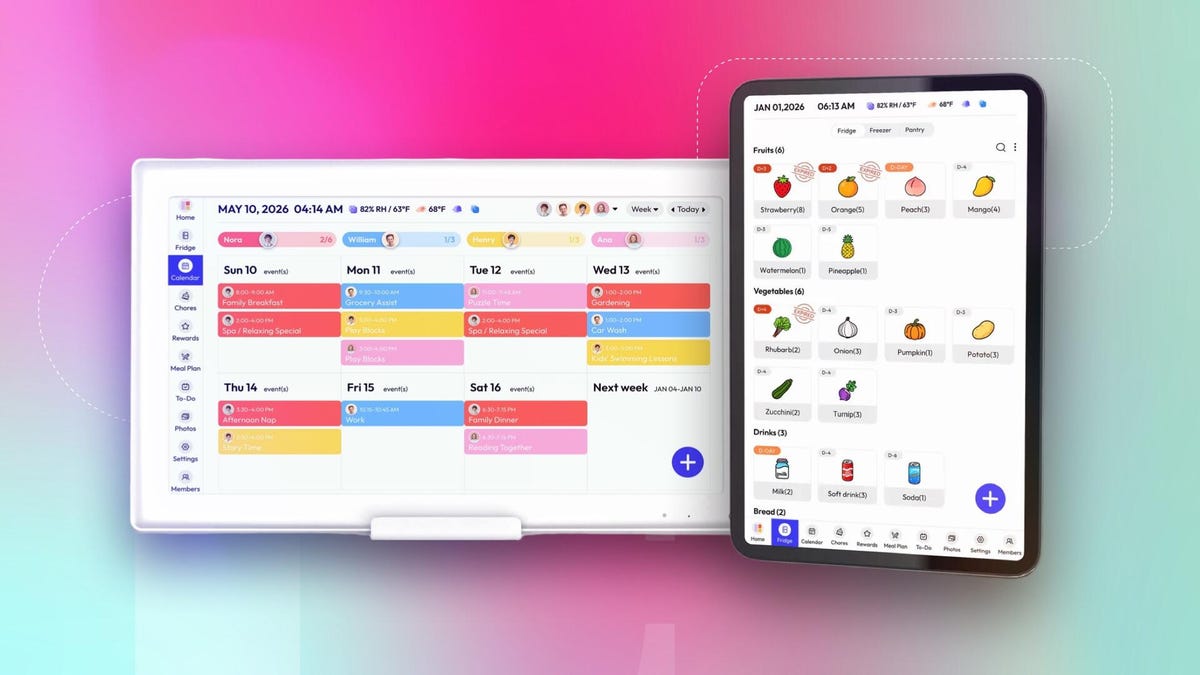
Lately, it feels like we have to download an app for everything: doctor’s appointments, calendars, meal planning, event tickets and even certain household electronics. Keeping track of them and ensuring you have enough cellphone storage to download yet another is half the battle alone.
Everblog aims to simplify this by serving as a one-stop digital calendar that organizes daily schedules and reminders, replacing one or more of the apps cluttering your smartphone. The caveat? It still requires installing another app and adding another smart device to your home.
My colleague, CNET senior editor Tyler Lacoma, and I tested the Everblog HomeCal Calendar and the FridgeCal to determine whether they actually make everyday life easier and are worth the price — or simply add yet another screen to your home.
How the Everblog HomeCal Calendar works
When I powered on the HomeCal, I was prompted to choose a language and create a dedicated Everblog email address for the device. This wasn’t my favorite since I already have numerous email accounts to keep track of, but regardless, it was a straightforward process that only took a couple of minutes. After setup, I was able to use both the device and app to manage the calendar.
You can add events, appointments and to-do lists to the calendar, plus individual profiles for everyone in your home. You can also assign chores, create a reward system, plan meals, keep track of the ingredients in your fridge and sync your phone’s existing calendars so you don’t have to enter everything manually.
The individual profiles allow everyone in your household to interact with the calendar. For example, I could assign the chore of loading the dishwasher every day. Once the assigned family member completes the task, they can check it off from the calendar. When they complete all of their chores for the day, the calendar plays a celebratory song with a congratulatory message and an emoji.
Every completed chore earns them a star, and you can create custom rewards based on the number of stars they earn. During my test, I created rewards such as a movie night, a new book and a week of no chores if they hit a milestone, but you can create any rewards you like and choose the amount of stars required.
As someone who already enjoys crossing something off my to-do lists, I found the reward system fun. I could easily see kids getting excited to complete their chores so they can interact with the calendar and unlock rewards.
My favorite HomeCal features, and the biggest drawbacks
I love the size of this calendar. At 21.5 inches wide when installed horizontally, the touchscreen is large enough for everyone to see and interact with.
The biggest downside, though, is that the HomeCal has to remain plugged into a power outlet at all times. This limits where you can place it — and the companion app is also rendered useless if you don’t have the smart calendar plugged in. You’ll want to follow the installation instructions closely because the calendar weighs 13.7 pounds and needs to be securely mounted.
During my testing, Everblog seemingly replaced the Entertainment Hub with AI Fridge, which helps you organize and label all of your ingredients (more on this later). While I liked the idea of searching for recipes or watching a show in the Entertainment Hub, it was glitchy enough that the AI Fridge is a worthy replacement.
Other successful features include displaying local weather and time, built-in timers and uploading photos to the calendar so it can also work as a digital photo frame when you’re not interacting with it.
Who is the Everblog HomeCal Calendar good for?
If you live alone or already have a phone calendar you’re comfortable with, the HomeCal may feel unnecessary. However, for busy families with multiple schedules, to-do lists, extracurricular activities and chores, the HomeCal is convenient for keeping everything organized in one place.
The meal planning and AI Fridge features are great additions, but if you’re looking for something more focused on food organization and with a smaller footprint and many of the same features, the Everblog 13.4-inch FridgeCal Calendar may be a better bet. Here’s what my colleague Tyler Lacoma thought of it after testing.
A magnetic fridge calendar
Everblog’s smaller digital calendar is made to attach to your refrigerator and serve as a stop for your meal planning, events, chores and a variety of other productivity steps.
One advantage of the FridgeCal tablet model is its AI features, which can identify the items in your fridge and organize them on the tablet for meal planning. It also provides access to hundreds of recipes to help you plan your weekly meals and reduce food waste by making sure ingredients don’t spoil.
This approach has its limits, but if you’re looking to add lots of detailed organization to your life, it certainly has potential.
FridgeCal setup and the app: Pros and cons
During my tests, I found the calendar’s design to be lighter and less durable than many of the tablets you may be familiar with, such as the iPad Pro. But since it spends most of its time on the fridge (in landscape or portrait mode), that’s less of a concern.
The FridgeCal comes with a metal backplate you can attach to your fridge or other nearby surfaces with adhesive. That takes a little time, but fortunately, the back of the tablet is magnetic either way, so it’ll latch onto most fridge doors and sides all on its own. The included stylus can, too, which is superfluous unless your hands are greasy from cooking.
Similarly to the HomeCal, you need to download the Everblog app and create a unique Everblog email to sign up for this service. The app contains all the tablet’s capabilities and then some, and it’s required for the more advanced AI features I tried. The interface isn’t always intuitive (I had trouble finding certain features), but it’s serviceable.
Tablet settings also let you control on/off schedules, time until the tablet hibernates and more. It takes a second to respond when asleep, but I found a quick two-tap on the screen worked reasonably well.
AI fridge recognition and related fun
The FridgeCal offers a plethora of organization options, possibly too many for the average home, but its AI food features are the highlight that help set it apart from brands such as Skylight, another digital calendar company, and I enjoyed seeing what they can do.
At the top of the list is the ability to snap a photo of the inside of your fridge and have AI identify and catalog everything it sees, allowing you to review and edit the list to keep an up-to-date inventory of your refrigerated items. I know this kind of AI recognition has come a long way, but I was surprised by just how much it could identify.
While not perfect, it was very good at recognizing anything labeled in my fridge, including oyster sauce, eggs (it correctly saw it was a pack of six, not a dozen), whipping cream, gochujang and more. If bottles are crowded together (as they often are) on the side shelves, the AI can’t do much with that.
However, only some of the food in a fridge is packaged and labeled. For everything else, the AI made a valiant effort but stumbled several times. It labeled my ciabatta as a baguette (eh, close enough) and called my container of pork patties a “braised meat dish.” Tomato soup became a “sauce dish,” which is fair enough, and my pickled daikon and carrot were labeled a “shredded carrot dish,” which is probably about as close as it could get.
The AI also missed some things completely, like sliced green papaya and macadamia nuts, while hallucinating other things I didn’t have at all, including mushrooms, avocados and sparkling water.
So while you can’t trust the AI to tag all your fridge items, it’s a good starting place you can adjust and add to, automatically setting use-by dates for items so your food doesn’t go bad. If that’s been a problem for you, this calendar could be an effective — although pricey — solution. It also has a freezer section in the app and an additional satellite fridge section for another fridge in your home.
The AI features also work for other tricks, such as importing recipes, meal plans and events from elsewhere to automatically put them into the tablet. It can digest emails, photos, PDFs, cookbook snapshots, screenshots and more, potentially saving you time.
FridgeCal’s notes, calendars and recipes
Apart from fridge management, FridgeCal does a bit of everything like the HomeCal. Notably, it can also sync with other calendars you may be using. Two-way syncing (so you can update from either the tablet or app) is only available for Google Calendar and Outlook, although I found it easy to set up. Other calendar apps are supported, but only for one-way syncing.
FridgeCal also offers the Chores and To-Do sections, where I liked having the ability to enter items as they sprang to mind, and before I forgot them 30 seconds later.
The Meal Plan section is particularly in-depth. It suggests recipes based on the meal, but you can search for nearly anything you have in mind and the tablet will look in its trove of recipes for you, adding ingredients to your shopping list.
The only downside is that some recipes had suggested ingredients, while others were blank and needed to be filled in, and there’s no way to tell which is which until you select one.
Other sections held less appeal for me personally. The Rewards tab may be useful for dieting or encouraging kids to complete chores, but it’s more work than it’s worth for my needs. The Photos tab also asks for access to your photo library to add more pictures, which raised privacy concerns for me without offering much value.
An interesting niche for the right fridge space
If you already have a smart display in your kitchen, you may not get much out of this FridgeCal digital calendar. But if you want a device dedicated to food and meal management with handy spaces for to-do lists and events, I found it quite capable. It takes some work to set up and keep updated every time you go grocery shopping, but app syncing helps streamline the process.
The AI tricks, meanwhile, are used to import information and add recipes from nearly anywhere. They aren’t super accurate at identifying everything in the fridge, but correct enough to serve as a useful jumping-off point when starting to use the device.
If this niche is for you and the $250 price tag isn’t discouraging, this tablet really could change how you use your fridge and daily planner. But it will take time to make it a habit, and the FridgeCal encourages a more obsessive type of user.
Is HomeCal or FridgeCal best?
Ultimately, if you have children and want to motivate them to complete chores through a reward system, and you have space near an outlet to mount the large calendar, the HomeCal is the better choice. However, if your priority is meal planning and ingredient tracking and you prefer a smaller device that doesn’t need to stay plugged in all the time, the FridgeCal may be a better fit.
If you don’t see yourself interacting with a smart calendar at least once a day, though, you may not be the target audience and would probably be better off sticking with your current organization system.
Read the full article here