

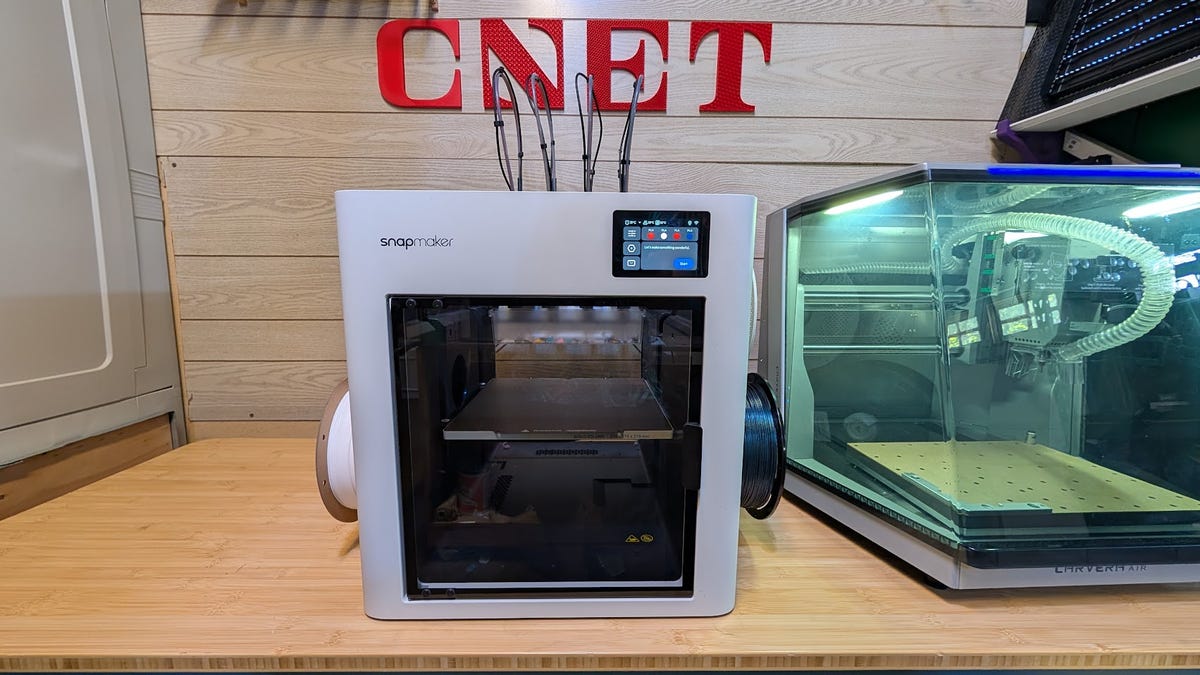
Editor’s note: The Snapmaker U1 is the latest 3D printer to win a CNET Editors’ Choice Award. I’ve really enjoyed the four-tool changer and how well it prints. The added bonus of reducing the waste to almost zero makes it an excellent option for almost anyone. The original article is below.
Snapmaker has a history of making 3D printers that don’t always follow the standard trends. The original Snapmaker was a small three-in-one machine that could be a 3D printer, laser cutter or CNC, depending on the type of tool head you use, and for years, the company has iterated on that idea, culminating in the much larger Artisan model. After that, Snapmaker tried a dual-nozzle 3D printer called the J1. In my review of the J1, I liked that the nozzles could print two models at the same time, reducing the time it takes to print batches, but I felt the cost was prohibitive.
8.5
Snapmaker U1
Like
The complete lack of waste is fantastic
Each model makes maybe two or three little strands, and that’s it
The four print heads work seamlessly to deliver multi-material and multi-color
The setup was very easy, even with the four tool heads.
Don’t like
I wish it came with the cover instead of it being an optional extra
With the advent of multi-color systems, Snapmaker could have gone the way of Bambu Lab, Anycubic and other companies and made an AMS system to filter four colors into one nozzle but true to form it went another direction. The U1 is a four-tool head 3D printer that uses independent tool heads to print four different colors or even four different materials. It’s a system that can work incredibly well or fail utterly.
Thankfully, Snapmaker has made a tool changer that not only works well but also serves as an out-of-the-box solution with little to no setup time. I’ve been using it and having fun with it for a few weeks now, and the U1 is a smart way to do multi-material printing that reduces almost all the waste most color systems produce. It’s a machine that is a joy to use and one that I can see as a staple in many workshops this year.
What’s the difference between a tool changer and an AMS?
Tool changers and AMS are both mechanisms to allow a 3D printer to use different materials — often different colors of the same material, or a material used to support a different material — without the need to swap the filament manually.
The AMS does this by automatically loading and unloading the filament from the hot end each time a color change is needed. The advantage of the AMS is that it only requires one fairly standard hot end with a splitter on the 3D printer itself. The AMS unit, which can be bought separately, does most of the heavy lifting in this situation rather than the printer itself. The disadvantage is the large amount of waste the AMS produces. It has to purge a lot of filament from the nozzle each time it changes colors/materials to make sure they don’t mix on the print itself.
A tool changer like the Snapmaker U1 circumvents the waste issue by having four separate hot ends and, therefore, four separate nozzles. This allows each nozzle to stay uncontaminated by any other material, thereby reducing the waste output to just the purge tower. This also speeds up the entire process, as the mechanical switching of the tool heads is much faster than the purging required by the AMS. I printed the same model on the Anycubic S1 and the Snapmaker U1, and though the colors are a little different, you can see that the S1’s waste (pictured on the left) is far greater than the U1’s.
The big disadvantages of a tool changer are the extra mechanisms that can malfunction and the price. Four tool heads mean four more areas for things to go wrong, like blockages, worn nozzles and, because the tool heads need to be swapped, a chance for them to be knocked over as they load and unload. The price is also a limiting factor as tool changers tend to be more expensive than their AMS cousins.
It’s also worth noting that having four tool heads also doesn’t change the natural properties of the materials you’re using. PLA still won’t stick to PETG, and TPU won’t magically start sticking either. What it does allow, though, is to use these products in conjunction with each other without risk of mixing them up in the nozzle.
The Snapmaker U1 that I have makes good-quality prints; some have even been great, but there is still some work to be done. I don’t think the issue is mechanical, though. The Snapmaker uses a forked version of OrcaSlicer, and while I like Orca as a slicer, this version is not yet finished. I am using a pre-release version, and I hope to see many more updates to the software before the end of the Kickstarter. Right now, it lacks good profiles for the most common filaments, and this causes a lot of stringing if you don’t tune the settings yourself.
The tool changers work extremely well in delivering material with no break in the printing process. The entire 3D printer is fast, accurate and, with some fine-tuning, will be capable of truly excellent prints in short order. I used it to make my kids some flexi dragons with a touch of color — just white eyes, teeth and claws — and it printed them at the same speed as if it were only one color. That type of speed is going to be what really separates the U1 from the competition, especially with such a competitive price tag. While almost all of the prints had stringing on them, there was very little in the way of defects. The single color prints were all as flawless as you would expect from a modern 3D printer and could be easily sold on an Etsy shop — while you still can, that is — with no real post-processing needed
Snapmaker U1 specifications
| Build Volume | 270mm × 270mm × 270mm |
|---|---|
| Hot end | 4 x Stainless steel nozzles |
| Nozzle Diameter | 0.4mm |
| Max nozzle temperature | 300C |
| Max bed temperature | 100C |
| Max speed | 500mm/s |
| Live view camera | Yes |
| Supported material | PLA, PETG, ABS, TPU (more to come) |
| Storage | USB port, 8GB internal |
The initial setup was also extremely fast and simple compared to other tool changers I have used. The entire 3D printer was already assembled, and the configuration took around 15 minutes to make sure the tool changers were aligned and ready to go. This kind of out-of-the-box printing is becoming a prerequisite for consumers, so it’s good to see that Snapmaker is trying to simplify the startup procedure. Simplification is a big part of the U1. Each filament roll has an auto loader that makes loading the filament a breeze, and the unloading process allows you to unload all the material at the same time if you want. Fast and simple.
I would like to see a few changes to the onboard operating system, but they will likely happen as the platform evolves. The color selection for each filament is terrible and needs to be addressed, as it’s hard to find a color that matches your filament. That said, if you are using a USB dongle to transfer files, you can map the colors in the file to the colors on your printer, which is handy. I also wish the U1 had a cover as standard. A fully enclosed system is needed if you want to print some of the more structural filaments, and while you can buy a lid separately, it would be nice if it came with it from the get-go.
My time with the Snapmaker U1 has given me a chance to see what an affordable tool changer is capable of, and I’ve been pleasantly surprised at how good it is. The prints are of good to great quality, and the four tools give you a lot of scope to try new and interesting ways to combine materials. Tool changers are still a niche type of 3D printer, and they need a few good products in the space to gain more popularity. The Snapmaker U1 is a great example of what can be done in this space.
Read the full article here