
Close Menu
Modern Life Today
  • Tech
  • Smart Home
  • Energy
  • Home Security
  • Kitchen & Household
  • Outdoor
  • Home Internet
  • More Articles
Trending Now

Best Walking Pads for Working From Home (2026)

May 6, 2026

AirDoctor Coupon Codes: 40% Off | May 2026

May 6, 2026

Unleash Your Creativity With This Laser Engraver While It’s a Door-Busting $340 Off

May 6, 2026
Facebook X (Twitter) Instagram
Modern Life Today
  • Tech
  • Smart Home
  • Energy
  • Home Security
  • Kitchen & Household
  • Outdoor
  • Home Internet
  • More Articles
Subscribe
Modern Life Today
Home»Tech»Make the Most of Chrome’s Toolbar by Customizing It to Your Liking
Tech

Make the Most of Chrome’s Toolbar by Customizing It to Your Liking

Press RoomBy Press RoomMarch 7, 2026No Comments2 Mins Read
Share Facebook Twitter Pinterest Copy Link LinkedIn Tumblr Email

The main job of Google Chrome is to give you a window to the web. With so much engaging content out there on the internet, you may not have given much thought to the browser framework that serves as the container for the sites you visit.

You’d be forgiven for still using the default toolbar configuration that was in place when you first installed Chrome. But if you take a few minutes to customize it, it can make a significant difference to your browsing. You can get quicker access to the key features you need, and you may even discover features you didn’t know about.

If you’re reading this in Chrome on the desktop, you can experiment with a few customizations right now—all it takes is a few clicks. Here’s how the toolbar in Chrome is put together, and all the different changes you can make.

The Default Layout

Extensions are always easily accessible in Chrome.

Photograph: David Nield

Take a look up at the top right corner of your Chrome browser tab and you’ll see two key buttons: One reveals your browser extensions (the jigsaw piece), and the other opens up your bookmarks (the double-star icon). There should also be a button showing a downward arrow, which gives you access to recently downloaded files.

Right away, you can start customizing. If you click the jigsaw piece icon to show your browser extensions, you can also click the pin button next to any one of these extensions to make it permanently visible on the toolbar. While you don’t want your toolbar to become too cluttered, it means you can put your most-used add-ons within easy reach.

For the extension icons you choose to have on the toolbar, you can choose the way they’re arranged, too: Click and drag on any of the icons to change its position (though the extensions panel itself has to stay in the same place). To remove an extension icon (without uninstalling the extension), right-click on it and choose Unpin.

Making Changes
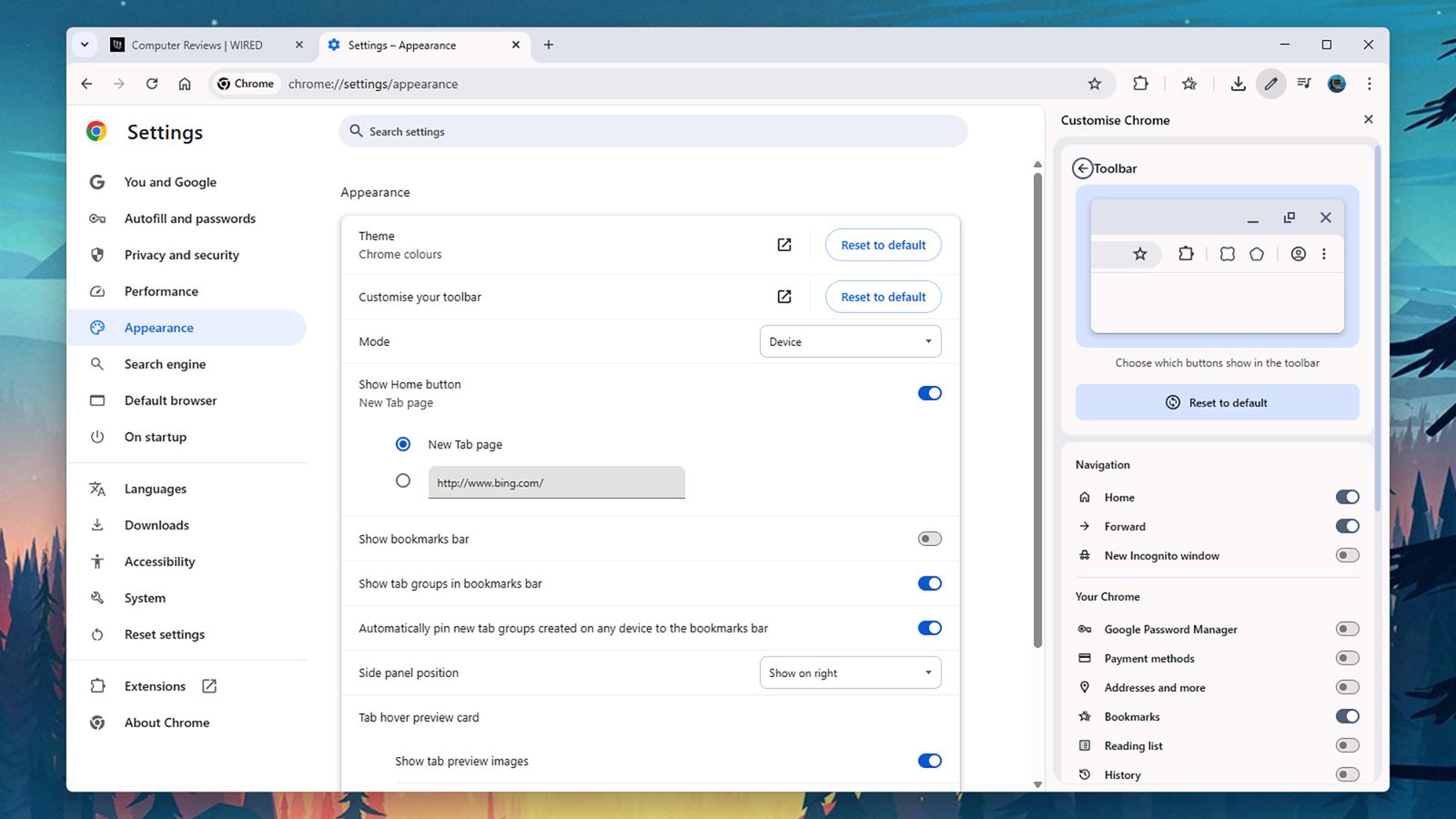
Image may contain Text and Page

The revamped toolbar customization pane.

Photograph: David Nield

Click the three dots up in the top right corner of any browser window and then Settings > Appearance > Customize your toolbar to get to the main toolbar customization panel, which has recently been revamped. Straight away you’ll see toggle switches that let you show or hide certain buttons on the toolbar.

Read the full article here

Share. Facebook Twitter Pinterest LinkedIn Tumblr Email

Related Articles

Best Walking Pads for Working From Home (2026)

May 6, 2026

AirDoctor Coupon Codes: 40% Off | May 2026

May 6, 2026

Unleash Your Creativity With This Laser Engraver While It’s a Door-Busting $340 Off

May 6, 2026
Add A Comment
Leave A Reply Cancel Reply

Demo
Top Articles

Is Apple Fun Again? Loving MacBook Neo Vibes (and the New Finder Guy)

March 13, 2026

Get Blazing Print Speed and a High-End Performance 3D Printer for Just $239

March 29, 2026

28 Best Headphone and Speaker Deals at Amazon’s Spring Sale 2026

March 28, 2026

Simplify Spring Cleaning With Up to 50% Off Narwal Vacuums During the Amazon Spring Sale

March 27, 2026
Don't Miss

This Hidden Deal Drops Samsung’s M7 Smart Monitor to Only $220

By Press RoomMay 6, 20260

The Samsung M7 M70F smart monitor is down to $220 at B&H after an $80…

Your Robot Vacuum Isn’t a One-Time Expense. How to Save Money on Maintenance

May 6, 2026

The Best Food Gifts You Can Buy Online for Friends, Family, or Yourself

May 6, 2026

The Best Sustainable Surf Gear (2026): Patagonia, Billabong, Outerknown

May 6, 2026
About Us
About Us

Modern Life Today is your one-stop website for the latest gadget and technology news and updates, follow us now for the news that matters to you.

Facebook X (Twitter) Pinterest YouTube
Featured News

72 ‘Buy It for Life’ Products: Cast-Iron, Tools, Speakers, Chairs, and More

March 6, 2026

Can You Run ChatGPT on a Dumb Phone? It Turns Out Yes, but With Caveats

March 6, 2026

These $500 Windows Laptops Show the MacBook Neo’s Competition

March 6, 2026
Trending Now

This Jammer Wants to Block Always-Listening AI Wearables. It Probably Won’t Work

March 7, 2026

Kids Online Safety Act Advances to House Amid Concerns Over Free Speech and Civil Rights

March 7, 2026

Review: Marley Spoon Meal Kit

March 7, 2026
  • Home
  • Privacy Policy
  • Terms of use
  • For Advertisers
  • Contact
2026 © Prices.com LLC. All Rights Reserved.

Type above and press Enter to search. Press Esc to cancel.