
Close Menu
Modern Life Today
  • Tech
  • Smart Home
  • Energy
  • Home Security
  • Kitchen & Household
  • Outdoor
  • Home Internet
  • More Articles
Trending Now

Govee Launches Wild, Colorful and Pixel-Dense Ceiling Light Ultra

April 27, 2026

Don’t Miss These Rare Direct Discounts on the Samsung Galaxy Ring at Many Retailers

April 27, 2026

Best Chromebooks (2026): Most Are Bad, but These Aren’t

April 27, 2026
Facebook X (Twitter) Instagram
Modern Life Today
  • Tech
  • Smart Home
  • Energy
  • Home Security
  • Kitchen & Household
  • Outdoor
  • Home Internet
  • More Articles
Subscribe
Modern Life Today
Home»Tech»You Can Now Install—and Update—Microsoft Store Apps Using the Command Line
Tech

You Can Now Install—and Update—Microsoft Store Apps Using the Command Line

Press RoomBy Press RoomFebruary 28, 2026No Comments3 Mins Read
Share Facebook Twitter Pinterest Copy Link LinkedIn Tumblr Email

I can’t stand opening the Microsoft Store. It’s slow to load, confusing to browse, and full of ads for things I don’t care about. Luckily, thanks to a new feature, I don’t have to open the Microsoft Store ever again.

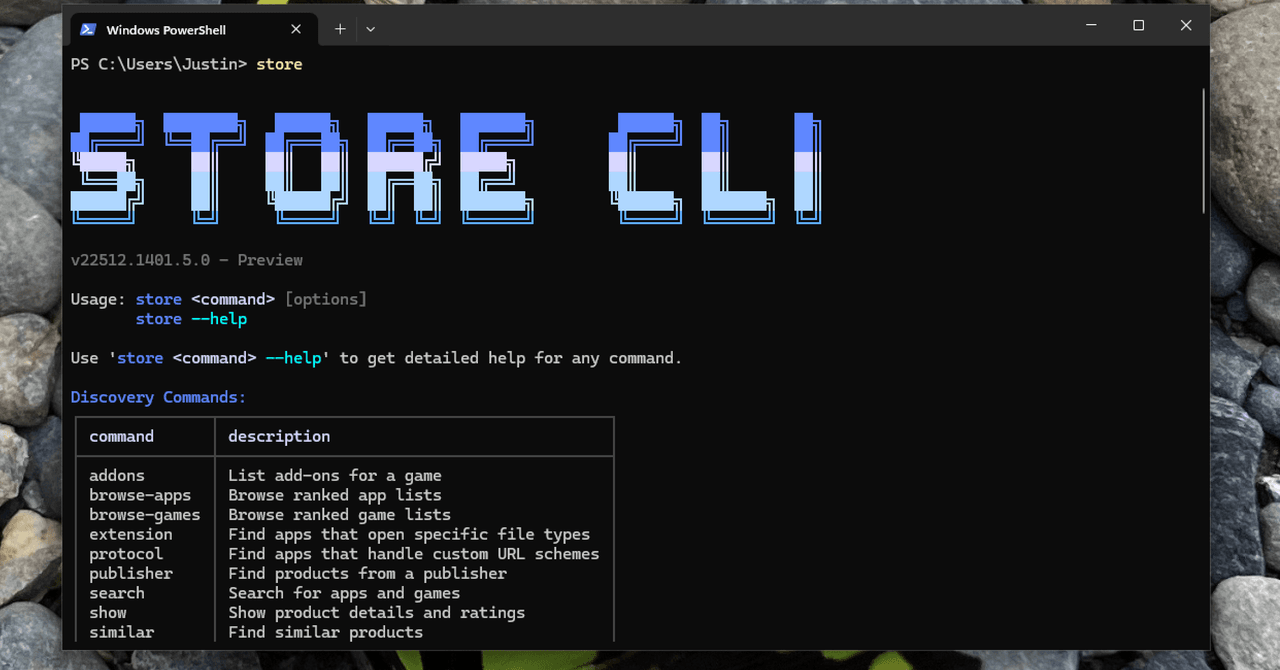
Last week Microsoft announced a brand new command line interface for the Microsoft Store, which you can access right now by opening PowerShell and typing “store.” If the command doesn’t work, make sure you’ve run all of the current Windows 11 updates.

If it does work, you will see a fancy bit of ASCII art along with a list of sub-commands. This tells you how you can search for, install, and even update software with just a few keystrokes.

Linux users are used to installing software from the command line, and Mac users know how to find third party tools for the job, like MAS for the Mac App Store. I can’t recall a mainstream commercial operating system including a way to browse and install software from a commercial app store using only commands.

Now Windows users can enjoy the privilege of installing software from the command line.

Courtesy of Justin Pot

Microsoft’s implementation is quite nice. For example, you don’t need to know the exact name of the app in order to install something. While testing this new interface, I typed “store install firefox,” not knowing if that would work. The tool searched the store, found the app most likely to match “firefox,” told me the company that made it (Mozilla, in this case), and asked if that was in fact what I wanted to install.

I can’t overstate how easy this makes installing software. Similar services I’ve tested don’t work this way—you need to know the exact name used by the package manager or else you’ll get an error. It’s really great to see this implemented so well.

There are downsides. The tool can only install applications that are offered in the Microsoft Store, which is inherently limiting. A few extremely popular apps, including Google Chrome and Paint.net, aren’t available this way. But plenty of applications are, and you might not know what is and isn’t there. You can type “store search” followed by a query in order to search the store. You can get more details by typing “store show” followed by the name of the application in order to read more about it.

You can also browse the Microsoft Store. The command “store browse-apps” will tell you about a few categories you can look into, including the bestseller lists. Taken together, these commands allow you to do just about everything you can do in the Microsoft Store, but faster.

Read the full article here

Share. Facebook Twitter Pinterest LinkedIn Tumblr Email

Related Articles

Best Chromebooks (2026): Most Are Bad, but These Aren’t

April 27, 2026

Beatbot Pool-Cleaning Robots Are on Sale for a Limited Time

April 27, 2026

Amazon Is Clearing Out Final M3 iPad Air Inventory, With Price Cuts of Up to $250

April 27, 2026
Add A Comment
Leave A Reply Cancel Reply

Demo
Top Articles

Is Apple Fun Again? Loving MacBook Neo Vibes (and the New Finder Guy)

March 13, 2026

Get Blazing Print Speed and a High-End Performance 3D Printer for Just $239

March 29, 2026

28 Best Headphone and Speaker Deals at Amazon’s Spring Sale 2026

March 28, 2026

Simplify Spring Cleaning With Up to 50% Off Narwal Vacuums During the Amazon Spring Sale

March 27, 2026
Don't Miss

Walmart Deals of the Day: Put This 4K TCL TV in Your Living Room for Over $350 Off

By Press RoomApril 27, 20260

It’s Monday, which means there’s a fresh batch of deals for you to shop this…

Beatbot Pool-Cleaning Robots Are on Sale for a Limited Time

April 27, 2026

Amazon Is Clearing Out Final M3 iPad Air Inventory, With Price Cuts of Up to $250

April 27, 2026

The Best Merino Wool T-Shirts for Every Occasion

April 27, 2026
About Us
About Us

Modern Life Today is your one-stop website for the latest gadget and technology news and updates, follow us now for the news that matters to you.

Facebook X (Twitter) Pinterest YouTube
Featured News

EveryPlate’s Meal Kit Offers Affordable Vegetarian Options

February 28, 2026

The Most Useless Security Cam Features and Why You Don’t Need Them

February 28, 2026

This Ruroc Helmet Ruined My Ski Holiday

February 28, 2026
Trending Now

Gas vs. Electric vs. Induction Stoves: How to Choose the Right Range

February 28, 2026

5 Places You Should Never Keep a Bottle of Wine, According to Experts

February 28, 2026

You Can Now Install—and Update—Microsoft Store Apps Using the Command Line

February 28, 2026
  • Home
  • Privacy Policy
  • Terms of use
  • For Advertisers
  • Contact
2026 © Prices.com LLC. All Rights Reserved.

Type above and press Enter to search. Press Esc to cancel.