

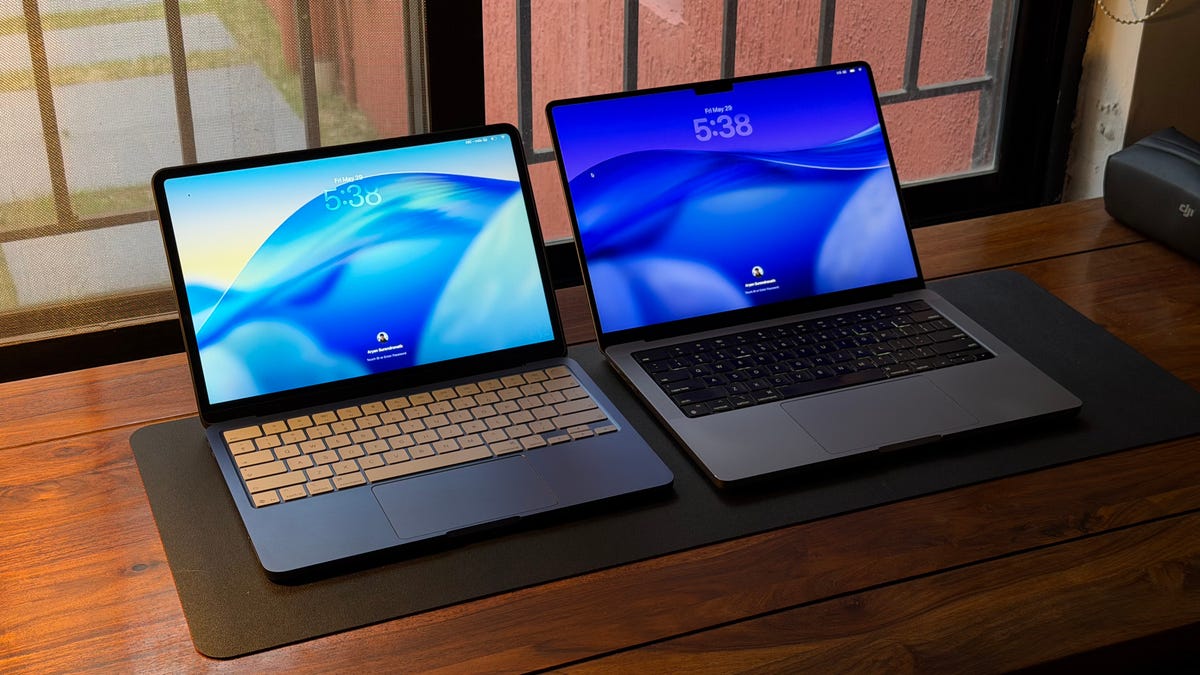
My 14-inch M1 Pro MacBook Pro is a workhorse. I bought it in 2022 and have never looked back. I spilled water on it a while back, however, and things came to a head when I started having trouble with one of its USB-C ports. So I backed it up and took it to the Genius Bar for repairs.
As luck would have it, my MacBook Pro troubles happened right after I purchased a MacBook Neo, giving me the perfect opportunity to put the entry-level Apple laptop through its paces. Here’s what I liked — and didn’t like — about it during the week my MacBook Pro was away.
How different did the two MacBooks feel?
Setting up the MacBook Neo didn’t take me long. I already had a Time Machine backup of my MacBook Pro, so the switchover was simple. And because the Neo uses the same MacOS software you see on other Apple computers, I felt right at home. However, there was a noticeable shift in the hardware experience.
I moved from a laptop with a 14.1-inch mini-LED screen to one with a 13-inch LCD screen, making the Neo’s smaller size along with brightness and contrast differences instantly noticeable. There was also a downgrade in RAM and the ports I could use. I now had 8GB instead of 16GB of memory, and I no longer had a MagSafe charging port or the extra USB-C, HDMI and SD card slots on the right side of my MacBook.
Thankfully, because I sprung for the 512GB MacBook Neo, I didn’t struggle with storage and still had Touch ID — the 256GB variant of the MacBook Neo misses out on it. But I really wish that Apple had included a backlight on this otherwise flagship-grade keyboard. Nevertheless, after making a few adjustments to my workflow, I continued my week with the Neo.
Read more: Best MacBooks We’ve Tested
My week with the MacBook Neo
I create videos for my Instagram page and YouTube channel and work as a freelance writer. That means my day-to-day tasks involve editing short vlogs using Adobe Premiere Pro, researching topics in Safari and Chrome, writing in Notion and doing some simple — but very necessary — file management and invoicing with Google’s Workspace tools and Finder.
During the entire week of testing, the Neo only beach balled once (this is when a Mac becomes unresponsive). It happened when I imported about 50 4K-resolution iPhone video clips into a Premiere Pro project and applied effects to them on my edit timeline with about 20-25 browser tabs in the background. (Please don’t judge me; I have a few tab groups that make my life very easy.) To add some MacBook Pro context, I’ve demanded much more from it and have never seen it drop a frame, so I definitely had some adjusting to do.
But I have to say, the Neo was a decent substitute for my MacBook Pro. Yes, my video exports took a little longer than usual. And I had to rein myself in after the first beach ball experience. But after that, I didn’t face any slowdowns or crashes. Bridget Carey, CNET’s editor-at-large, had a somewhat similar experience with her MacBook Neo.
Now, there were still a few sticking points during my week, so let’s turn to those.
My problems with the MacBook Neo
The first issue for me — one that I really hope Apple corrects with the next generation — is the lack of backlit keys. The keyboard on this laptop is otherwise every bit as good as the one on my MacBook Pro.
I also felt the Neo could use a slightly larger display. I found myself squinting quite a bit when making finer cuts during editing and missed the extra screen my 14-inch MacBook Pro offers. Again, it’s not a deal-breaker — the Neo does let you use one external display — but if I were making a wish list for the next generation, I’d put this on it.
The last issue I had was its slow charging speed. Battery endurance on the Neo isn’t bad. Yes, it’s shorter than that of the MacBook Air and Pro, but it was enough to take it to a coffee shop and work through an entire writing block, complete a short video edit and export it for publishing.
But making sure it had power for the next day meant I had to stay tethered to a charging port for at least an hour and a half. And this was with a faster, 45-watt charger. The 20-watt adapter that Apple includes in the box takes 2.5 hours to charge the Neo to 100%, as we covered in our MacBook Neo review.
When I first started using the Neo, I expected to feel hamstrung by having only two USB-C ports, but getting by with just the pair was easier than I thought. I edit from a USB-C SSD, so I dedicated the slower USB port to charging and the faster one to my external storage when it was time to edit. I do wish, however, that Apple would put a port on each side of the device instead of both being on the same side the next time around.
What does the entry-level MacBook make me feel?
With everything said, my week with the MacBook Neo left me with a positive impression of Apple’s entry-level laptop. When I bought my first Mac, I went with a MacBook Pro because I wanted the best experience Apple had to offer and enough performance headroom that I wouldn’t need a new machine for quite some time. But at $1,700, I paid for that privilege.
The MacBook Neo costs just a fraction of what I paid for my MacBook Pro, and while it can’t match the Pro’s performance or likely its useful lifespan, it did everything I needed it to do during the week I was without my Pro. It’s a well-balanced machine for anyone buying their first computer with hopes to start a passion project and handle simple day-to-day computing tasks.
What’s going to happen to my MacBook Neo? Well, it’s going to find a new home with my partner. She’s switching over from a Windows PC, and it’ll be her first MacOS device. She did a test run with it for a day and felt it would be useful for the times she needs the desktop versions of Illustrator and Photoshop. Because she already has an iPad, I’m excited to see the Apple ecosystem experience this combination will unlock for her.
As for me, I’ll be sticking to my 14-inch M1 MacBook Pro. All the Pro-level performance — and the bigger screen and backlit keys — make my life as a creator easier. The MacBook Neo is a solid fallback, but not something I’ll pick up every day. If I had a 16-inch MacBook Pro, then I could see the Neo becoming a part of my setup, especially on days when I’m working from a coffee shop or want to write in bed, but that isn’t the case, so it’s back to the Pro for me.
Read the full article here