

Pros
- Strong overall performance from Intel Core Ultra X7
- Privacy screen feature is actually useful
- Sleek, sturdy chassis
Cons
- High price that rarely, if ever, goes on sale
- Battery life is merely average
- 1080p webcam disappointing for biz laptop
You really need to love the Microsoft Surface Laptop for Business in order to stomach its pricing. The problem is, as much as I like the latest eighth-generation of this laptop, Microsoft’s pricing for it makes me queasy and keeps me from summoning any deeper feelings for it. Lenovo’s ThinkPad X1 Carbon and HP’s EliteBook Ultra G1i remain closer to my heart; they’re still my picks for the best business laptops.
The Surface Laptop for Business, eighth edition, is available in two sizes and comes with either Intel Core Ultra Series 3 or Qualcomm Snapdragon X2 processors. I tested the 13.8-inch model with a Core Ultra X7 processor and integrated Intel B390 graphics. It proved to be a strong overall performer with good (but not great) battery life, wrapped in a thin and light (but not superlight) enclosure.
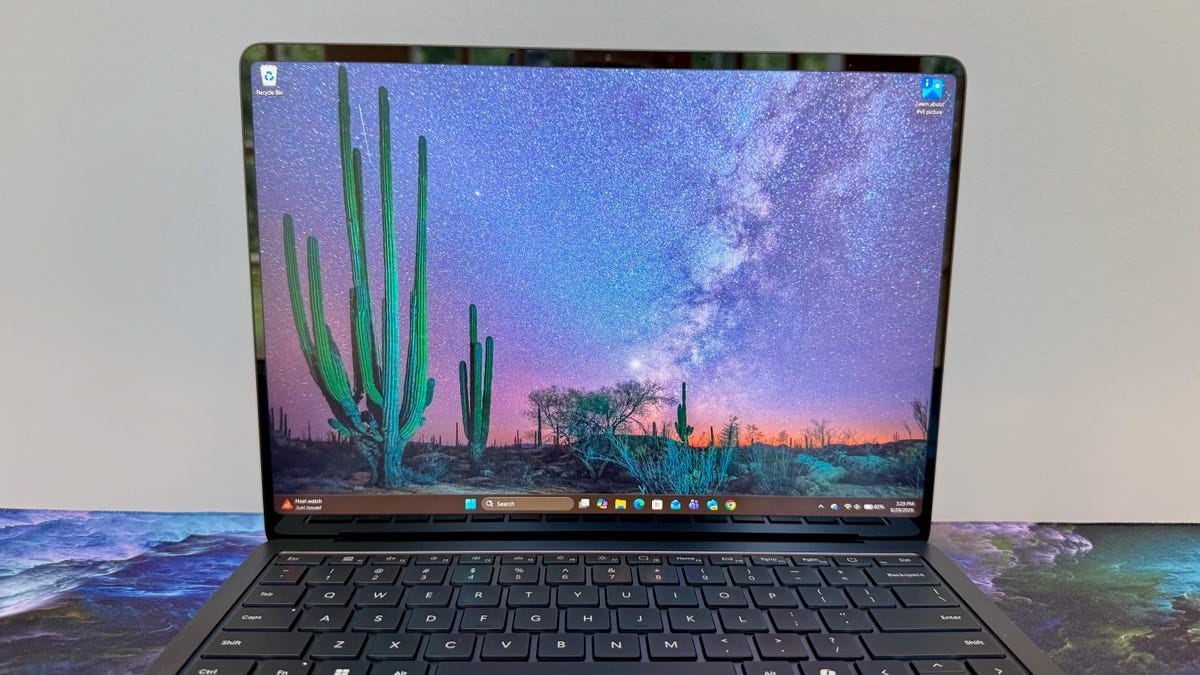
The standout feature here is the Surface Laptop for Business’s integrated privacy screen that you can toggle on and off to keep nosy neighbors from peeping at your display. It’s really effective in narrowing the horizontal viewing angles while leaving the vertical viewing angles alone, so you, sitting directly in front of the laptop, can still see everything on the screen. That’s a trick that Lenovo’s Privacy Guard doesn’t quite pull off and a feature that HP doesn’t offer for its EliteBook Ultra.
That said, if you don’t do a lot of your work on airplanes, crowded coffee shops and other public places near potential onlookers, then you’re better off with a ThinkPad X1 Carbon or HP EliteBook Ultra, both of which can frequently be found deeply discounted.
Microsoft Surface Laptop for Business 13.8-inch (8th Edition)
| Price as reviewed | $3,300 |
|---|---|
| Display size/resolution | 13.8-inch 2,304×1,536 touchscreen 120Hz |
| CPU | Intel Core Ultra X7 368H |
| Memory | 32GB LPDDR5-8533 |
| Graphics | Intel Arc B390 |
| Storage | 512GB SSD |
| Ports | USB-C Thunderbolt 4 (x2), USB-A 3.2, combo audio |
| Networking | Wi-Fi 7 and Bluetooth 5.4 |
| Operating system | Windows 11 Pro 25H2 |
| Weight | 3 pounds (1.4 kilograms) |
Unlike the consumer version based on Qualcomm Snapdragon X2 processors, the eighth edition of the 13.8-inch Surface Laptop for Business offers both Qualcomm and Intel chips. The Qualcomm series starts at $1,650, and the Intel series starts at $1,950. The entry-level Intel model features a Core Ultra 5 335 CPU, 16 gigabytes of RAM and a 256GB SSD. That’s not a lot of storage in a laptop that costs nearly $2,000.
You can upgrade to a 512GB SSD for an extra $100, but upgrading to 32GB of memory costs a lot more. The Core Ultra 5 model with 32GB of RAM and 256GB of storage costs $2,500, while it costs $2,700 for 32GB/512GB.
Choose the processor upgrade to a Core Ultra X7 368H, and pricing begins at $2,550 for 16GB of RAM and a 256GB SSD. The model I tested with the X7 chip, 32GB of RAM and a 512GB SSD costs a rather staggering $3,300. And if you want to double the storage to a 1-terabyte SSD, you’ll need to be prepared to spend $3,700. Even for enterprise models, which are generally pricier than consumer laptops, these are painfully high prices.
The Intel B390 graphics chips integrated to the Core Ultra X7 processor are Intel’s most powerful integrated graphics processing unit to date, but it’s still no match for a dedicated GPU with its own video random-access memory. And with pricing that escalates to more than $3,000, this laptop quickly gets into content creation laptop territory without the requisite graphics boost.
One feature the Core Ultra X7-based models of the Surface Laptop for Business (eighth edition) provide is the integrated privacy screen. This feature is not offered on the Core Ultra 5 configurations, but otherwise, the display is the same: a 13.8-inch IPS LCD with a unique 3:2 ratio, a 2,304×1,536-pixel resolution, a dynamic refresh rate up to 120Hz and touch support.
The Surface Laptop for Business, eighth edition, starts at £1,829 in the UK and AU$3,249 in Australia.
Microsoft Surface Laptop for Business (8th Edition) performance
Armed with a Core Ultra X7 CPU and 32GB of RAM, the eighth-gen Surface Laptop for Business performed admirably on our labs tests. Not surprisingly, the 16-core CPU helped the laptop score well on the multicore tests of Geekbench 6 and Cinebench 2024, but its multi- and single-core scores on both tests trailed those of the HP OmniBook Ultra 14 and Lenovo Yoga Slim 7x Gen 11, each of which has an 18-core Snapdragon X2 Elite processor.
Where the Surface Laptop for Business enjoyed its most success (among other laptops with integrated GPUs) was on our 3D tests. There’s simply no better integrated GPU currently than Intel’s B390 graphics chip with its 12 Xe cores. Its score on 3DMark Steel Nomad was far better than either result from the HP OmniBook Ultra 14 or Lenovo Yoga Slim 7x Gen 11, and it actually delivers playable 3D frame rates. It averaged 60 frames per second on the Guardians of the Galaxy benchmark (High at 1080p) and 61 fps on Shadow on the Tomb Raider (Highest at 1080p). Not that this laptop is designed for gaming, but this performance means it’ll be able to handle more demanding graphics tasks without grinding to a halt.
The advantage returned to the two Snapdragon X2 Elite laptops in our battery test. Each lasted more than 20 hours on our YouTube streaming battery drain test, and the Surface Laptop for Business failed to top the 15-hour mark. Microsoft advertises 23 hours of battery life for the machine, but that’s for local video playback as opposed to streaming. And the quoted 23 hours must be for the less powerful, more efficient Core Ultra 5 chip.
Understated, repairable design
You can get the Surface Laptop for Business in platinum or black. Microsoft sent me the latter. The matte-black shell and minimalist aesthetic give it a Razer-like feel (if Razer made a thin, light business machine instead of a gaming laptop).
Unlike the previous version, the eighth-gen model doesn’t offer the option to add 5G cellular connectivity, which is sad news for road warriors who must work between Wi-Fi connections. What you gain from this absence is an all-aluminum chassis. (With 5G as an option, the seventh-gen Surface Laptop for Business has a plastic keyboard deck to help improve the cellular signal.)
The all-metal enclosure is impressively thin, measuring just 0.7 inches thick, and is also exceptionally sturdy — there is no flex to the rigid frame. At 2.98 pounds, the laptop has an average weight for its size. It’s not nearly as light as the 2.2-pound Lenovo ThinkPad X1 Carbon or the 2.6-pound HP EliteBook Ultra. So while not the lightest travel companion, the Surface Laptop for Business certainly looks and feels like a premium laptop, which is a good thing given Microsoft’s pricing for it.
Helping you extend the life of the Surface Laptop for Business and your not insignificant investment in it, Microsoft has made many of its parts replaceable, including the SSD, keyboard, haptic touchpad and battery. It’s easy to get inside the laptop. After plucking off the four rubber feet on the bottom panel, only four Torx screws need to be removed to access the motherboard. It took me less than five minutes to remove the bottom panel, and a minute or two of that time was discovering that I could, in fact, pop off the rubber feet.
Microsoft suggests that repairs be made by a “skilled technician,” and I can see why. I didn’t see any obvious way to remove the SSD from the motherboard, for example. Removing the battery is a more straightforward operation, but with the RAM integrated into the CPU, there is no way to replace or expand system memory after purchase.
A privacy display you’ll actually use
The display is unique in three ways. First, it has a 3:2 ratio that’s a little taller and not quite as wide as a typical 16:10 laptop display. Secondly, its antiglare finish is stellar. And third, the integrated privacy screen is unusual in that it’s actually usable.
The 3:2 layout is a good fit for a work laptop, where you’re able to see more lines on the screen while keeping the design as compact as possible. The trade-off is accepting more letterboxing when watching shows and movies than you would on a wider screen. The 2,304×1,536-pixel resolution results in crisp text and images, and the variable 120Hz refresh rate allows for smooth scrolling and movement.
The antiglare finish finds the perfect balance between reducing distracting glare and reflections without dulling the image on the screen. The screen proved to be plenty bright. It hit a peak of 522 nits on my tests with a Spyder X Elite colorimeter. And it has wide color support, with 100% coverage of the sRGB gamut and 99% of the larger P3 color space.
Geekbench 6 CPU (multicore)
HP OmniBook Ultra 14 (Qualcomm) 19685Lenovo Yoga Slim 7x Gen 11 19155Microsoft Surface Laptop for Business 13.8-inch (8th Edition) 17014M5 MacBook Air 16890MSI Prestige 14 Flip AI Plus 16607HP OmniBook Ultra 14 (Intel) 16534Dell XPS 14 16197Lenovo ThinkPad X1 Carbon Gen 13 11,079
With the press of the F1 key, you can enable the privacy screen feature. It lowers the brightness of the display, but only somewhat, and makes it next to impossible for someone sitting next to you to see what’s on the screen. The viewing angle from the sides is greatly restricted, but the vertical viewing angles stay steady.
In my experience with privacy shields, they either dimmed the display to such a great degree that it made it too much of a challenge for me to see my own screen or they cut down on the vertical viewing angle so much that I had to keep my head still or risk not being able to see my own screen. Microsoft’s privacy shield for the Surface Laptop for Business is the best implementation I’ve seen yet.
The title of best laptop keyboard, at least to my fingertips, still belongs to Lenovo’s ThinkPads. There’s nothing inherently wrong with the Surface Laptop for Business’s keyboard — the flat keys offer shallow travel with a firm response — but I prefer a ThinkPad’s sculpted keys and plush feel. I have no complaints about the haptic touchpad: It’s fantastic, with a consistent and accurate click response across its entire surface.
The 1080p webcam will suffice for most video calls, but it’s a bit of a disappointment on a biz laptop that will probably get regular use for video calls. You’ll appear crisper and clearer with the higher-res camera on the HP EliteBook Ultra G1i.
The Surface Laptop for Business’s camera does have an IR sensor so you can use it for easy, secure logins. It does not have a fingerprint reader, though, so facial recognition is the only biometric option.
Ports are minimal, with three USB ports — a pair of USB-C Thunderbolt 4 ports and a USB-A port — and a headphone jack on the left side and the Surface Connect port for power on the right. You’ll need to provide your own adapter for HDMI or Ethernet, but the magnetic Surface Connect port is a nice inclusion because it keeps both USB-C ports free when charging the laptop. And it releases the power cord easily to prevent sending your laptop crashing to the floor should you trip over the power cord.
Is the Microsoft Surface Laptop for Business (8th Edition) worth buying?
The eighth-gen Surface Laptop for Business is worth it, particularly if you frequently have sensitive information on your screen and often work in public places. Microsoft’s privacy screen here is the best implementation of this feature that I’ve experienced on a laptop. But if a privacy screen isn’t high on your priority list, then I like the lighter designs and fuller feature sets that you get with either the Lenovo ThinkPad X1 Carbon or HP EliteBook Ultra G1i.
And with both of those laptops, you have a good chance of finding it deeply discounted. Lenovo and HP rotate sales that can save you hundreds of dollars. You’re less likely to find the Surface Laptop for Business on sale; its price hasn’t budged since I’ve been tracking it throughout the past month.
The review process for laptops, desktops, tablets and other computerlike devices consists of two parts: performance testing under controlled conditions in the CNET Labs and extensive hands-on use by our expert reviewers. This includes evaluating a device’s aesthetics, ergonomics and features. A final review verdict is a combination of both objective and subjective judgments.
The list of benchmarking software we use changes over time as the devices we test evolve. The most important core tests we’re currently running on every compatible computer include Primate Labs Geekbench 6, Cinebench R24, PCMark 10 and 3DMark Fire Strike Ultra.
A more detailed description of each benchmark and how we use it can be found on our How We Test Computers page.
Geekbench 6 CPU (multicore)
HP OmniBook Ultra 14 (Qualcomm) 19685Lenovo Yoga Slim 7x Gen 11 19155Microsoft Surface Laptop for Business 13.8-inch (8th Edition) 17014M5 MacBook Air 16890MSI Prestige 14 Flip AI Plus 16607HP OmniBook Ultra 14 (Intel) 16534Dell XPS 14 16197Lenovo ThinkPad X1 Carbon Gen 13 11,079
Geekbench 6 (single core)
M5 MacBook Air 4148HP OmniBook Ultra 14 (Qualcomm) 3956Lenovo Yoga Slim 7x Gen 11 3075HP OmniBook Ultra 14 (Intel) 3026Microsoft Surface Laptop for Business 13.8-inch (8th Edition) 2953MSI Prestige 14 Flip AI Plus 2896Dell XPS 14 2813Lenovo ThinkPad X1 Carbon Gen 13 2,742
Cinebench 2024 CPU (multicore)
Lenovo Yoga Slim 7x Gen 11 1,285HP OmniBook Ultra 14 (Qualcomm) 1,169M5 MacBook Air 926Microsoft Surface Laptop for Business 13.8-inch (8th Edition) 802HP OmniBook Ultra 14 (Intel) 788Dell XPS 14 700MSI Prestige 14 Flip AI Plus 692Lenovo ThinkPad X1 Carbon Gen 13 557
Cinebench 2024 CPU (single core)
M5 MacBook Air 199HP OmniBook Ultra 14 (Qualcomm) 158Lenovo Yoga Slim 7x Gen 11 149Microsoft Surface Laptop for Business 13.8-inch (8th Edition) 125HP OmniBook Ultra 14 (Intel) 125Dell XPS 14 124Lenovo ThinkPad X1 Carbon Gen 13 121MSI Prestige 14 Flip AI Plus 115
3DMark Steel Nomad
MSI Prestige 14 Flip AI Plus 1527Microsoft Surface Laptop for Business 13.8-inch (8th Edition) 1387Dell XPS 14 1286HP OmniBook Ultra 14 (Intel) 1231M5 MacBook Air 1073Lenovo Yoga Slim 7x Gen 11 994HP OmniBook Ultra 14 (Qualcomm) 947Lenovo ThinkPad X1 Carbon Gen 13 680
Online streaming battery drain test
MSI Prestige 14 Flip AI Plus 25 hr, 18 minLenovo Yoga Slim 7x Gen 11 22 hr, 10 minHP OmniBook Ultra 14 (Qualcomm) 20 hr, 6 minLenovo ThinkPad X1 Carbon Gen 13 17 hr, 54 minHP OmniBook Ultra 14 (Intel) 17 hr, 37 minM5 MacBook Air 17 hr, 2 minMicrosoft Surface Laptop for Business 13.8-inch (8th Edition) 14 hr, 42 minDell XPS 14 14 hr, 42 min
System configurations
| Microsoft Surface Laptop for Business 13.8-inch (8th Edition) | Microsoft Windows 11 Pro; Intel Core Ultra X7 368H; 32GB DDR5 RAM; Intel Arc B390 Graphics; 1TB SSD |
|---|---|
| HP OmniBook Ultra 14 (Qualcomm) | Microsoft Windows 11 Pro; Qualcomm Snapdragon X2 Elite X2E-90-100; 64GB DDR5 RAM; Qualcomm Adreno X2-90 Graphics; 2TB SSD |
| HP OmniBook Ultra 14 (Intel) | Microsoft Windows 11 Pro; Intel Core Ultra X9 388H; 64GB DDR5 RAM; Intel Arc B390 Graphics; 2TB SSD |
| Lenovo ThinkPad X1 Carbon Gen 13 | Microsoft Windows 11 Pro; Intel Core Ultra 7 258V; 32GB DDR5 RAM; Intel Arc 140V Graphics; 512GB SSD |
| Lenovo Yoga Slim 7x Gen 11 | Microsoft Windows 11 Home; Qualcomm Snapdragon X2 Elite X2E-88-100; 32GB DDR5 RAM; Qualcomm Adreno X2-90 Graphics; 1TB SSD |
| Dell XPS 14 | Microsoft Windows 11 Home; Intel Core Ultra X7 358H; 32GB DDR5 RAM; Intel Arc B390 Graphics; 1TB SSD |
| MSI Prestige 14 Flip AI Plus | Microsoft Windows 11 Home; Intel Core Ultra X7 358H; 32GB DDR5 RAM; Intel Arc B390 Graphics; 1TB SSD |
| M5 MacBook Air | Apple MacOS Tahoe 26.3.1; Apple M5 (10‑core CPU, 10‑core GPU); 16GB LPDDR5; 1TB SSD |
Read the full article here