

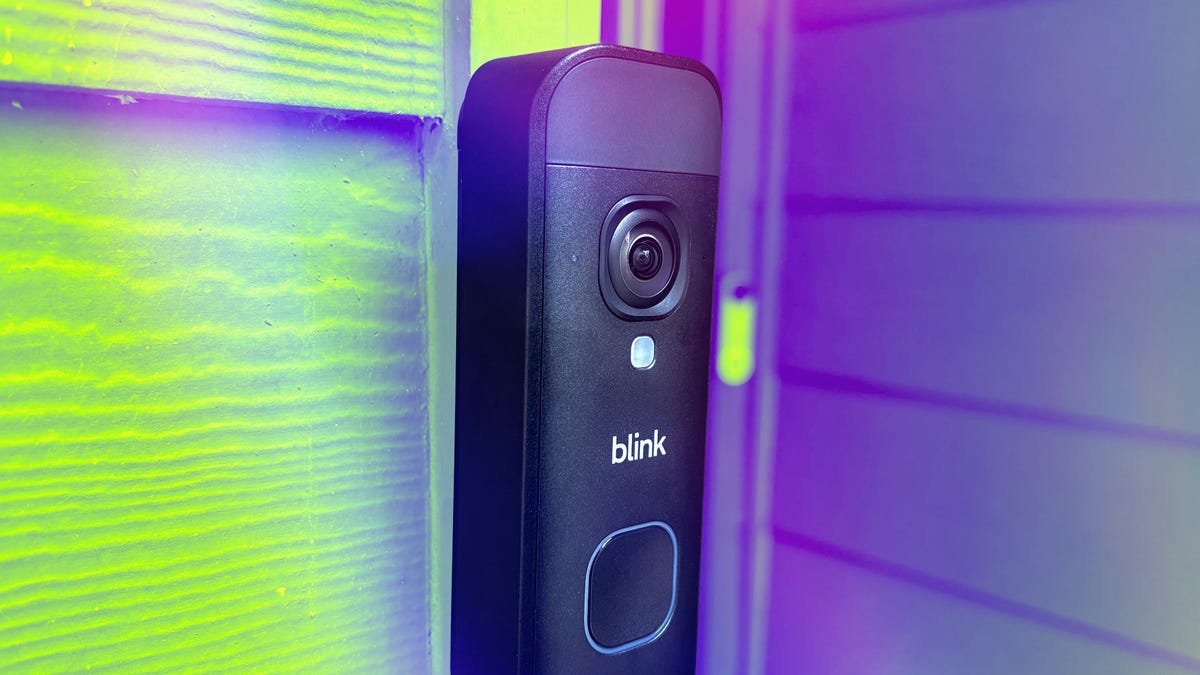
Pros
- Very affordable and good quality for the price
- Great app
- Many settings you can customize
- Upgraded 2K resolution works very well
- Can upgrade to local storage to avoid subscriptions
- Battery model is easy to place anywhere and Blink’s batteries last a long time
- AI descriptions can be useful but are entirely optional
- Low subscription fees if you want cloud storage
Cons
- Using local video storage will require buying an extra hub, up to $100
- Audio still picks up lots of ambient sounds
- AI descriptions can be hit or miss
Blink’s been giving its security line steady upgrades for the past year or so, one of the final releases being the new version of its extra-affordable video doorbell, the Blink Battery Doorbell 2K Plus ($60).
It’s a little more expensive than before, but it offers upgraded 2K resolution, enhanced audio and the same strong battery life, rated up to two years without worry. Plus, I’m always a fan of battery video doorbells since the position for wiring in a doorbell doesn’t always work for the security camera (although you can choose a wired version to knock the price down more).
Bottom line? If you’re looking for a budget video doorbell without giving up anything, this should be your starting point. You may want to give the included hub an upgrade to avoid subscription fees — or conversely, pay a little more for somewhat handy AI features. Here’s what I thought of all these features.
Higher resolution, same Blink design
From the outside, the Blink Doorbell 2K Plus looks nearly identical to older versions, but with minor upgrades. At these prices, it’s not going to reach the compact durability of something like the Google Nest Doorbell, but it’s also stronger and better-feeling than other budget doorbells in its price range.
In the back, you’ll find a spot for the three lithium AA batteries, secured by extra felt protection to minimize temperature impact on battery life. I can’t say if the batteries will last their full two years (yet), but in my tests with earlier Blink cameras, I got a good year and a half out of their batteries, which is a good sign. Doorbells will have a bit less with how frequently they activate.
The model also comes with a Sync Module Core to plug in and supply the Wi-Fi connection. It’s a nice addition at no extra cost, but you may want to upgrade to a better Sync Module hub and a microSD card to avoid cloud storage and any subscription fees (combined, they’ll cost an extra $70 t $100).
That 2K resolution lens and the head-to-toe viewing angle work very well once the doorbell is set up. I found the extra detail welcome, especially for more distant objects and motion, with a 140-degree vertical/horizontal field of view that also offers more placement options. During my testing, I didn’t encounter any issues with latency messing up my clarity.
Blink also says that it upgraded the audio, now with noise cancellation. I couldn’t detect much of the noise cancellation in my tests: There was still plenty of ambient noise, both during and after rainstorms. However, the audio was very sharp, picking up specific voices and sounds even from a couple of dozen feet away, so you won’t need to worry about missing anything.
Finally, it’s worth noting the doorbell doesn’t come with its own chime, but you can get one or use a device like Blink’s Mini 2 security camera as a chime. If you choose a wired version, it will use your existing chime.
A snappy app with more features than ever
Blink’s app is one of my favorites in home security, mostly because it’s so easy to use, especially for beginners. It walks you quickly through the doorbell setup (two screws are needed), with instructions on attaching the plate and wedge mount if necessary. Once complete, the app adds the doorbell to the home screen, where you can get a live view with one tap.
A shortcut menu allows you to turn notifications on or off or snooze them for a specific amount of time, a feature I’ve noticed on other security camera apps. You can quickly turn audio on or off too, or download a recording of what you’re currently seeing. But dig into the settings, and many more features become available.
In video settings alone, you have options to adjust how long the doorbell records after detecting motion, choosing video quality (which can affect local storage or streaming), changing night vision or turning on a daily summary mode. You can also create privacy zones to limit detection or permanently turn off video/audio, as desired for privacy.
For basic smart detection, you can turn person, vehicle and general motion on or off, but you will need a subscription (starting at $4) for anything beyond motion detection. You can also control what alerts pop up on your phone, from doorbell rings and temperature warnings to low batteries, motion clips, and arm/disarm scheduling.
All these settings will take time to learn for beginners, but Blink’s app arranges them logically with no distractions, so you can quickly learn your way around.
The one issue I noticed was that loading the live view for the doorbell took a few seconds to load every time, possibly because of the higher 2K resolution. That’s not a deal-breaker, but it could be annoying if you’re trying to catch someone before they leave the porch or see just what’s happening to a package. And speaking of packages, it’s time to talk about Blink’s new AI options.
Blink’s new AI stumbles a bit but is still useful
For basic plans or subscription-free use, Blink’s video clips section will show motion-detected clips with little fanfare. But add an AI subscription, starting at $7 per month, and Blink’s features expand.
Blink offers Moments, which combine multiple videos into one more advanced summary (more useful if you have multiple cameras). But the real value lies in video descriptions, which send you text alerts and include text alongside captured video that summarizes the objects the AI analyzed, saving you time and giving you extra details to make quick decisions based on what the doorbell is reporting.
I find this feature interesting, but somewhat hit or miss. The doorbell could track multiple actions at once, like noticing a person, a dog and vehicles during a busy moment. It also provided reliable details, such as “a man walks on grass carrying a white bucket,” which was indeed what had happened.
But other times, the feature didn’t always trigger. The first time I set a package out, the AI missed me putting the package down on the delivery box (like a UPS worker might), but detected when I removed it — “A person is picking up a blue box from the table and walking on the deck.” The second time I tried, the doorbell detected me putting the package down, but not picking it up and walking away.
The good news is that this AI is one of the cheapest available (although Eufy’s no-subscription version is on the way this year), and when it works, it provides useful detail in a reasonable timeframe, although I did get a little tired of learning the colors of every car driving down the street (this is where privacy zones become important). Don’t consider an AI plan necessary to get the most use out of the doorbell.
Final thoughts on the Blink Battery Doorbell 2K Plus
For a budget wireless model, nothing really beats Blink’s new video doorbell with a 2K resolution. I couldn’t notice a big difference in the audio, and you will need to upgrade the hub if you want to use local storage and dodge subscription fees, but there are a few other caveats for this affordable porch protector. The app also remains a top performer.
Blink’s subscriptions for person and vehicle detection are low: $4 per month (which also includes cloud storage), or $7 if you want AI video descriptions. Those descriptions, while time-saving when they work, didn’t always activate reliably for me, but I don’t think they’re necessary, especially if you want to continue saving.
Now that you know what you’re getting into, you’re ready to decide if this surprisingly feature-rich entry model doorbell is for you.
Read the full article here