





Pros
- Access and objecting monitoring for under $50
- Very accurate performance in every mode
- Door and window monitoring without needing a two-part device
- Useful alerts and settings
- Can set up home automations
- Useful for nearly anything that moves or needs to stay in place
Cons
- Requires a Zigbee Aqara hub to unlock full potential
- Limited Thread support only supports open/close function for now
I had never seen a sensor like Aqara’s new P100 before, but its claims certainly caught my eye. A small device that — without any attachments — could monitor door, drawer and window access? While also being able to sense tampering, vibration and if an object is moved out of place? And with Thread support for other platforms like Apple Home? That seemed like a lot for a little standalone sensor under $50.
But as my tests went on, I grew delighted with the Aqara Multi-State P100 sensor ($42). It performed nearly flawlessly, living up to every one of Aqara’s claims and showcasing a leap in home security tech I wasn’t expecting. This device can take the place of older, bulkier access sensors, and that’s just the beginning of what it can guard.
Like Ikea’s access sensor, Aqara’s P100 is a glimpse of the slim, capable future of security. But Aqara takes things a step further, and old-school security systems should watch out. Here’s how it performed.
A simple design that leaps ahead of the pack
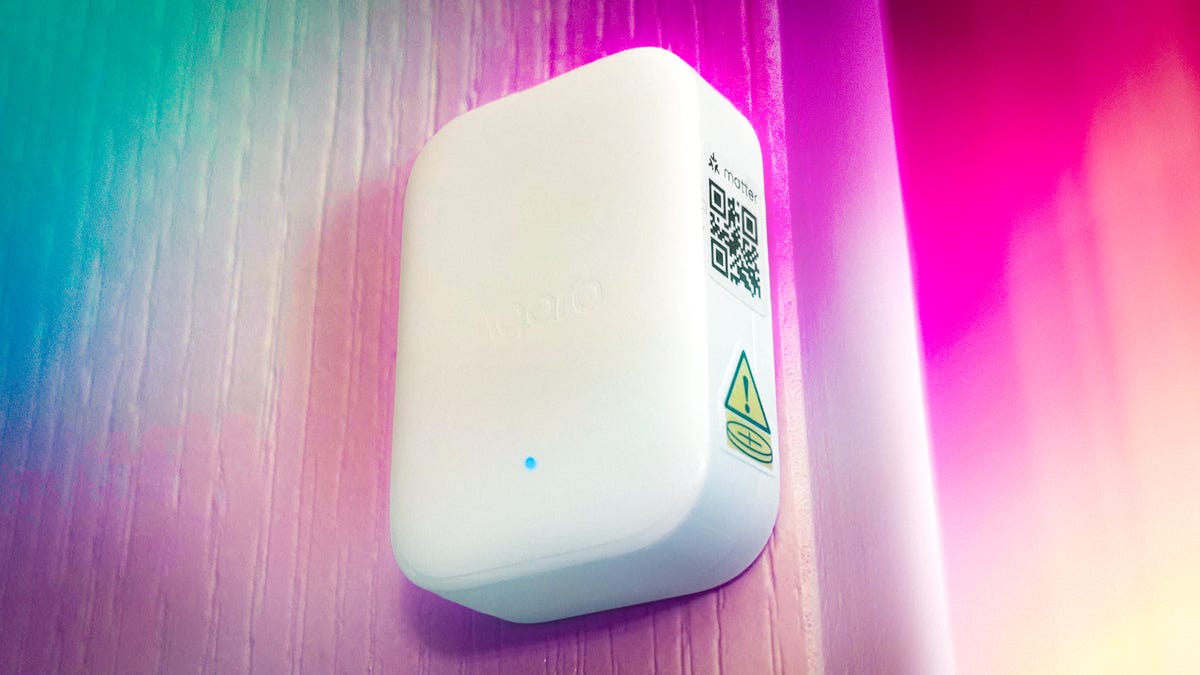
With the P100, Aqara is combining several of its past sensors that I’ve tested as part of its security camera hub into one device, about the size of a key fob.
On the back are two small adhesive strips for sticking the sensor on, well, anything. Aqara includes two additional strips in the box, which helped my review as I moved the sensor around to different stops around my house. Other than a small button on top and a cover in the back to replace the battery, there’s not much else to this device.
Aqara recommends using the sensor on objects like doors, windows, drawers (inside the drawer to detect motion), mailboxes, picture frames, baby cribs, medicine cabinets or boxes, pet food that may need to be monitored, and so on. It could also work for safes, art objects and anything else you don’t want moved, shaken or outright stolen.
Access sensors for doors and windows have existed for many years, but Aqara’s is one of the first I’ve seen that doesn’t require two different sensor halves that need to be properly aligned. With movement or orientation sensing, it can do the job all on its own, making installation much easier.
The button on the top of the sensor uses a long press to reboot or start pairing, and an easy three-press calibration to set the sensor to “closed” and help it recalibrate when you’re moving it to a new spot.
Setup and app choices
The P100 has two different connection options: Thread and Zigbee. The Thread connection allows the sensor to connect to other Matter-related home platforms, like Google Home, Apple Home, and Amazon Alexa, with a quick scan of a QR code, which I tried successfully.
The catch is that Thread compatibility is in progress and using a third-party home platform limits the sensor to only open/close access for doors, windows, drawers and so on. That’s still handy, but you can find cheaper access sensors that do something similar. Note that you’ll need a device that can handle Thread connections, such as an Apple, Google or Echo hub, to enable this support.
The second connection option is via Zigbee and Aqara’s own app, which opens up all the other sensor capabilities and is by far my preferred option.
With Aqara’s own app, you can choose between open/close detection and object monitoring. Choosing open/close also lets you choose the type of opening (say, a casement window vs. a traditional home door) to improve accuracy. Pop the sensor on the door close to the edge, and you’re good to go.
With object monitoring, you can choose what the sensor detects and alerts you about, such as the orientation of an object (like a picture frame), general movement, falls and vibration. You can choose all these, just one or the assortment you’d prefer.
The Zigbee approach offers versatility, but you will need an Aqara device that supports Zigbee connections. Fortunately, I had a couple lying around, but if you don’t, you’ll need an Aqara camera ($100) or a hub like the M200 ($70). That’s the only significant barrier if you’re new to home security devices.
A near-flawless performance for any kind of detection
Following the connection to the Aqara app, I ran the sensor through its numerous paces to judge accuracy and responsiveness. Once that quick calibration process finished, the sensor repeatedly impressed.
Open and close status alerts work without ever getting it wrong, despite relying on motion instead of a contact sensor. I tried this mode in multiple locations with the same results. I also switched over to Apple Home and Google Home, which required some rebooting but also yielded accurate results, albeit limited to this feature.
On to the object monitoring, which also worked as promised. I moved the sensor from cabinet drawers to safes to books, and without fail, it alerted me when objects were shaken, dropped, moved or generally messed with. Finally, I took it to the windows, where the P100 accurately sensed vibration every time I tapped on the glass.
One feature, in particular, I liked about object monitoring was that its triggering included a timer showing exactly how many seconds and minutes had passed since the last trigger. That made it easier to see if there were repeated attempts at tampering or carrying an object, versus a single event that could have other causes. You can also access a timeline of triggered events and adjust sensitivity for triggering, although I didn’t find a need to tweak it.
The only problem I noticed throughout my testing was that relocating the sensor or switching modes sometimes confused it, requiring me to recalibrate it a few times to get the sensor back on track. On the plus side, throughout the tests, the battery didn’t drop a measurable spot.
With this full suite of sensing capabilities, the P100 could take on many security roles around the home, depending on what you want to watch. That flexibility allows it to address concerns that older security sensors can’t easily handle. You can choose to simply get alerts on your phone, or pair it with a security camera so you can look at the live view and see if anything is happening.
Potential home automations round off this sensor nicely
With smart connections, the P100 can also play a role in automations if you connect other devices to Aqara’s app or your preferred home platform.
Aqara suggests a couple of different scenarios for this automation, such as putting the sensor on a gaming chair so that when you sit down at certain times of day, it will activate gaming lights and your monitor. Or you could put the sensor on a window and have it turn off a connected air conditioner if the window has been open for more than 10 minutes.
I’d add a few more possibilities, such as putting the sensor on an inside door and having it turn on a nearby heater when the door is opened to enter a room. Or when a mailbox has been opened at a certain time of day, you could set an indoor smart bulb to turn green so you know to check it.
The sensor also has a “three-tap” mode to activate other devices. Put it on the underside of your desk, and you could rap your knuckles three times to turn off the lights or start playing music, among other interesting tricks.
None of this is necessary for security monitoring, but they are fun features to experiment with if you’d like the sensor to do even more.
Final thoughts on Aqara’s multi-purpose sensor
As I ran the P100 through its many claims of monitoring objects and access, I found myself repeatedly saying, “Well, that works well.” It really is a sensor you can put anywhere to accurately judge what’s happening, without needing a camera or motion detector. Additional smart routines are also fun to play with, such as activating a device with a triple-tap on a surface.
There’s still room for improvement — I had to reboot a few times as I switched between settings and platforms, and the P100 only unlocks its full potential with a Zigbee hub (which could add extra costs) and Aqara’s own app for now.
But overall, the little sensor is very impressive, especially if you consider it as a replacement for more complex, expensive systems that you’d no longer need. While it may not have a flashy innovation like a smart lock powered by the sun, it’s a quiet leap forward that promises better home security for everyone.
Read the full article here


