
Close Menu
Modern Life Today
  • Tech
  • Smart Home
  • Energy
  • Home Security
  • Kitchen & Household
  • Outdoor
  • Home Internet
  • More Articles
Trending Now

What I Packed to Run 80 Miles Across the Italian Apennine Mountains

May 6, 2026

Ring Promo Code: 50% Off

May 6, 2026

Need to Share Your Wi-Fi Password? Here’s Where to Find It on Mac and Windows

May 6, 2026
Facebook X (Twitter) Instagram
Modern Life Today
  • Tech
  • Smart Home
  • Energy
  • Home Security
  • Kitchen & Household
  • Outdoor
  • Home Internet
  • More Articles
Subscribe
Modern Life Today
Home»Tech»Review: Samsung Galaxy S26 Ultra
Tech

Review: Samsung Galaxy S26 Ultra

Press RoomBy Press RoomMarch 14, 2026No Comments3 Mins Read
Share Facebook Twitter Pinterest Copy Link LinkedIn Tumblr Email

Even better, because it’s integrated, you can customize when the Privacy Display turns on through the software. Mine activates automatically with select messaging apps, banking apps, and for notifications, and there’s no visual indication when looking at the phone straight on that the Privacy Display is enabled or not (unless you tilt the screen slightly).

You can still see the screen from the sides with Privacy Display enabled, it’s just much dimmer and harder to make out the content. For maximum effect, you can turn on Max Privacy Protection via the quick settings menu, which makes it near impossible to read the screen from the sides. You don’t want to use that mode all the time because the screen looks washed out, but it’s good for when you want to be extra private. Oddly, Samsung doesn’t let you configure this extra layer to automatically turn on with specific apps—it’s a manual toggle every time.

I’ve seen some complaints online about the Privacy Display affecting the screen quality, but I have to disagree. Then again, the first thing I did when setting up the phone was max out the screen resolution to Quad HD+ and also set the colors to Vivid. I haven’t seen any fuzzy text, and brightness hasn’t been a problem for me either.

Yes, you can buy a cheap privacy screen protector and add it to any phone, but sometimes you do want the person next to you—be it a friend or family member—to be able to read the screen alongside you. Or maybe the phone is on a table, and you want to lazily scroll TikTok while trying to keep an eye on work. That’s where a standard privacy screen protector won’t help, as it blocks you from seeing your own screen, but Samsung’s solution gets around that. Now, I wish every smartphone had a privacy screen.

You don’t need to be doing anything illicit or extremely sensitive to justify having this feature. Maybe you want your conversation with a loved one to be private. Maybe you’re authenticating a login and don’t want anyone else to see the code. Or you’re opening your banking app, and don’t want anyone snooping at your checking account. It’s just nice to have privacy.

The Phone

Photograph: Julian Chokkattu

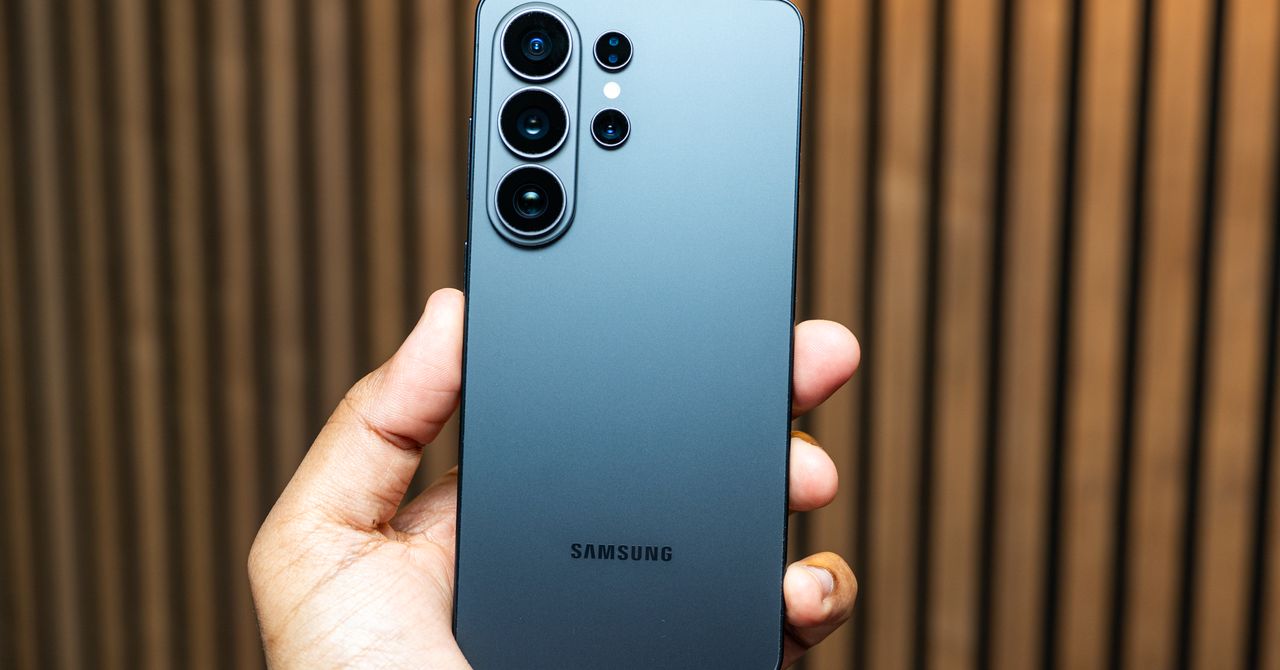
Samsung has made its Ultra smartphone more like the standard Galaxy S26 and S26+, with rounded corners instead of the boxy look of its predecessors. (It’s still the only one of the lot with the integrated S Pen stylus.) The overall design language is still quite dull, and the phone’s muted colors aren’t exciting (you can buy an iPhone 17 Pro in orange for crying out loud!).

Read the full article here

Share. Facebook Twitter Pinterest LinkedIn Tumblr Email

Related Articles

What I Packed to Run 80 Miles Across the Italian Apennine Mountains

May 6, 2026

Ring Promo Code: 50% Off

May 6, 2026

Need to Share Your Wi-Fi Password? Here’s Where to Find It on Mac and Windows

May 6, 2026
Add A Comment
Leave A Reply Cancel Reply

Demo
Top Articles

Is Apple Fun Again? Loving MacBook Neo Vibes (and the New Finder Guy)

March 13, 2026

Get Blazing Print Speed and a High-End Performance 3D Printer for Just $239

March 29, 2026

28 Best Headphone and Speaker Deals at Amazon’s Spring Sale 2026

March 28, 2026

Simplify Spring Cleaning With Up to 50% Off Narwal Vacuums During the Amazon Spring Sale

March 27, 2026
Don't Miss

Best Portable Monitors for 2026

By Press RoomMay 5, 20260

Viewsonic VG1656N: This is a pretty mediocre monitor, especially given its $300-plus price tag, but…

Save Almost 20% on an Apple Magic Mouse While You Can

May 5, 2026

Airseekers Tron SE Robot Mowers Deliver Ultimate Lawn Care

May 5, 2026

Review: KitchenAid Artisan Plus Stand Mixer

May 5, 2026
About Us
About Us

Modern Life Today is your one-stop website for the latest gadget and technology news and updates, follow us now for the news that matters to you.

Facebook X (Twitter) Pinterest YouTube
Featured News

These 4 Foods Quietly Strip the Coating Off Your Cast-Iron Skillet

March 6, 2026

Daylight Saving Time Has an Unexpected Benefit for Home Safety

March 6, 2026

Review: Corsair Sabre V2 Carbon Fiber and Magnesium Gaming Mice

March 6, 2026
Trending Now

Why MacBook Neo Is Going to Change Everything

March 6, 2026

Review: Jones Mercury FASE Snowboard Bindings

March 6, 2026

These 2 Apps Help Me Make Sense of My 100K Screenshots

March 6, 2026
  • Home
  • Privacy Policy
  • Terms of use
  • For Advertisers
  • Contact
2026 © Prices.com LLC. All Rights Reserved.

Type above and press Enter to search. Press Esc to cancel.