



Close Menu
Modern Life Today
  • Tech
  • Smart Home
  • Energy
  • Home Security
  • Kitchen & Household
  • Outdoor
  • Home Internet
  • More Articles
Trending Now

Amazon Can Use Your Twitch Content to Train Its AI—Unless You Opt Out

August 16, 2026

This Art Project Slows Down Citi Bikes to Make NYC’s Rent Crisis Feel Real

August 16, 2026

How to Choose a Camera (2026): Sensors, Megapixels, Terms

August 15, 2026
Facebook X (Twitter) Instagram
Modern Life Today
  • Tech
  • Smart Home
  • Energy
  • Home Security
  • Kitchen & Household
  • Outdoor
  • Home Internet
  • More Articles
Subscribe
Modern Life Today
Home»Tech»Review: Razer Naga V3 Pro
Tech

Review: Razer Naga V3 Pro

Press RoomBy Press RoomAugust 15, 2026No Comments3 Mins Read
Share Facebook Twitter Pinterest Copy Link LinkedIn Tumblr Email

Really, the shape is ideal for long-term use. It’s fairly ergonomic, and it’s easy enough to lay your hand across with a relaxed grip. I found it to be a great option for raid nights in Destiny 2 (with as many as five or six Crota runs in one night) and more chill games like The Big Walk, where precision and agility take a bit of a back seat to consistency and comfort.

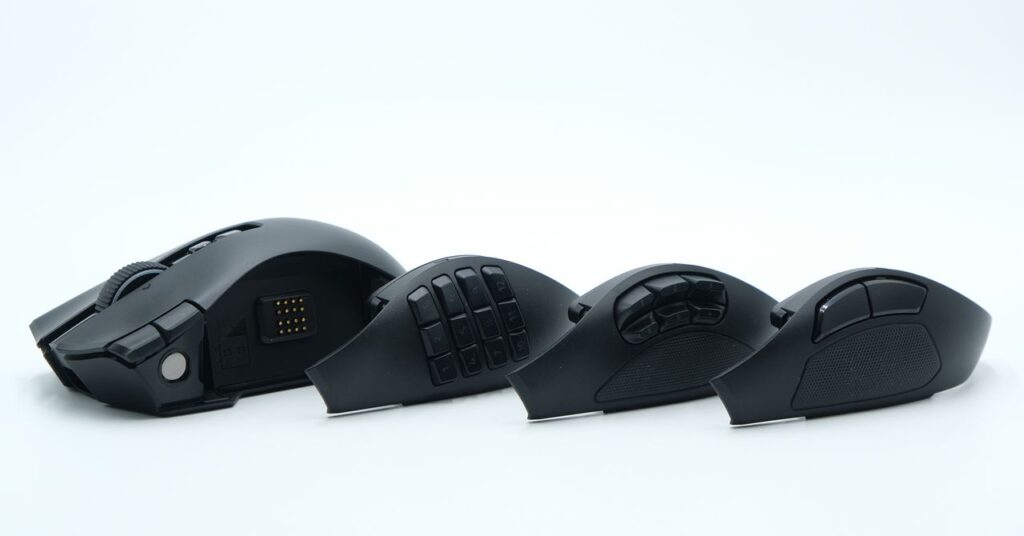
While the Naga V3 Pro weighs 116 grams with the heaviest twelve-button side panel (the six-button panel is 115 grams, and the two-button is 113), the mouse doesn’t feel particularly heavy. The weight is all kept fairly low, and is distributed well across the mouse. Compared to some older mice with high-up batteries and nose-heavy shapes, the Naga hardly feels like its weight; I would’ve guessed it was below 100 grams if I hadn’t checked. You’ll notice the added heft if you’re switching directly from a 60 gram gaming mouse, but otherwise, this mouse manages its mass very well.

One downside to its old-school vibe is the limited color options. Black is the only version available, and while that’ll always be the most popular (especially for Razer), a more niche mouse like the Naga V3 Pro could have definitely benefitted from another color.

So Many Buttons

This mouse has an absurd number of buttons. I found myself struggling to use all of them, but I’m sure there are quite a few people who still won’t think it’s quite enough.

Like the Logitech MX Master 4, the Naga incorporates a customizable mouse wheel with options for smooth or ratcheting operation, along with a “precision tactile” mode that decreases the space between each of the scrolling steps. The wheel also has a tilt function for horizontal scrolling; it’s ideal for spreadsheets and multimedia work that requires two axes of movement, but can just as easily be remapped to any number of macros (I could see it being useful for leaning to the left or right in a tactical shooter like Rainbow Six: Siege).

Drawing further comparisons to the MX Master line, I really found this mouse to be good for everyday work. The comfortable shape and extensive navigation capabilities made it great for multimedia work, and the number pad was ideal for mapping software-specific functions, especially for photo and video editing software that can require some repetitive and complex inputs.

Despite the sheer number of buttons, I really found that they never got in the way when not in use. All of them are placed in such a way to be easily accessible without disrupting the basic left and right click functionality. The only button I found myself regularly pressing on accident was the third click button, which can be locked entirely using a switch on the underside of the mouse.

Photograph: Henri Robbins

Read the full article here

Share. Facebook Twitter Pinterest LinkedIn Tumblr Email

Related Articles

Amazon Can Use Your Twitch Content to Train Its AI—Unless You Opt Out

August 16, 2026

This Art Project Slows Down Citi Bikes to Make NYC’s Rent Crisis Feel Real

August 16, 2026

How to Choose a Camera (2026): Sensors, Megapixels, Terms

August 15, 2026
Add A Comment
Leave A Reply Cancel Reply

Demo
Top Articles

TikTok Shoppers Thought They Were Bidding on iPhones. Instead, They Won Teddy Bears

June 16, 2026

Which AI Best Predicts the 2026 World Cup Final? We Asked 5 Models About Sunday’s Match

July 18, 2026

Cozyla’s Digital Calendar Just Took a Prime Day Dive to $280, but Expect This Deal to End Soon

June 29, 2026

Why You Need an Internet Provider With No Data Caps

June 24, 2026
Don't Miss

Review: Razer Naga V3 Pro

By Press RoomAugust 15, 20260

Really, the shape is ideal for long-term use. It’s fairly ergonomic, and it’s easy enough…

The Complicated Case of Passing On Your Digital Estate

August 15, 2026

Best Android Charger: Wireless, Portable, Cable (2026)

August 15, 2026

Layla Sleep Coupon: Save Up to $600 in August 2026

August 15, 2026
About Us
About Us

Modern Life Today is your one-stop website for the latest gadget and technology news and updates, follow us now for the news that matters to you.

Facebook X (Twitter) Pinterest YouTube
Featured News

Samsung S95H OLED Review: Not Quite the ‘Ultra’ Frame TV We Wanted

June 16, 2026

Review: Universal Audio Volt 876 USB Audio Interface

June 16, 2026

19 Best Gifts for Plant Lovers and Gardeners (2026)

June 16, 2026
Trending Now

Toy Story 5 Puts Technology at the Heart of Its Most Timely Story Yet

June 16, 2026

Xreal’s Android XR Aura Glasses Are Coming This Fall, With a Brand New Qualcomm Chip Inside

June 16, 2026

The Commodore Callback 8020 Is a Digital Detox Phone That Isn’t Dumb

June 16, 2026
  • Home
  • Privacy Policy
  • Terms of use
  • For Advertisers
  • Contact
2026 © Prices.com LLC. All Rights Reserved.

Type above and press Enter to search. Press Esc to cancel.