
Close Menu
Modern Life Today
  • Home
  • Tech
  • Smart Home
  • Energy
  • Home Security
  • Kitchen & Household
  • Outdoor
  • Home Internet
Trending Now

7 Embarrassing Pasta Crimes You’re Committing and How to Fix Them

March 15, 2026

My Moccamaster Delivers Drip Coffee Perfection

March 15, 2026

Review: Razer Boomslang 20th Anniversary Gaming Mouse

March 15, 2026
Facebook X (Twitter) Instagram
Modern Life Today
  • Home
  • Tech
  • Smart Home
  • Energy
  • Home Security
  • Kitchen & Household
  • Outdoor
  • Home Internet
Subscribe
Modern Life Today
Home»Tech»Review: Razer Boomslang 20th Anniversary Gaming Mouse
Tech

Review: Razer Boomslang 20th Anniversary Gaming Mouse

Press RoomBy Press RoomMarch 15, 2026No Comments3 Mins Read
Share Facebook Twitter Pinterest Copy Link LinkedIn Tumblr Email

The original Boomslang came from the era of Xbox’s bulky Duke controller. We had just barely made it past the N64’s beloved three-pronged abomination. At a time when “ergonomics” was a novel idea to be explored instead of a defined concept, this design was a lot more palatable.

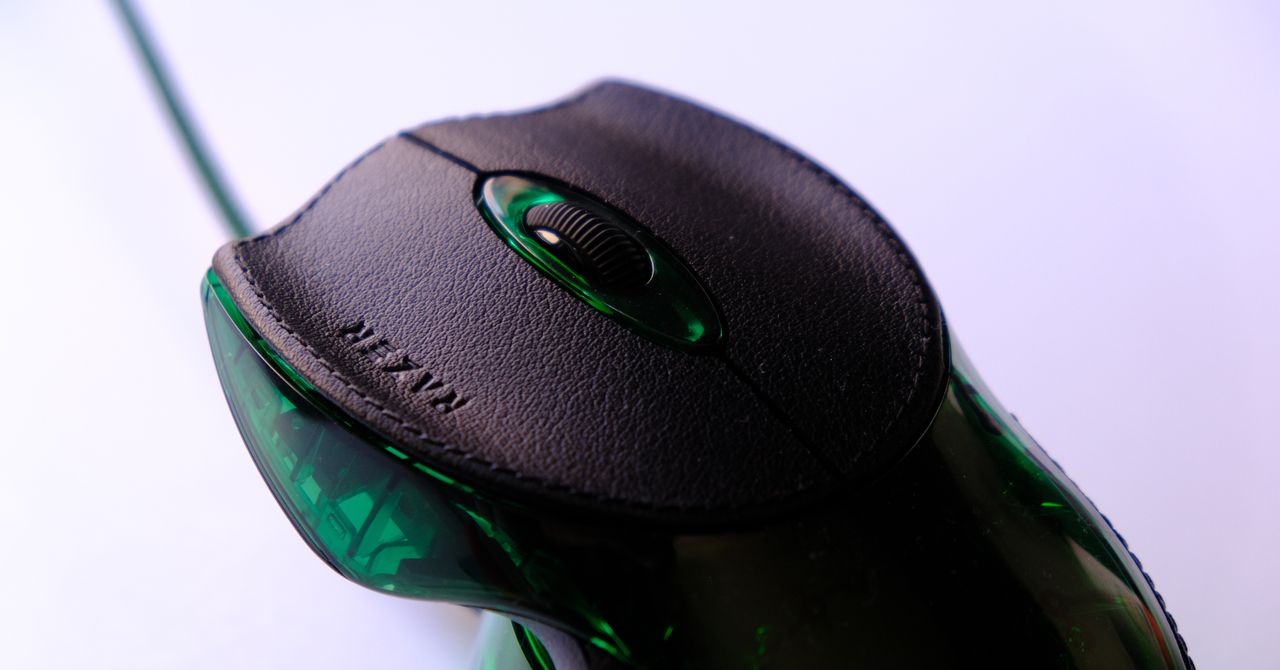
It’s still a gaming mouse in theory, even if the vast majority of them will spend more time on a shelf than on a mousepad, so I do need to talk about whether it can game. Shockingly enough, it’s not that bad. The shape is unusual, yes. Compared to a standard mouse, the Boomslang is low-slung and wide. It feels like it was designed for an Elite from Halo to hold, their two central fingers and a thumb on each side. It is bizarre and ancient feeling, but it’s not bad.

Putting your hand on this mouse, you have to rethink where everything goes. Your thumb curls underneath the main hump, and your pinky mirrors it on the opposite side. There’s enough real estate on the two main buttons for all three fingers to sit comfortably. If you’re like me, and you tend to rest your middle finger on the right mouse button, it’s exceptionally odd. Instead, your middle finger really wants to rest on the mouse wheel. It feels natural after a few minutes, but you’ll need to adjust.

To properly test this mouse, I paired it with some of the heavy hitters from back in the day. Halo CE, Counter-Strike, Quake 2, and Half-Life. To get any agility, your hand is pretty much forced into a fingertip-only grip, where your thumb and pinky slide into the crevices of the side buttons for added stability. The mouse wheel is set fairly far back compared to a standard mouse, so putting your fingertips at the edge of the mouse means your middle finger can’t easily use the mouse wheel. Instead, with your fingertips sitting directly next to the wheel, the palm of your hand is left hanging off the back. I would imagine everyone who uses this will have a newfound appreciation for how far ergonomics have come over the years.

The largest struggle I had with this mouse was fine controls. The large head and weight means this is slightly more prone to maintaining momentum than most that I’ve tested, wanting to swing around like a battle axe when being used precisely.

The truly strangest aspect of this mouse from a modern perspective is the side buttons. They sit in what I can best describe as the “armpits” of the mouse, curving underneath the front section and sitting exactly where your thumb and pinky intuitively want to be. Both of them have a strange, creased shape that follows the lines of the mouse’s two halves, and require a good bit of force to be pressed down, meaning you won’t accidentally press them during regular use, but this also means they’re easy to forget about.

Read the full article here

Share. Facebook Twitter Pinterest LinkedIn Tumblr Email

Related Articles

My Moccamaster Delivers Drip Coffee Perfection

March 15, 2026

Spring Cleaning? Here’s How to Declutter Responsibly—and Maybe Earn Some Cash

March 14, 2026

Review: Samsung Galaxy S26 Ultra

March 14, 2026
Add A Comment
Leave A Reply Cancel Reply

Demo
Top Articles

Best Mobile VPN of 2026: Enjoy Privacy Protection on the Go

February 6, 2026

Apple’s Next M5 MacBook Pros Could Drop With MacOS 26.3

February 3, 2026

Tonal 2 Makes Strength Training Smarter With AI-Driven Motivation

January 20, 2026

Best Samsung Phone of 2026

January 16, 2026
Don't Miss

Bigme B251 Color E Ink Monitor Review: Dreams Don’t Always Come True

By Press RoomMarch 14, 20260

Pros Easy-to-see in very bright environments Many input source options Cons E Ink benefits diminished…

What to Do in Vegas If You’re Here for Business (2026)

March 14, 2026

Here’s What I Look for When Choosing a Trustworthy VPN

March 14, 2026

Google’s AI Search Results Love to Refer You Back to Google

March 14, 2026
About Us
About Us

Modern Life Today is your one-stop website for the latest gadget and technology news and updates, follow us now for the news that matters to you.

Facebook X (Twitter) Pinterest YouTube
Featured News

This Is the Best Time of Day to Work Out Based on Your Daily Schedule

January 15, 2026

I Tried Cooking with Smart Glasses. Here’s Where They Helped the Most

January 15, 2026

The Samsung Galaxy Tab S10 Plus Is $170 Off on Amazon. Grab It Before the Price Jumps Back Up

January 15, 2026
Trending Now

Best Streaming Services of 2026

January 15, 2026

Shop This Galaxy A17 Deal and Get AI Features and 5G Connectivity for Just $170

January 15, 2026

You’re Recycling Wrong: 7 Takeout Containers That Don’t Go in the Blue Bin

January 15, 2026
  • Home
  • Privacy Policy
  • Terms of use
  • For Advertisers
  • Contact
2026 © Prices.com LLC. All Rights Reserved.

Type above and press Enter to search. Press Esc to cancel.