



Close Menu
Modern Life Today
  • Tech
  • Smart Home
  • Energy
  • Home Security
  • Kitchen & Household
  • Outdoor
  • Home Internet
  • More Articles
Trending Now

The Best Audio Players for Kids: Yoto, Toniebox, and More

August 30, 2026

The Easiest Ways to Share Anything Between Android and iOS

August 30, 2026

Review: BenQ GV50 Ceiling Projector

August 30, 2026
Facebook X (Twitter) Instagram
Modern Life Today
  • Tech
  • Smart Home
  • Energy
  • Home Security
  • Kitchen & Household
  • Outdoor
  • Home Internet
  • More Articles
Subscribe
Modern Life Today
Home»Tech»Review: BenQ GV50 Ceiling Projector
Tech

Review: BenQ GV50 Ceiling Projector

Press RoomBy Press RoomAugust 30, 2026No Comments3 Mins Read
Share Facebook Twitter Pinterest Copy Link LinkedIn Tumblr Email

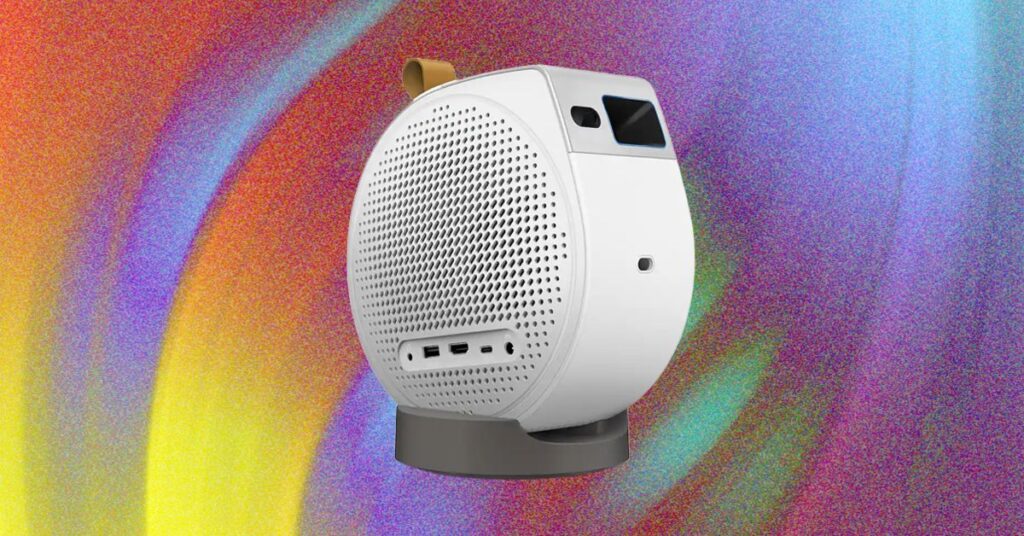
You can slide the projector up or down on the base for a vertical shift up a wall or ceiling. For a horizontal tilt, you can fold out the base’s two feet and point the projector at a slight angle on the ceiling. No matter the direction, it’s easy to slide around but also stays put.

The projector only has one HDMI port, which you can use for ARC 5.1 pass- through audio or connecting to another source, like a gaming console. There’s a USB-A port and a USB-C port, both for connecting a thumb drive or a hard drive (or charging a gadget), plus a 3.5-mm port. The GV50 does not have an Ethernet port and uses Wi-Fi 5, which is older and not as widely compatible or as speedy as modern standards like Wi-Fi 6E or Wi-Fi 7. I had some connection issues with my Google Nest mesh network where the projector couldn’t connect.

Photograph: John Brandon

Aside from needing to complete a system update that took about 45 minutes, setup was ultra-smooth and mostly involved using the Google Home app to scan a QR code and install the apps. The GV50 used auto-keystoning to map to my projector screen, and it worked well. When I used the projector on a wall and on the ceiling, the keystoning also worked—I only made a few minor adjustments to the size. The GV50 remote uses the typical, intuitive BenQ layout with a Home button in the center, a setup button that’s easy to find, and shortcut buttons for Netflix, YouTube, and Prime.

Not only can the GV50 run on battery power, but it also has plenty of settings to manage its efficiency, including powering down automatically after a set period. I found Battery mode to be marginally helpful, since I use the device in my house, connected to a wall outlet, but the capability does add portability should you want to use the projector while camping or living anywhere else that outlets are sparse. You can use the projector on battery charge alone for a few hours, but the device will dim a little bit to save power.

Picture Quality and More

The GV50 is not trying to be a cinematic marvel by any means, but the projector failed my typical Spears & Muncil benchmark tests. I noticed the skin tone tests were about average for a midrange model like this, not showing much tonal variation. In the demo reel tests, the 1080p quality and lack of good contrast and brightness were much more obvious. A red cactus and yellow flower lacked vividness, and trees in the foreground of a mountain scene looked too dark and mixed into the inky black background. Butterflies that should have looked bright and colorful looked dull, flat, and a bit lifeless.

When I switched to streaming from my iPhone 17 Pro and an iPad 12.9-inch, the GV50’s slow processing speed became an issue. While both Google Cast and Apple AirPlay were functional, the playback was choppy and jittery. If I tried to fast-forward, the stream would pause or fail altogether due to the paltry 2 GB of RAM and 1.5-GHz processor.

Read the full article here

Share. Facebook Twitter Pinterest LinkedIn Tumblr Email

Related Articles

The Best Audio Players for Kids: Yoto, Toniebox, and More

August 30, 2026

The Easiest Ways to Share Anything Between Android and iOS

August 30, 2026

Netflix Failed at Video Games. Now It’s Trying to Promote Them

August 29, 2026
Add A Comment
Leave A Reply Cancel Reply

Demo
Top Articles

Which AI Best Predicts the 2026 World Cup Final? We Asked 5 Models About Sunday’s Match

July 18, 2026

Is This Poker Player Bluffing? The AI Thinks So

August 5, 2026

The 10 Best Electrolyte Powders (We Tested Over 20)

July 28, 2026

A Recycling Expert Shares 7 Takeout Containers That Don’t Belong in the Blue Bin

July 15, 2026
Don't Miss

SelectBlinds Promo Codes & Coupons: Save on Custom Window Treatments

By Press RoomAugust 28, 20260

After living in over a dozen apartments with the “Landlord’s Special” fixes, like shoddy paint…

Reebok Discount Code: Save 15%+ in September 2026

August 28, 2026

Stop Touching Your Keyboard. Use This AI-Powered Microphone Instead

August 28, 2026

Someone Finally Fixed Installing Apps on a Mac

August 28, 2026
About Us
About Us

Modern Life Today is your one-stop website for the latest gadget and technology news and updates, follow us now for the news that matters to you.

Facebook X (Twitter) Pinterest YouTube
Featured News

Here’s How to Recycle Your Old Laptop, PC and Printer

July 1, 2026

Forget the Grill. This Countertop Appliance Is Even Better During a Heat Wave

July 1, 2026

More Than 1 in 5 Users Make Health Decisions Based on Social Media, Despite Widespread Distrust

July 1, 2026
Trending Now

Gear Up for Less. The Best Fourth of July Outdoor Deals on Garmin, Anker and GoPro Are Live

July 1, 2026

Review (2026): Tello Mobile Prepaid Phone Plans

July 1, 2026

6 Tech Products You Need to Help Manage Blackouts and Power Failures

July 1, 2026
  • Home
  • Privacy Policy
  • Terms of use
  • For Advertisers
  • Contact
2026 © Prices.com LLC. All Rights Reserved.

Type above and press Enter to search. Press Esc to cancel.