

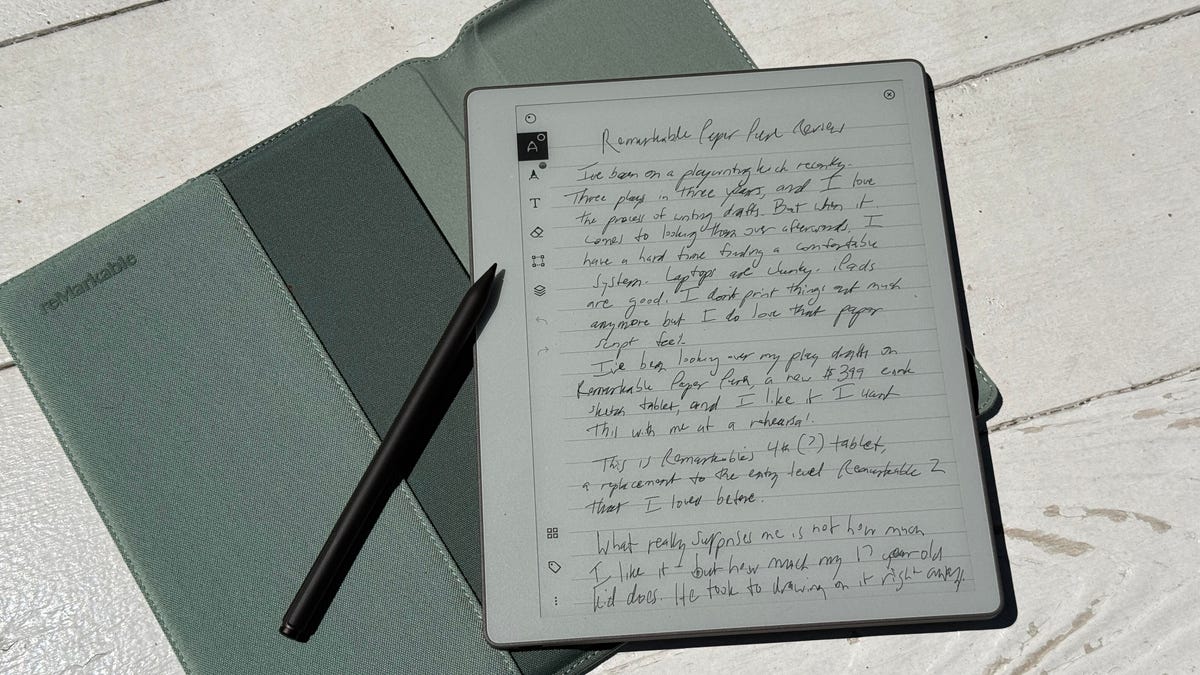
I’ve been on a playwriting kick lately. Three plays in three years, and I love the process of writing drafts. But when it comes to looking them over afterward, I have a hard time finding a comfortable system.
Laptops are chunky. iPads are good. I don’t print things out much anymore. But I’ve been looking at my play drafts on the new Remarkable Paper Pure in the mornings, and writing this review intro via longhand on the tablet’s crisp white screen. It feels like an actual notebook.
I remember being wowed by Remarkable’s ultra-fast E Ink stylus magic nearly a decade ago, and since then, stylus-friendly E Ink tablets have become their own industry. Amazon’s Kindle Scribe and Boox’s many tablets compete with Remarkable, which has its own line of black-and-white and color tablets now.
The Remarkable Paper Pure is an update and replacement to the Remarkable 2, a black-and-white/grayscale tablet that was released back in 2000. The $399 Pure, available for preorder now and shipping in early June, is the same price as the Remarkable 2. But it’s subtly and notably better.
The refresh speed of the Canvas greyscale display is twice as fast (21 millisecond refresh now), and most page turns and other interactions feel relatively zippy now. I like that, but I also love that the display is much whiter. The tablet’s footprint is smaller, too and weighs less (12.6 ounces versus 14.2 ounces for Remarkable 2, despite having the same 10.3-inch, 1,872×1,404-pixel greyscale display. It feels more welcoming, although the tablet is a bit thicker now (.2 inches).
There isn’t a back (or front) light, though, something the color Paper Pro and Paper Move both have. Lights on E Ink tablets don’t always look that fantastic, but they are useful. The Pure is meant to be used like a regular notebook, with ambient room light.
What really surprises me about the new Pure tablet isn’t how much I like it, though. It’s how much my 17-year-old kid does. He took to drawing on it right away. Now he wants one. Although he isn’t wild about how much it costs, he’s very into the whole proposition.
Back to the (improved) basics
Remarkable, based in Norway, took a surprisingly pulled-back approach with the new Pure model this time around compared with the Remarkable 2. There isn’t a folio case cover accessory this time, or a keyboard case. Instead, the Pure is sold on its own for $399, or comes with a padded sleeve case and a step-up pen for $449.
I miss the folio case, but the new padded sleeve is reinforced inside and automatically puts the tablet to sleep when slid in. I appreciate its cozy vibe, and it’s come with me on the train and to a bunch of local coffee shops. I’d recommend the $449 bundle for the case (you’ll need one) and the better pen, which has an eraser mode on the back.
As opposed to the Pro line that came out two years ago, which had a front-lit color E Ink display, the Pure feels pared down. And it is, but in a good way. The Pure feels more focused on feeling like a sheet of paper, and it won me over. And my wife. And my kids. They were impressed by it, and they’re rarely impressed by any tech I test lately.
The big differences are the faster refresh, the whiter screen, and a battery life that’s supposed to last longer (three weeks versus two with the Remarkable 2). Using it frequently for five days or so, my battery life has already dipped a fair amount, but Remarkable makes its battery estimates based on an hour of daily use.
The plastic case at first doesn’t feel as ultra-sleek as that of the Remarkable 2, but it’s inviting to hold and light. And the device’s inner magnesium case makes it feel sturdy, not flexy or creaky. The whole product feels very well designed and minimalist. Leaning on the tablet to write nearly feels like working on a paper notepad.
I tried writing this review on the Remarkable Paper Pure, in longhand, which is rough because I have terrible handwriting. But the Pure feels great for handwriting and sketching, so it’s not the tablet’s fault, really. However, your methods for working on the Remarkable tablet are limited as always. It doesn’t run Android or any other app store, leaning entirely on its own OS and tools. It’s a pared-down focus experience, where writing and annotating are the main event.
I do love the simple interfaces and intuitive touch gestures and menus. Moving documents to and from the tablet is easier than before, thanks to a web app that can convert documents or add PDFs, Word docs and ePubs. It’s a little odd because the actual iPhone app doesn’t allow document adding, but the web app can. Still, sharing out docs from the tablet is a lot easier too because links to files in the web app can be sent to people without their needing a Remarkable account.
However, while many Remarkable features can work for free with an account set up via Remarkable, a subset of features are subscription-based. The free account can connect Remarkable to Google Drive, Microsoft OneDrive and Dropbox accounts for file sharing, and it can convert handwriting, but the $40 a year subscription is needed for Remarkable’s unlimited cloud storage of files, more app and service hook-ins, accessing a bunch of clever and useful note and art templates offered by Remarkable, or searching handwriting in notebooks.
After a year or so away from spending time with one of Remarkable’s tablets, I found some new features pretty compelling. I got a kick out of demoing a presenter tool that’s now part of the tablet, where a web app can be used to stream what’s on the tablet while the stylus marks and points to parts of the screen, even while hovering over it. There’s an AI tool that summarizes notes into a transcript that can be shared with colleagues, breaking down pieces into bullet points.
I’m also impressed by the tablet’s handwriting-to-text conversions, which aren’t instant but recognized my terrible penmanship far better than I could have imagined.
While I feel inspired by a lot of the Remarkable Paper Pure’s core ideas, it also feels like the equivalent of a very specialized kitchen tool. I bought a coffee grinder over a year ago that I ended up never using…until a few weeks ago. Now I use it nonstop. I can see the same thing happening with how someone might use a tablet like this. It might never help improve your life, or you might lean on it as your favorite new focused sketchpad.
A fun gift for sketch artists?
My oldest son saw me testing the Remarkable Paper Pure and fell in love with it too, but as a drawing tool. He’s been thinking about sketch apps and tablets, and found drawing on the Pure really satisfying. He also got deep into adding layers, or separate editable overlays in a single art file, which is, an easy process on the Pure.
It’s the most excited he’s been about a gadget I’ve tested in years, but he was sad about the price. $400 isn’t super expensive, but it’s not cheap either, considering iPads start at $349. The Remarkable tablet won’t double as a regular work device for other apps, but then again, its pen-plus-tablet price is lower than the cheapest iPad-plus-Pencil. And, as my son immediately appreciated, the Remarkable’s easy and creation-first interface feels extremely inviting for spontaneous doodling or sketching.
Yes, the price is high. However, most equivalent E Ink note-taking tablets aren’t cheap either. I still love how nonburdened by spammy extras the whole Remarkable layout feels, and it makes me feel — as I browse my play drafts to read and highlight, or a 120-page report on the immersive entertainment industry that I’m adding notes to in the margins — that I have a friendly pad for notes and longhand revision markups. And iPads serve this purpose too, and do a whole lot more. And yet I never find myself compelled to use the Apple Pencil much with iPads: I’m keyboard-first. With Remarkable’s tablets, I’m always pen in hand.
Read the full article here