







Pros
- Durable wired design that can be set or mounted nearly anywhere indoors
- Highly effective, speedy pan/tilt with privacy shutter
- Clear image and no latency issues
- Can set recognition for up to five pets
- Easy to adjust sensitivity and turn all features on or off
- At well under $100, it’s a solid entry model for those who want stronger camera
Cons
- The AI features failed to work in my tests, so I think you can safely skip the subscription fees
- Audio was fairly short range
- You’ll need to create a pet profile and skip past some marketing during setup
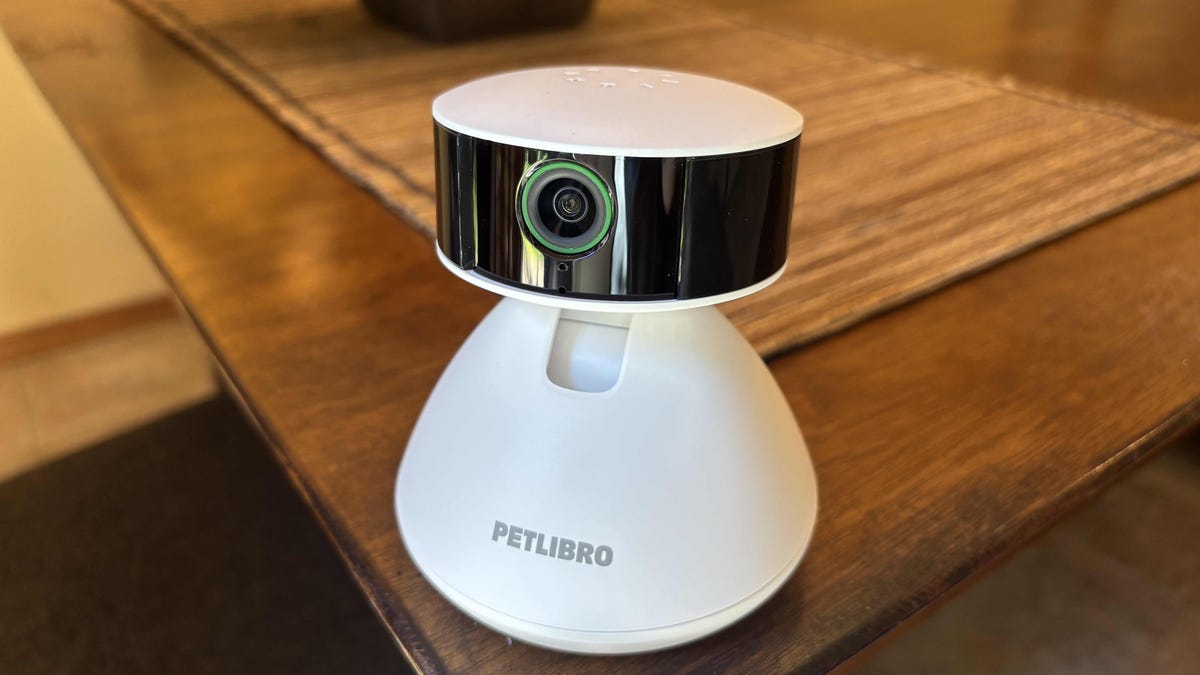
I’m always on the lookout for the latest pet camera technology, especially during Amazon’s weeklong Pet Day event, to see what’s working best when we want to keep an eye on our furry friends. One of the latest from Petlibro is a pan/tilt camera called Scout, which can be placed on the floor, a shelf or mounted directly to a wall.
This 1080p Scout cam ($70) proved a good entry point for pet owners who want to keep an eye on their pets while they’re away from home, or watch pets in areas that may otherwise be difficult to access (like around the litter box). It’s a well-rounded combination of cost and features that gives you plenty of options without going over $100.
Like so many cameras these days, Scout is also chock-full of AI possibilities if you pay for a subscription, starting around $12 per month or $100 per year. There are some AI features I like for pet cameras, but in this case, especially for an entry-level model, I’m not sure you need them. Here’s my experience.
Note: It always pays to check the pet camera’s security, since these pet brands don’t always follow the same security practices as big security brands. A vulnerability was discovered in Petlibro’s system in 2025. However, since it wasn’t exploited, and the company quickly patched the issue and fixed the follow-up problem noted by Bobdahacker, I’m still willing to recommend Petlibro products.
Simple but effective design and setup
The Scout cam’s rounded head is a unique design compared with other cameras I’ve tested, but it’s well-suited for pan/tilt functionality. The plug-in, 1080p camera doesn’t have a lot of tricks, but design quality is quite sturdy, as is the included cable (an important point for pets that can get a little chewy. It even passed my “try to wrench the lens head off” test, so I wouldn’t worry much about your pets tossing it around.
Add in the mounting options, and this is one of the top pet cam designs I’ve reviewed, a combo of durability and versatility better than many brands. There’s also a built-in privacy shutter that lets you manually shut the camera off when you want. No option for true local video storage exists on the Scout, but you can take screenshots and record, then save, live video directly to your phone.
The setup was mostly easy once I downloaded the app. The only speed bump was creating my account and logging in, which required skipping past several “buy this subscription” screens and filling out a pet profile to even get started, which was slightly annoying.
Cam quality and audio capabilities
Furbo’s 1080p cam is quite capable. I found no problems with latency and encountered clear, detailed video, both live and recorded. The pan/tilt features proved relatively quick compared with other panning cameras I’ve tested, and intuitive to use by swiping through the app. The camera did struggle a little with washed-out images in especially bright, sunny conditions, so I wouldn’t try aiming it directly at the sky.
The two-way audio was a more mixed experience. Audio delivery through the app sounded hollow and short-range — enough to pick up howling and yowling without a problem, but not necessarily to get smaller sounds at a distance.
Speaking through the cam was more effective, with clarity enough to understand words, tone and perhaps a familiar voice. There’s also a fun little feature that mimics a bird call, though my cat didn’t know what to make of it.
My app experience and the AI that wasn’t
With the basics tested, it was time to set up the camera near one of my pet’s favorite spots and test out the app features. Petlibro’s app offers comprehensive features, including pet recognition for up to five pets, auto-tracking pets, recognizing humans and sensitivity settings for nearly everything.
Then there’s the $100-per-year AI package, which enables more detailed recognition of individual behaviors like eating, drinking, using the litterbox and “selfies,” which I never found the purpose of. Here’s the Scout’s weak point, because these AI settings were capricious at best.
Let’s start with a few things I liked about the full AI subscription:
- The Scout camera automatically looks for pets and grabs a picture of them to use for identification, without needing to do it manually — which led to the crankiest snapshot of my cat I’ve ever seen.
- You can get daily summaries or filter AI results by activity tags, as well as receive real-time alerts when the camera detects activity.
- Auto pet tracking works, easily following pets as they move around.
But when I ran into problems, they quickly snowballed:
- After the initial setup, the AI recognition, well, didn’t recognize anything. Even after tweaking sensitivity and settings, I couldn’t get the camera to recognize my pet, even though it showed up multiple times.
- Specific activity functions also didn’t function. I fed my cat multiple treats in front of the cam (lucky orange hooligan), but it never once recognized or alerted me to a pet eating.
- The alerts seem to lack the descriptive elements I’ve found in other pet cameras and general AI security cams, such as describing what the pet is doing and what objects it’s interacting with.
- Eventually, after multiple tries, I did get a “[pet name] is on the move!” alert with a video tracking my cat’s latest inspection, but I don’t know why this triggered, and nothing else did.
Those issues aren’t worth the price, but the camera doesn’t really need AI. You get the basic functions, including pet recognition that you can set up yourself, all for free, which I think is the ideal way to use this model. If you want AI, choose a brand with more descriptive, accurate features like Furbo, Petcube or a general security brand like Blink.
Final thoughts on the Petlibro Scout camera
While Petlibro makes a lot of fuss over the AI capabilities of the Scout camera, my experience was the opposite. I found a solid, versatile cam that would make an excellent entry-level model for a pet owner without needing additional fees to work well. There’s no local storage, but you can take screenshots and download live video recordings to your phone as alternatives. The video is clear and the audio serviceable, especially at close range.
However, the AI function failed in my tests, unable to recognize basic activities or pets, even after it chose its own cat profile picture. But I don’t think this camera really needs an AI subscription, especially when other cameras offer more comprehensive AI features. For now, the Scout cam serves best as a simple model to check up on your pets while getting basic recognition services without ongoing costs.
Read the full article here


