
Close Menu
Modern Life Today
  • Tech
  • Smart Home
  • Energy
  • Home Security
  • Kitchen & Household
  • Outdoor
  • Home Internet
  • More Articles
Trending Now

Enjoy the Summer Heat in Style With This Patio Umbrella for a Massive $200 Off

July 5, 2026

The Threat Landscape Has Evolved to Target Your Data, Not Just Your Devices

July 5, 2026

Review: HP OmniBook Ultra 14

July 5, 2026
Facebook X (Twitter) Instagram
Modern Life Today
  • Tech
  • Smart Home
  • Energy
  • Home Security
  • Kitchen & Household
  • Outdoor
  • Home Internet
  • More Articles
Subscribe
Modern Life Today
Home»Tech»New Dental Robot Attaches to Patient’s Teeth for Drilling
Tech

New Dental Robot Attaches to Patient’s Teeth for Drilling

Press RoomBy Press RoomJuly 5, 2026No Comments2 Mins Read
Share Facebook Twitter Pinterest Copy Link LinkedIn Tumblr Email

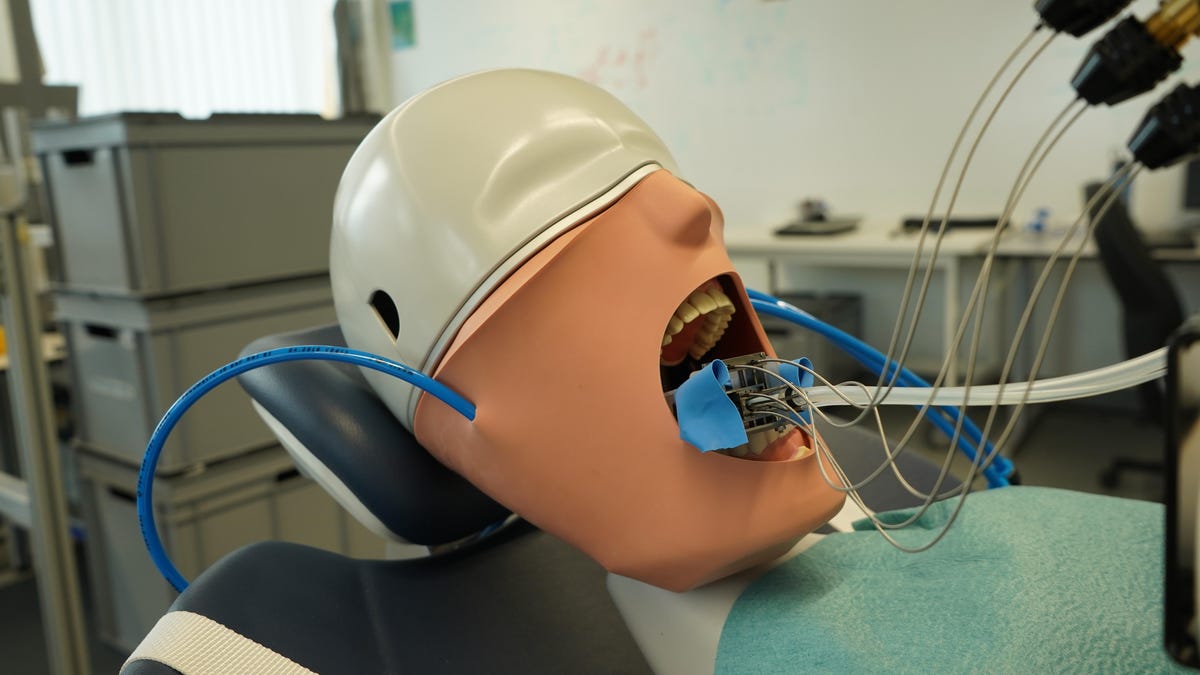
A new dental robot is in development at the University of Basel in Switzerland to help with tooth drilling. It’s called the MIR, or Miniature Intraoral Robot, and its bite-sized design allows it to fit inside a patient’s mouth.

The aim is to speed up the process of fitting a new crown when tooth decay is discovered. Today, a patient with tooth decay needs multiple follow-up appointments to prepare the tooth for the new crown, including fitting a temporary crown. With the MIR, a dentist could scan the patient’s mouth and order a new crown during the first appointment, reducing the number of visits required.

The robot’s larger components, including the motor and controls, are kept outside the mouth and connected to the robot via cables and a drive shaft. It’s similar to the process used in cars to transfer motion from the motor to the wheels.

The robot is mounted to a custom-fitted dental splint, which attaches to the teeth. If the patient moves their head, the robot moves with it.

So far it’s been tested on fake ceramic teeth in a fake patient’s mouth but it’s not yet ready to be used on a human. The team plans to add sensors and a camera so the robot can keep track of its position, even during a power outage.

To see the robot in action, check out the video in this article.


Read the full article here

Share. Facebook Twitter Pinterest LinkedIn Tumblr Email

Related Articles

Review: HP OmniBook Ultra 14

July 5, 2026

The Best Bluetooth Speakers

July 5, 2026

How I Cleaned Up the Thousands of Photos and Videos I Had Scattered Across the Internet

July 5, 2026
Add A Comment
Leave A Reply Cancel Reply

Demo
Top Articles

Starlink Hikes Prices for Nearly 3 Million US Customers. Just One Plan Escaped

May 19, 2026

Zapping Mosquitos With Lasers Is a Real Thing, Thanks to AI

June 4, 2026

Registered Dietitians Swear by These 5 Air Fryer Recipes for Healthy Weeknight Meals

May 28, 2026

Garmin Forerunner 70 and Forerunner 170 Add New Training Tools and Better Screen

May 12, 2026
Don't Miss

Best Exercise Bikes of 2026 – Cycling Expert Tested

By Press RoomJuly 5, 20260

Although there are plenty of exercise bikes, it’s important to consider the different brands and…

The Best Bluetooth Speakers

July 5, 2026

How I Cleaned Up the Thousands of Photos and Videos I Had Scattered Across the Internet

July 5, 2026

Lost Power During a Winter Storm? You Can Still Save the Food in Your Fridge

July 5, 2026
About Us
About Us

Modern Life Today is your one-stop website for the latest gadget and technology news and updates, follow us now for the news that matters to you.

Facebook X (Twitter) Pinterest YouTube
Featured News

Best Portable Monitors for 2026

May 5, 2026

Best WordPress Hosting for Building a Successful Website in 2026

May 5, 2026

Proposed Class Action Suit Claims Faulty Roku, TCL Software Updates ‘Bricked’ TVs

May 5, 2026
Trending Now

Need to Share Your Wi-Fi Password? Here’s Where to Find It on Mac and Windows

May 6, 2026

Ring Promo Code: 50% Off

May 6, 2026

What I Packed to Run 80 Miles Across the Italian Apennine Mountains

May 6, 2026
  • Home
  • Privacy Policy
  • Terms of use
  • For Advertisers
  • Contact
2026 © Prices.com LLC. All Rights Reserved.

Type above and press Enter to search. Press Esc to cancel.