

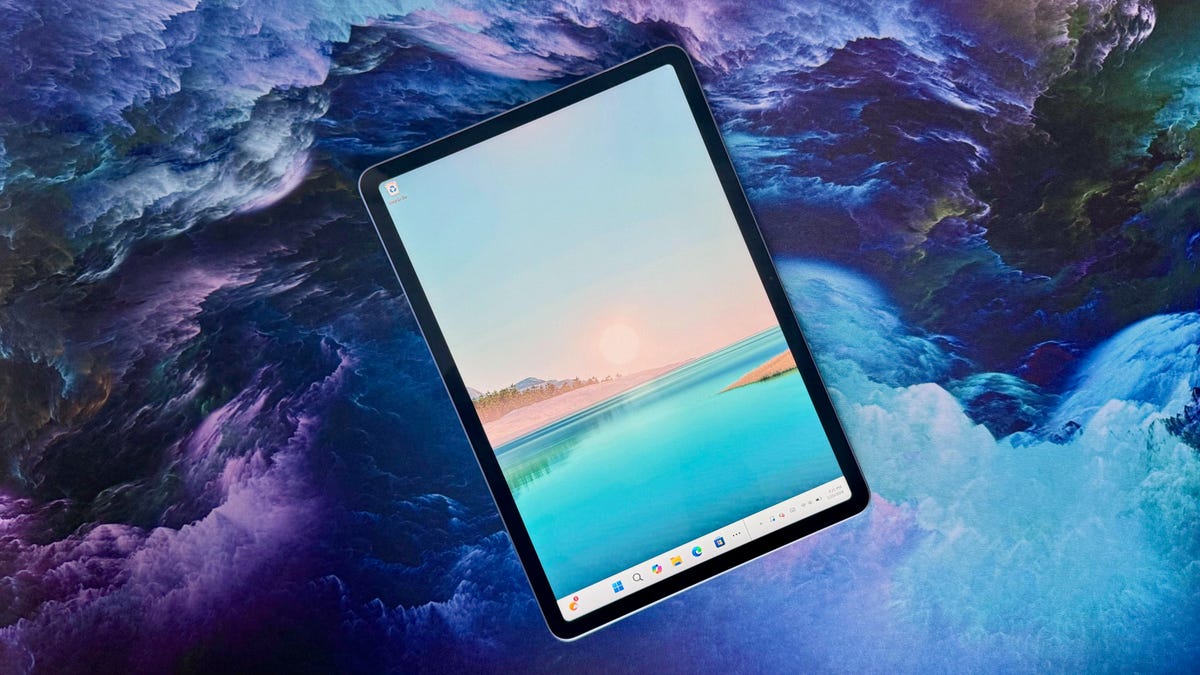
Pros
- Same great Surface Pro design at a smaller price, size
- Good size for tablet mode and light laptop use
- IPS display is sharp and bright
- Good overall performance for the price and exceptional battery life
Cons
- Necessary accessories add to the bill
- Seriously, the charger is an extra $70?
- 12-inch display can feel cramped in laptop mode
- External connectivity limited to a pair of USB-C 3.2 ports
Microsoft shrunk the price and screen of its Surface Pro for people who, like me, view the tablet PC not as a primary daily driver but as a versatile secondary machine for browsing the web, watching YouTube and Netflix (and soon again MLB.TV) and playing the occasional mobile game when I can’t decide on what to stream. Even the larger 13-inch Surface Pro is too small for me for every use, and as much as I like the detachable keyboard, I wouldn’t want to type on it for an entire workday. So, the 13-inch model is overkill for my needs, but the 12-inch Surface Pro is another story.
The 12-inch model does sacrifice some things to hit a lower price but maintains the excellent Surface Pro design: a thin aluminum chassis with a great kickstand and an “optional” keyboard that neatly snaps into place magnetically. The areas where you sacrifice are with the processor, display and webcam. And you’ll need to pay more than you want for a power brick because a USB-C cable is included in the box, but not a power adapter. If you can get past that kick in the pants, then you’ll still walk away with a well-rounded detachable for one or two hundred dollars less than the 13-inch version.
Microsoft Surface Pro (12-inch)
| Price as reviewed | $920 ($700 without accessories) |
|---|---|
| Display size/resolution | 12-inch 2,196×1,464 90Hz IPS LCD |
| CPU | Qualcomm Snapdragon X Plus X1P-42-100 |
| Memory | 16GB LPDDR5-8448 |
| Graphics | Qualcomm Adreno X1-45 |
| Storage | 512GB UFS SSD |
| Ports | USB-C 3.2 (x2) |
| Networking | Wi-Fi 7 and Bluetooth 5.4 |
| Operating system | Windows 11 Home |
| Weight | 1.5 pounds (2.2 pounds w/ keyboard) |
The Microsoft Surface Pro 12-inch starts at $650 for an eight-core Snapdragon X Plus processor, 16GB of RAM and a 256GB SSD. For another $50, you can get it with a 512GB SSD, which is well worth that minor upcharge. With the 512GB models, you get color choices Ocean and Violet in addition to the standard Platinum. The only CPU offered is the Snapdragon X Plus X1P-42-100, and you get 16GB of memory, take or leave it.
Then come the accessories, starting with an almost insulting $70 for a 45-watt USB-C power adapter. (If you’re thinking about using an old iPad charging brick, those are only of the 10- or 20-watt variety.) Then you’ll need to pay another $150 for the keyboard or $250 for the keyboard and Slim Pen. The Flex Keyboard that’s available with the 13-inch Surface Pro, which adds Bluetooth connectivity, isn’t offered on the 12-inch model.
The total price for my review sample with 16GB of RAM and a 512GB SSD breaks down like this:
- 12-inch tablet with 8-core Snapdragon X Plus: $700
- 45-watt charger: $70
- Keyboard: $150
- Total: $920
Compare that to the 13-inch Surface Pro, also with 16GB of RAM and 512GB SSD:
- 13-inch tablet with 10-core Snapdragon X Plus: $850
- Keyboard: $170
- Total: $1,020
- 13-inch OLED tablet with 12-core Snapdragon X Elite: $990
- Keyboard: $170
- Total: $1,160
The above pricing reflects the discounts at the time of this review. You can almost always find both models at a discount from Microsoft, and I like getting the 12-inch Surface Pro with a 512GB SSD for less than $1,000 with its current $200 discount. What I like less is the $70 charge I need to pay for the charger with the 12-inch model, which narrows the gap to only $100 between it and the baseline 13-inch model.
The 12-inch Surface Pro starts at £799 in the UK and AU$1,198 in Australia.
Microsoft Surface Pro 12-inch performance
Microsoft offers just one processor for the 12-inch Surface Pro: the eight-core Snapdragon X Plus X1P-42-100. You’re also stuck with 16GB of RAM and can go up to only a 512GB SSD unless you opt for the 12-inch Surface Pro for Business, which allows up to 24GB of RAM and a 1TB SSD. With the 13-inch Surface Pro, you can pack it with up to 32GB of RAM and a 1TB SSD.
Despite using the lower-powered Snapdragon X Plus, the 12-inch Surface Pro managed to produce scores competitive with the higher-powered 13-inch Surface Pro. Its benchmark results were in line with the HP OmniBook 5 and Acer Swift Go 14, which feature the same Snapdragon X Plus processor. That is to say, it did well on Geekbench 6 scores, trailing the 13-inch model by 15% on the multicore test and actually outpacing it on the single-core test.
Where the 12-inch Surface Pro fell behind the 13-inch model to a greater degree was on the multicore Cinebench 2024 test, but again the 12-inch edged it in single-core performance. Our 3DMark Steel Nomad test was a resounding win for the 13-inch Surface Pro, but with integrated Qualcomm Adreno graphics, neither Surface Pro will be mistaken for a content-creation or gaming laptop.
The 12-inch Surface Pro may deliver merely average multicore performance and below-average graphics performance, but it makes up for those with lengthy battery life. And it’s no surprise because the HP OmniBook 5 14 is the current battery life champ for laptops, and the Acer Swift Go 14 isn’t far behind. The 12-inch Surface Pro lasted 22.5 hours on our YouTube streaming battery drain test, which is nearly 10 hours longer than the 13-inch model for truly all-day battery life.
Same Surface Pro design, just smaller
For balancing the demands of both laptop and tablet use, the 12-inch display definitely favors the tablet side of the ledger. Without the keyboard, the display weighs only 1.5 pounds — that’s half a pound lighter than the 13-inch model. And when you add the detachable keyboard, the 12-inch Surface Pro remains highly portable at 2.2 pounds.
The 12-inch IPS display features a 3:2 aspect ratio that’s slightly boxier than the standard 16:10 ratio of most laptop displays. The 3:2 layout is still wide enough in landscape orientation to make navigating Windows feel natural while at the same time making the tablet feel natural in portrait mode. I find that longer, narrower displays look and feel awkward as tablets.
The 12-inch Surface Pro is a reasonable facsimile of a Windows laptop, but I began to feel a bit cramped when juggling more than two windows. Then again, the only slightly larger 13-inch model isn’t a magic multitasking machine either.
You get the same great Surface Pro design with the 12-inch model, a well-crafted, all-aluminum chassis with nicely rounded edges and corners. The thin yet sturdy kickstand lets you prop the display up in a wide range of angles and keep it there. The only drawback of the kickstand is that its thin edge tends to dig into thighs if you’re using the Surface Pro in laptop mode on your lap.
The 2,196×1,464-pixel resolution delivers crisp images and text, and the 90Hz refresh rate enables smooth scrolling and screen movement. The 13-inch model offers a higher-resolution display and an OLED option with a 120Hz variable refresh rate. The 12-inch model’s resolution and refresh rate are both adequate to my eyes, but the black levels don’t look as inky as an OLED’s.
Brightness isn’t a problem; the 12-inch Surface Pro hit a peak brightness of 435 nits in my tests with a Spyder X Elite colorimeter. Color performance is a little lacking, however, with coverage of only 96% of sRGB when most displays can cover 100% of that color gamut. The numbers dropped on the larger color spaces: 72% of AdobeRGB and 71% of P3. It’s doubtful you’d use such a small display backed by an integrated GPU for serious graphics work, but these color performance numbers certainly douse any flicker of hope there.
There are two hidden design differences when moving from the 13-inch to the 12-inch Surface Pro. For one, the smaller 12-inch version has a fanless design, so it operates in complete silence. The other change is in the solid-state storage drive. The 13-inch model features an NVMe SSD common to laptops, and the 12-inch model has universal flash storage that’s more commonly found on phones and tablets. UFS drives usually offer slower read and write speeds than NVMe drives, but the 13-inch Surface Pro didn’t exactly set the world on fire with its drive. Its score of 2,015 on 3DMark’s Storage test was much closer to the 12-inch Surface Pro’s score of 1,986 than other laptops with NVMe drives, with scores around 2,500 and higher.
The detachable keyboard is great for quick typing activities like entering URLs or firing off a few emails — keys feel punchy for such a thin keyboard — but I wouldn’t want to use it for longer writing sessions. The keyboard doesn’t leave much room for the touchpad, which is undersized but oddly wide. It’ll do in a pinch, and you can always rely on the 10-point touch display instead.
Another area where you take a step down from the 13-inch model to the 12-inch model is with the webcam, going from a 1440p to a 1080p cam. This should not be a deciding factor in deciding between the two because the 1080p also produces a clean, well-balanced image that’ll have you looking clear to your video conference mates.
Like the 13-inch model, ports are limited to a pair of USB-C connections on the 12-inch Surface Pro, but they’re slower here. They aren’t Thunderbolt or USB4 but the slower USB 3.2 variety.
Is the Microsoft Surface Pro 12-inch worth buying?
As a secondary device to have around your house or apartment for browsing the web, watching shows and playing casual tablet games on a screen that’s larger than your phone’s, sure, it’s worth at least considering. I wouldn’t want to spend more than $1,000 on such a purchase, and the 12-inch Surface Pro lets you do that, even when you factor in the keyboard cover and overpriced charger.
To keep the price in the triple digits, I’m willing to give up some performance and use a slightly lower-resolution display and webcam. (Just make sure all your must-have apps work well with the Arm-based chip, too.) With a better build quality than most laptops at its price, the 12-inch Surface Pro offers great value and versatility, but its value proposition would be even greater if Microsoft didn’t charge an additional 10% ($70) of the price of the system ($700) for the charger, which is included in the box with the 13-inch model and nearly every other laptop sold today.
The review process for laptops, desktops, tablets and other computerlike devices consists of two parts: performance testing under controlled conditions in the CNET Labs and extensive hands-on use by our expert reviewers. This includes evaluating a device’s aesthetics, ergonomics and features. A final review verdict is a combination of both objective and subjective judgments.
The list of benchmarking software we use changes over time as the devices we test evolve. The most important core tests we’re currently running on every compatible computer include Primate Labs Geekbench 6, Cinebench R23, PCMark 10 and 3DMark Fire Strike Ultra.
A more detailed description of each benchmark and how we use it can be found on our How We Test Computers page.
Geekbench 6 CPU (multi-core)
Apple MacBook Air M4 (13-inch, M4) 15049Microsoft Surface Pro 13-inch 13253Acer Swift Go 14 11490HP OmniBook 5 14 11379Microsoft Surface Pro 12-inch 11263Dell 14 Plus 11027Asus Zenbook A14 10632Acer Aspire 14 AI 10082
Geekbench 6 (single-core)
Apple MacBook Air M4 (13-inch, M4) 3818Dell 14 Plus 2694Acer Aspire 14 AI 2567Microsoft Surface Pro 12-inch 2445Acer Swift Go 14 2422HP OmniBook 5 14 2395Microsoft Surface Pro 13-inch 2329Asus Zenbook A14 2114
Cinebench 2024 CPU (multi-core)
Apple MacBook Air M4 (13-inch, M4) 824Microsoft Surface Pro 13-inch 743Acer Swift Go 14 709HP OmniBook 5 14 675Acer Aspire 14 AI 567Microsoft Surface Pro 12-inch 541Asus Zenbook A14 535Dell 14 Plus 465
Cinebench 2024 CPU (single-core)
Apple MacBook Air M4 (13-inch, M4) 169Dell 14 Plus 120Acer Aspire 14 AI 112HP OmniBook 5 14 110Microsoft Surface Pro 12-inch 108Acer Swift Go 14 107Microsoft Surface Pro 13-inch 105Asus Zenbook A14 96
3DMark Steel Nomad
Dell 14 Plus 575Acer Aspire 14 AI 525Microsoft Surface Pro 13-inch 493Asus Zenbook A14 235Acer Swift Go 14 233Microsoft Surface Pro 12-inch 228HP OmniBook 5 14 228
3DMark Storage Benchmark
Acer Swift Go 14 3155Asus Zenbook A14 2576HP OmniBook 5 14 2534Acer Aspire 14 AI 2455Microsoft Surface Pro 13-inch 2015Microsoft Surface Pro 12-inch 1986
Online streaming battery drain test
HP OmniBook 5 14 28 hr, 19 minAsus Zenbook A14 24 hr, 7 minAcer Swift Go 14 23 hr, 11 minMicrosoft Surface Pro 12-inch 22 hr, 29 minAcer Aspire 14 AI 18 hr, 56 minApple MacBook Air M4 (13-inch, M4) 15 hr, 50 minDell 14 Plus 14 hrMicrosoft Surface Pro 13-inch 12 hr, 51 min
System configurations
| Microsoft Surface Pro 12-inch | Microsoft Windows 11 Home; Qualcomm Snapdragon X Plus X1P-42-100; 16GB DDR5 RAM; integrated Qualcomm Adreno Graphics; 512GB UFS SSD |
|---|---|
| Microsoft Surface Pro 13-inch | Microsoft Windows 11 Home; Qualcomm Snapdragon X Elite X1E-80-100; 16GB DDR5 RAM; integrated Qualcomm Adreno Graphics; 512GB SSD |
| HP OmniBook 5 14 | Microsoft Windows 11 Home; Qualcomm Snapdragon X Plus X1P-42-100; 32GB DDR5 RAM; Qualcomm Adreno Graphics; 1TB SSD |
| Acer Swift Go 14 | Microsoft Windows 11 Home; Qualcomm Snapdragon X Plus X1P-42-100; 16GB DDR5 RAM; Qualcomm Adreno Graphics; 1TB SSD |
| Asus Zenbook A14 | Microsoft Windows 11 Home; Qualcomm Snapdragon X X1-26-100; 32GB DDR5 RAM; Qualcomm Adreno Graphics; 1TB SSD |
| Acer Aspire 14 AI | Microsoft Windows 11 Home; Intel Core Ultra 5 226V; 16GB DDR5 RAM; Intel Arc 130V Graphics; 1TB SSD |
| Dell 14 Plus | Microsoft Windows 11 Home; Intel Core Ultra 7 256V; 16GB DDR5 RAM; Intel Arc Graphics; 1TB SSD |
| Apple MacBook Air M4 (13-inch, M4) | Apple MacOS Sequoia 15.3, M4 chip 10‑core CPU with 8‑core GPU; 16GB DDR5 unified memory; 256GB SSD |
Read the full article here