



Close Menu
Modern Life Today
  • Tech
  • Smart Home
  • Energy
  • Home Security
  • Kitchen & Household
  • Outdoor
  • Home Internet
  • More Articles
Trending Now

Best Computer Monitors (2026): The Home Office Upgrade You Need

August 19, 2026

I Wore an Electrical Muscle Stimulation Body Suit to Zap Myself Into Fitness

August 19, 2026

Western Digital Promo Code: 15% Off

August 18, 2026
Facebook X (Twitter) Instagram
Modern Life Today
  • Tech
  • Smart Home
  • Energy
  • Home Security
  • Kitchen & Household
  • Outdoor
  • Home Internet
  • More Articles
Subscribe
Modern Life Today
Home»Tech»I Wore an Electrical Muscle Stimulation Body Suit to Zap Myself Into Fitness
Tech

I Wore an Electrical Muscle Stimulation Body Suit to Zap Myself Into Fitness

Press RoomBy Press RoomAugust 19, 2026No Comments3 Mins Read
Share Facebook Twitter Pinterest Copy Link LinkedIn Tumblr Email

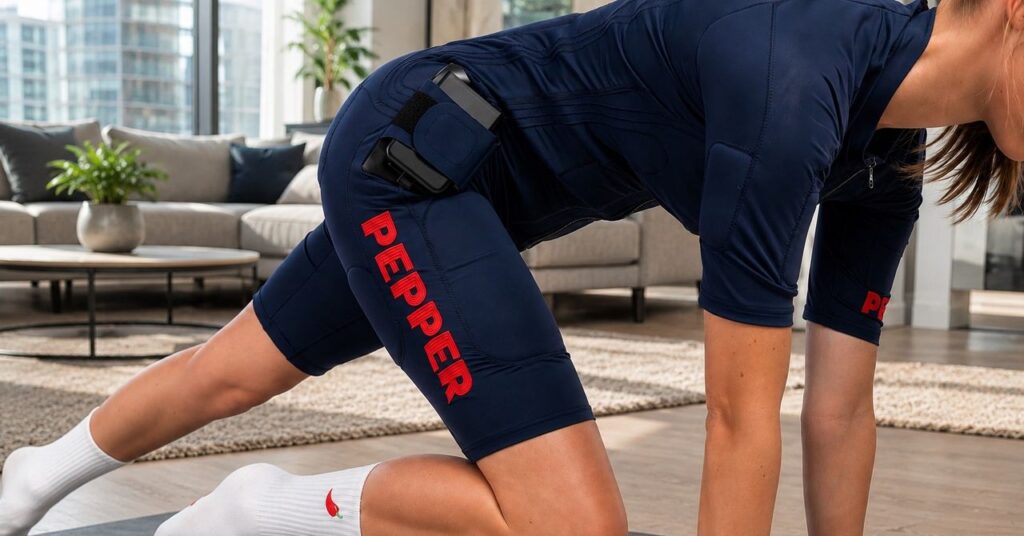
The suit is a lot like a spring-weather wetsuit that stops at the knees and the elbows. Like with a wetsuit, putting it on can require some effort. Twenty electrodes cover the abs, pecs, glutes, thighs, pecs, biceps, and multiple parts of the back. These are dry electrodes, so you don’t have to wet Pepper’s suit down before you put it on (a common requirement for older gear), but your sweat will improve the conduction of electricity. Of course, if you’re pregnant or need a pacemaker, you shouldn’t use an EMS suit.

Pepper’s suit, available in sizes from XXXS to XXXL, is designed to be very tight so that the electrodes won’t slip into places you don’t want them. Since the suit is intended to be worn with nothing underneath it, that’s a particularly important consideration. And based on the way certain body parts are situated beneath the fabric, it is definitively not something I felt I could wear in public without a cover-up layer.

The only removable part of the suit is a small box that connects at your hip. This is the brains of the operation and its power source. Charge it with a USB-C cable and it’s good for at least 10 training sessions.

Pepper’s app divides workouts into three categories: strength, cardio, and relax, each with a different electrode firing pattern. (Oddly, I discovered that a few workouts were available only in German.) I tried workouts across all of the categories but spent nearly all of my time in strength, as my goal was to build muscle. Strength sessions all involve electricity pulsing through the suit for four seconds, then pausing for four seconds, then repeating for up to 24 minutes.

ScreenshotPhotograph: Christopher Null

The workouts—there are dozens, I rarely repeated any—are tuned to the pulses so that you’re activating muscles across your body while the pulse is on, then usually resting while it’s off. Again, Pepper’s approach is that EMS only works if you are using your muscles while they are being energized, so many of the workouts involve entire body flexes, stretches, and crunches, four seconds at a time.

Plugging In

I’ve experienced isolated EMS for a back injury once before, so I had an inkling of what Pepper might feel like, but the full-body experience is on another level entirely. Fortunately, Pepper eases you in, starting off with soft pulses you can’t even feel. Each of Pepper’s 10 workout zones can be individually controlled, with the power level ranging from 1 to 100. My first video-based trainer said she starts to feel the pulses at level 25, so I slowly ratcheted my way up, bit by bit, until I had all regions hitting around 20.

The shocks on the lower settings don’t really hurt, but you can definitely feel them; powerful, rapid vibrations that shake your insides and sometimes burn a little on the skin. No pain, no gain, right? As I continued to push the levels up, I discovered there was a fine line—really 1 or 2 points on Pepper’s 100-point scale—between tolerable and painful. Those vibrations turned into racy shocks that could be almost paralytic at times, and I spent the rest of my initial 12-minute session dialing the power level back down.

Read the full article here

Share. Facebook Twitter Pinterest LinkedIn Tumblr Email

Related Articles

Best Computer Monitors (2026): The Home Office Upgrade You Need

August 19, 2026

Western Digital Promo Code: 15% Off

August 18, 2026

The Best Meal Delivery Services and Meal Kits of 2026

August 18, 2026
Add A Comment
Leave A Reply Cancel Reply

Demo
Top Articles

Which AI Best Predicts the 2026 World Cup Final? We Asked 5 Models About Sunday’s Match

July 18, 2026

Cozyla’s Digital Calendar Just Took a Prime Day Dive to $280, but Expect This Deal to End Soon

June 29, 2026

Why You Need an Internet Provider With No Data Caps

June 24, 2026

The 10 Best Electrolyte Powders (We Tested Over 20)

July 28, 2026
Don't Miss

I Tested the Best Cat Water Fountains—These Are Worth Buying

By Press RoomAugust 18, 20260

Compare Our Top FountainsMore Fountains We TestedPhotograph: Molly HigginsCheerble Pet Fountain Elfin E1+ for $70:…

1Password Coupon: Score a Free Trial in August 2026

August 18, 2026

The Best Samsung Galaxy S26 Cases and Accessories

August 17, 2026

The Best Portable Solar Panels: My Take After Years of Testing

August 17, 2026
About Us
About Us

Modern Life Today is your one-stop website for the latest gadget and technology news and updates, follow us now for the news that matters to you.

Facebook X (Twitter) Pinterest YouTube
Featured News

Why Wait for Prime Day When You Can Grab These Amazing Device Deals Right Now

June 19, 2026

Skip the Countdown and Shop These 60+ Prime Day Deals on Home Gear, Tech and More Right Now

June 19, 2026

The Best Handheld and Wearable Fans for People Who Hate Being Sweaty

June 19, 2026
Trending Now

From Power Banks to Robot Vacs: Over 30 Early Prime Day Anker Deals Worth Grabbing Today

June 19, 2026

Counting Down to Prime Day? Best Buy Has Thousands of Tech Deals Already Live

June 19, 2026

Need a New E-Reader? Our Favorite Options From Kobo Are Up to $30 Off Right Now

June 19, 2026
  • Home
  • Privacy Policy
  • Terms of use
  • For Advertisers
  • Contact
2026 © Prices.com LLC. All Rights Reserved.

Type above and press Enter to search. Press Esc to cancel.