

Pros
- Advanced design with futuristic outside touch panel
- UWB technology for timely connections and access
- Matter support for multiple platforms
- Aliro certification incoming for Samsung and Google Wallet keys as well as existing Apple Home keys
- Easy installation for a smart lock
- Easy invite creation
- Unique features include built-in alarm, approach angle customization, unlock warning light, sensitivity adjustments and more
Cons
- A smart home hub is required for more advanced Matter features
- Most expensive lock I’ve tried at $400
- No fingerprint reader for those who prefer biometrics
This year, I’ve tested out many smart locks that promised to have made the next big leap forward, and I haven’t been impressed. Embedded solar panels feel awkward and fragile. Facial recognition has proved problematic and invasive for many users. But now Schlage has stepped up, a lock brand old enough to be famous for its push-button inventions in the 1920s.
The Schlage Sense Pro ($400) is another kind of invention, sporting both new features and a bold touch panel design. It’s not what I expected from Schlage, although I have liked the company’s smart locks in the past. But the Sense Pro is something new, a vision of what locks will look like in the years to come — and I like it.
These advances come with changes not everyone will be comfortable with (as well as an extra-steep price tag). There’s no keyhole on this NFC, phone-focused lock, which is made for the new Aliro standard and hands-free unlocking with digital keys. Apple fans get immediate access to these innovations, but they’re coming to other digital wallets in time, although you may need a smart home hub to take advantage of it all.
Here’s my experience with the lock and why it’s on the forefront of what home locks can do.
Schlage’s new design shines with UWB and other tech
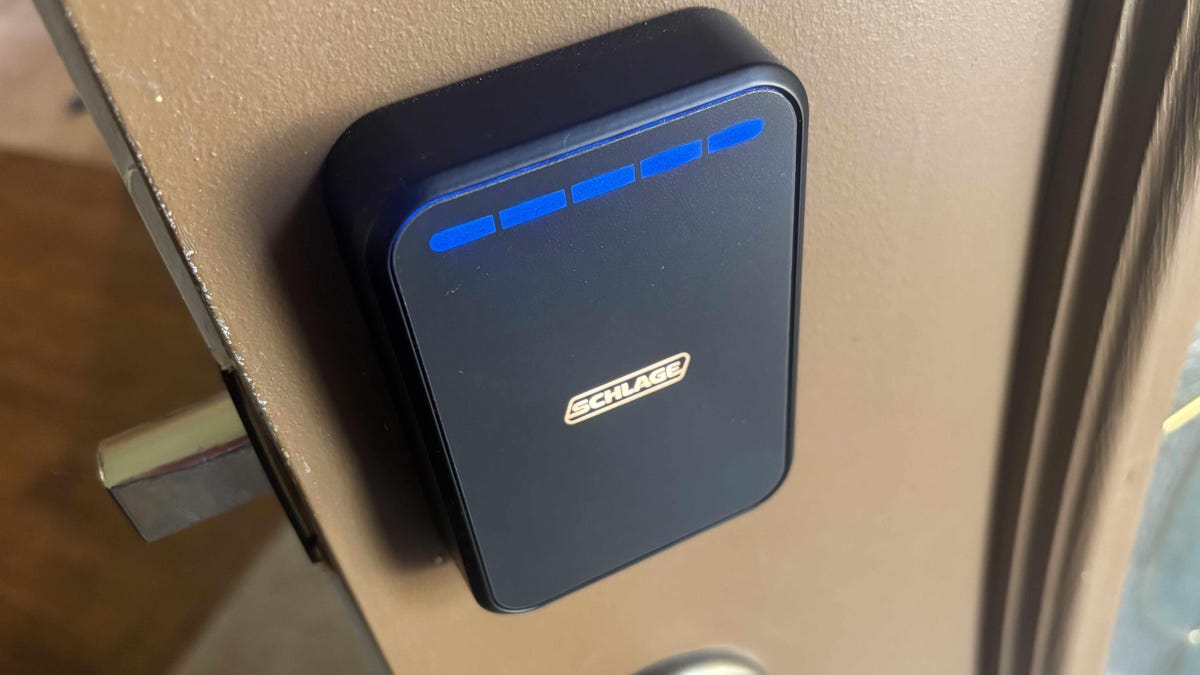
While every modern smart lock tries to impress with outward-facing keypads and buttons, Schlage’s Senso Pro is one of the few that truly feels futuristic, even a little sci-fi. The outside housing is a simple, blank panel available in silver or black. Get close or touch it, and it lights up with various options depending on whether you’re locking or unlocking the door. Those options include a keypad and an indicator bar, which appear only as necessary.
There’s no fingerprint sensor here, unfortunately, one of the few things I missed in this lock — although there is room for one, perhaps in a later version. There’s no traditional keyhole either, something most smart locks still include, at least as an emergency feature. Schlage’s approach is that its new design is made with phone keys/NFC in mind and removes the option for a burglar to pick an hardware lock. That may be true, but some might miss older key options on this high-tech slab.
On the inside, the lock remains compact with a large component for the thumbturn and four AA batteries.
Installation proved speedy with a simplified lock design (rated BHMA Grade 2), although my kit didn’t contain the in-depth instructions that most smart locks do, just an app walkthrough, so you’ll need to check out my smart lock installation guide for full DIY details.
The Sense Pro’s compact form also houses ultra wideband technology. I saw UWB pop up on smart locks a couple of years ago at CES. It doesn’t exactly add new features, but increases the accuracy of sensors behind the scenes, especially when judging trajectory and speed, and Schlage was an early adopter.
That means that the lock is better at judging exactly when a person will arrive at the door when they’re walking up, and less likely to accidentally unlock the door just by being near it. In practice, the door lit up the moment I stepped onto the porch and was unlocked by the time I tried the handle, just as intended.
Lock upgrades, especially for Apple users
In addition to the keypad codes you can set via app, Schlage’s new lock relies heavily on wireless connections and Apple Home Keys. However, you don’t have to be an Apple user to take advantage of these lock’s features, the combination of NFC and UWB still allows you to unlock your door at the wave or touch of a phone.
Apple Home and Home Keys do make the process more accurate and easier, and allow you to use your compatible Apple Watch, too. As I tested with my iPhone, I found the Sensor Pro had several different modes, depending on how freely I wanted it to open.
The default Intuitive mode makes the most use of UWB and automatically unlocks the door when you reach it with an iPhone or other compatible device on your person. The Touch mode requires you to touch the panel before it unlocks, and the Delay mode unlocks automatically, but after a short pause instead of right away. I liked the Intuitive mode the most by far, but the others add a little more security.
Or, of course, you can use the touch pad controls that appear, which is most handy for guests and visitors without Apple products, or just someone who forgot their phone. The lock can hold up to 250 of these codes.
Regardless of the mode you choose, you can manually lock the app with a tap on the panel when you’re leaving (not quite as useful as autolocking, which I’ll talk about below). If the batteries run out, a low-battery notification will start appearing on the screen so you know it’s time to change, and a hidden USB-C port allows you to jumpstart the lock with a cable if necessary.
Matter and Upcoming Aliro support
The Sense Pro is Matter compatible, which means you can use it with Alexa and Google Home if you prefer — and have a hub that can support Matter connections. For all those hands-free Apple features, for example, you’ll need a hub like a newer Apple TV or HomePod. Otherwise you’ll need a hub like the Nest Hub Max or a newer Echo/Echo Show, although they may not enable the full set of lock features.
However, pay close attention to the Aliro support. Aliro is a new smart lock standard available for certification in 2026. Unlike Matter, it’s made for specific smart lock functions, not only improving and securing lock data communication but expanding support for Google Wallet and Samsung Wallet keys.
Schlage plans to complete its Aliro certification later in 2026, at which time these platforms should offer similar benefits to Apple Home/Home Keys. Apple users are getting support earlier, but others won’t have to forego this lock’s most advanced capabilities forever.
Unique app settings for this advanced lock
Enough compatibility talk: What about the apps themselves? In addition to the features I mentioned above, you can send invites to any other Apple user, and set important functions like customizing the approach direction so the door only unlocks when someone is walking toward it at a specific angle. You can create routines with many other smart devices you may have in Apple Home, like turning a smart light a different color when the door is unlocked. You can also turn phone alerts on or off, depending what notifications you prefer.
In the Schlage app, more detailed settings are available, like autolocking, which will automatically lock the door after a certain period of time, so you don’t have to worry about forgetting it.
The Sense Pro has a few features I don’t usually see in smart locks, like enabling a built-in alarm when the lock senses tampering, or turning on an inside lock light when the door is unlocked. Geofencing settings are also available if you want to add your address.
All these options cement the Sense Pro as a smart lock of the future. Cutting-edge tech often comes with bugs, but Schlage’s attention to detail is clear. I didn’t run into any bugs, UI problems or malfunctioning features in my tests, although if you’re new to smart devices it may take time to pick up on everything the lock can do.
Final thoughts on the Schlage Sense Pro
From UWB and upcoming Aliro support to the most advanced touch panel I’ve seen, Schlage’s Sense Pro is a lock that combines the latest lock technologies in one product. It skips flashy touchscreens and unnecessary add-ons that some new locks embrace for a more compact, impressive design.
That also means this lock is geared for use with your phone. There’s no traditional keyhole here, and no fingerprint sensor, which won’t be to everyone’s liking. As I found in my testing, Apple users have it particularly good with the hands-free locking options, but Google and Samsung users should be getting similar capabilities soon.
If you want a future-proof lock with the most complete set of (useful) features I’ve found, the Sense Pro is ready. But at $400, it’s also one of the most costly front door devices I’ve seen, so prepare to pay for the full package.
Read the full article here