


You can find anything on Amazon—plus hundreds or thousands of versions of that thing. If its virtual shelves were translated into a brick-and-mortar storefront, it would probably be the most overstimulating space in the world. Take power banks, for example. Search “power bank” on Amazon and you’ll get more than 50,000 results, ranging from well-known brands like Anker and Jackery to obscure brand names with zero product reviews. There are hundreds and hundreds of companies and sellers to sift through, with varying capacities, port options, and charging speeds on offer.
So how do you know which brands are high-quality? Which listings are legitimate? What’s a good price to pay? Are any of these power banks actually on sale and worth buying, or are the discounts fake?
It’s remarkably easy to sell products on Amazon (as evidenced by its millions of sellers). That means there are plenty of subpar product listings that come from sketchy sellers—often with gibberish names or multiple sellers that are using the same photos and claiming to sell the same product. While many items on Amazon are safe and legitimate, you do need to be aware of the risks when you’re shopping. The site has problems with fake reviews and counterfeit items. Amazon has fairly good return policies, including an A-to-Z guarantee for items sold by third parties, but ideally you want to avoid having to deal with a return in the first place.
We can help. Below are a few tips for shopping at the Everything Store, especially ahead of Prime Big Deal Days on October 6 and 7, to make it more likely everything will arrive as advertised.
Updated September 2026: I’ve refreshed this story with current tips and information.
Table of Contents
Buy Direct
Screenshot: Louryn Strampe
When possible, you should buy items directly from Amazon. Amazon keeps a better eye on its own inventory than it does on items sold by third-party sellers. Items it sells directly are more likely to arrive as advertised and qualify for free two-day Prime shipping. Because Amazon manages everything, returns are usually painless. Sometimes you can even get refunds for defective items without having to return them at all.
If you’re already checking out a product on Amazon, like our favorite iPad, always make sure the seller info says “Ships from and sold by Amazon.com.” This information is typically in one of two places. Either it’s under the red price (and green “In Stock” text) or under the yellow Add to Cart and orange Buy Now buttons on the right rail. It’s also under those buttons on the Amazon app.
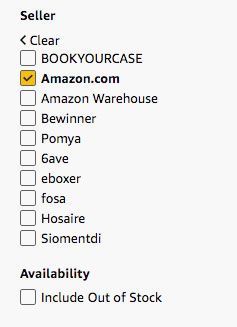
How to Only See Items Sold by Amazon.com:
Amazon
If you’re browsing through Amazon listings, filter the site’s search results to only show items sold by Amazon.com. Buying an item sold and shipped by Amazon generally makes delivery and customer-service inquiries more straightforward. However, it does not guarantee that the product is high-quality or authentic, so you should still investigate the brand and listing. I’ll use the Google Pixel 10a as an example of a product you might search for. It is our pick for the best affordable phone, after all.
Step 1: Search for a particular item in Amazon’s search box with the category set to “All.” In this case, I searched for “Pixel 10a.”
Step 2: Amazon’s search should select the right department automatically, but if needed, you can navigate to the menu on the left and click on a department that fits.
Read the full article here