

Pros
- Dual-camera design works well
- Doubles as a printer
- Sound Prints are a neat idea
Cons
- Necessarily a bit chunky
- Odd shutter button placement
- Sound clips disappear after 2 years
The Fujifilm Instax Mini LiPlay Plus is a hybrid instant film camera that captures digital photos and prints them. It’s a great way to have something physical to remember a moment but still have a digital file for online sharing. It also means you don’t waste film on bad shots. A second, rear-facing camera makes taking selfies far easier than with previous Instax models (which typically relied on a tiny mirror on the front). Via Bluetooth, it can also print photos captured with a phone or other camera. Perhaps most interesting, it can record short audio clips and, via an embedded QR code in the printed image, let your phone play them back.
While not as stylish or as adorable as some other Instax models, the Mini LiPlay Plus is small enough to fit in a purse or perhaps a large pocket. While image quality isn’t the point, the photos look decent enough when printed by the camera. In all, it’s a fun hybrid camera/printer that’s easy to use and creates something real that you can touch, keep or gift, a rarity in the modern era.
Fujifilm Instax Mini LiPlay Plus
| Photo resolution | 4.9 megapixels (1,920×2,560) front and rear |
|---|---|
| Video resolution | N/A |
| Sensor size | N/A |
| Lens | Front camera: 28mm (35mm equivalent) f/2.2; Rear camera: 28mm (35mm equivalent) f/2.2 |
| Image stabilization | None |
| Screen type | 3-inch LCD, fixed |
| Storage | MicroSD plus internal storage for ~45 images |
| Weight | 265 grams (0.6 pounds) not including film pack |
| App | iOS/Android |
The LiPlay Plus is not what you’d call a powerful camera, at least not in the way most cameras are judged. Both the front and rear cameras take photos at a meager 4.9 megapixels. That’s enough to print via the camera’s built-in printer, but if you like the image and want to blow it up for larger printing, it won’t look great. Likewise, really cropping in on a subject isn’t wise. While the lenses are fairly fast, low-light performance is quite poor, though there’s a small LED flash to help.
Absolute image quality isn’t what the LiPlay Plus is about, though. This is a fun camera meant to give you something tangible to remember a moment. This is a Polaroid instant camera for the modern era (though Polariod does this pretty well, too). To that end, it can straight up double as just a printer, so if you’ve taken a photo with your phone or other camera, you can send it to the LiPlay Plus for printing.
While the LiPlay Plus isn’t large, it is a bit chunky. Understandable, given that there’s a printer and a container of undeveloped film inside. The boxy design isn’t particularly stylish, and there aren’t as many interesting colors as on other Instax models. I mean, one of the two colors is literally “beige.”
Usability and photo quality
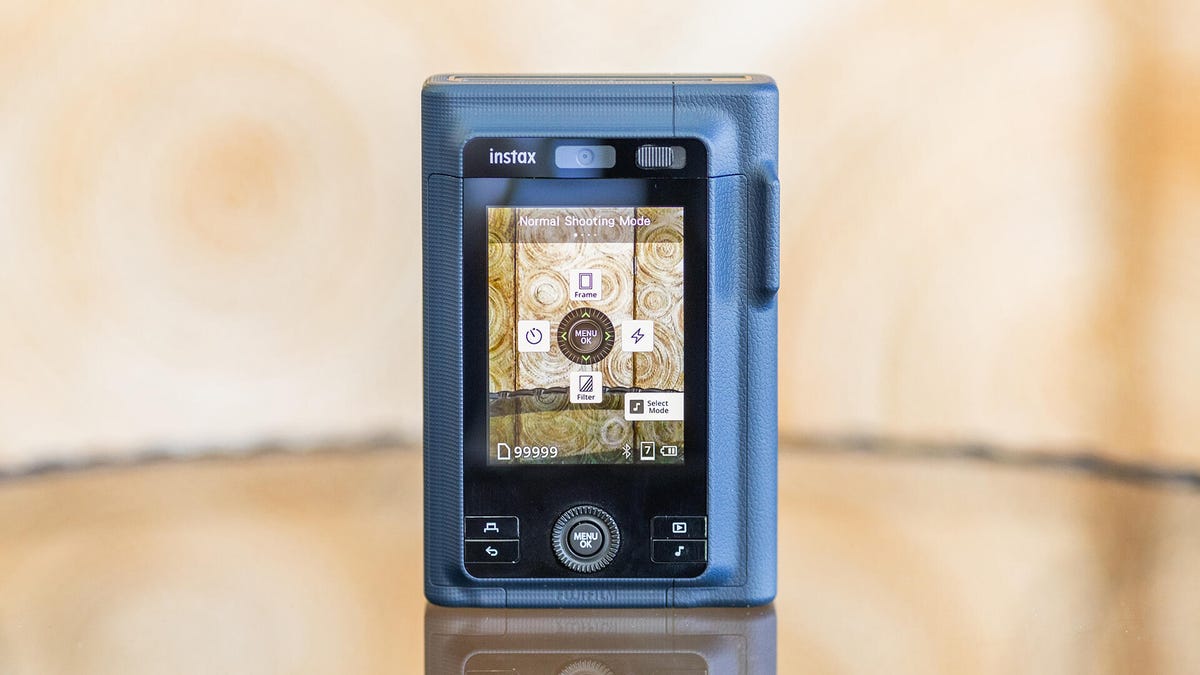
The LiPlay Plus is a little awkward to hold. There’s a tab that sticks out next to the screen that facilitates thumb placement; otherwise, it’d be far more difficult to hold correctly. It’s meant, or at least expected, to be held this way, with the screen oriented vertically. Thumb in place, your index finger more or less naturally falls onto the front-facing shutter button. If you try to hold the LiPlay Plus like a traditional camera, you’ll find that where the shutter button would be on other cameras, there’s just the power button and the button to switch between the front and rear-facing cameras.
Speaking of, the rear-facing selfie camera makes lining up a selfie photo infinitely easier, and you can combine shots from the front and rear cameras into a single image for printing. Many previous Instax cameras had a tiny convex mirror to line up shots, which worked, but a second camera with a screen right below is much faster.
There’s also audio, which might be surprising for something that prints out physical photos. In Instax Sound Print mode, the camera records 3 seconds of audio. This, along with the image, will get uploaded via the Instax app, and it will stay on Fujifilm’s servers for two years. When you print the photo, it will include a QR code in whatever corner of the image you choose. Follow the code, and your photo — complete with a frame to match the printed look — appears with the audio. You can also make a Sound Album, either in the camera or the app, which combines two to 10 images along with music and any audio clips. You could use it, for example, to create a little slideshow of a day or an event. This, too, can be shared via the printed QR code.
Lastly, because the camera is connected to your phone, you’re not limited to photos taken by the camera itself. You can use it just as a printer, which is the most common use among my friends with Instax cameras. They use their phone or a “real” camera, and just print out the best later.
If anything, the camera’s sensors underperform compared with the printer. Photos taken by another camera can look better printed than the ones printed from photos taken by the LiPlay Plus’ own cameras. This might be partly because the LiPlay Plus isn’t a camera made for image quality. That’s not its purpose. Images produced by the camera are fairly low resolution with mediocre dynamic range. They’re honestly not too different from the better inexpensive Amazon cameras I recently tested. They tend to be a bit washed out but quite vibrant. This camera is about the vibes, not the quality. That’s fine, just keep it in mind if you’re expecting to replace your phone with a “real” camera.
Analog/digital hybrid
There are a lot of factors at play with the LiPlay Plus, and I’m trying to keep them all in mind when forming my overall conclusions. First and foremost, this camera is trying to be fun. Again, it’s not going to win any image quality awards, nor was it designed to do so. It’s meant to take on a night out or to a party, where you can capture moments and then give the subject a physical memento. Or you can keep the photos yourself and decorate a wall, fridge, etc.
I do wish that it were a better camera, though. Image quality is not great, so personally, I’d never feel comfortable using it as my only camera anywhere. But then, I’m a photographer. I always have several cameras with me. It’s a whole thing, and I am clearly not the intended demo for this camera. However, Gen Z/Gen Alpha are embracing the lower-fidelity aesthetic of older digital cameras. If this is you, you’ll likely love the idea of the LiPlay Plus and won’t care that the 4.9-megapixel images are sub-phone quality. In fact, it’ll probably be just what you’re after.
So, judged with that in mind, the LiPlay Plus is almost review-proof. It’s supposed to look the way it does. It’s about the vibes, and the vibes are good. I think they missed a step with the two color options being “meh” and “blah,” but again, that’s probably not a huge deal. The point is being able to shoot and share something real, in the moment it happens, perhaps with a little audio clip to go with it. That’s just fun, and for that, it works.
Read the full article here