

Pros
- Incredibly light for a 14-inch laptop
- Strong build quality
- Beautiful, bright high-resolution OLED display
- Comfortable, responsive keyboard
Cons
- Underpowered audio output
- Mediocre multicore performance pales in comparison to some competitors
- Frustrating browser freezes while using Microsoft Copilot
- Underwhelming battery life
The Swift Edge is the sleekest, most expensive laptop in Acer’s Swift catalog, and your money is going more toward the thin, lightweight design than lofty performance. Acer outfits the Swift Edge 14 AI with a lovely 3K OLED display to sweeten the deal, but this Intel Lunar Lake laptop can’t keep up with similarly priced laptops, including the MSI Prestige 14 Flip AI Plus and Dell XPS 14, each of which features Intel’s newer Panther Lake silicon, and Apple’s M5 MacBook Air. Battery life also lags.
Despite Acer leaning heavily into AI branding with the Swift Edge 14 AI, I experienced a couple hiccups when I was using Microsoft Copilot, which was both surprising and frustrating. And as much as I appreciate the cool glow of the AI Activity Light on the touchpad as visual flair, the matter of this icon’s existence vexes me just as much as it does my colleague.
Still, I like the overall look of the Swift Edge 14 AI, and its build quality is strong, which is sometimes compromised in such a thin-and-light design. The keyboard is also surprisingly comfortable for such a thin laptop.
In the end, you are paying for the Swift Edge 14 AI’s extreme portability and high-resolution 14-inch touchscreen OLED display, both of which are superior to what Acer’s lower-cost Swift 14 AI affords. The 3K display is finer than the Asus Zenbook A14’s OLED panel, but the Qualcomm Snapdragon X-based Zenbook A14 offers nearly the same performance and far greater battery life in a similarly thin and light chassis.
Acer Swift Edge 14 AI
| Price as reviewed | $1,500 |
|---|---|
| Display size/resolution | 14-inch, 2,880×1,800 OLED |
| CPU | Intel Core Ultra 7 258V |
| Memory | 32GB LPDDR5-8533 |
| Graphics | Intel Arc 140V GPU |
| Storage | 1TB SSD |
| Ports | Thunderbolt 4 (x2), USB-A (x2), HDMI (x1), dual headphone/microphone jack |
| Networking | Wi-Fi 7 and Bluetooth 5.4 |
| Operating system | Windows 11 Home 25H2 |
| Weight | 2.18 lbs (0.99 kg) |
Acer Swift Edge 14 AI specifications
Acer offers only two configurations for the Swift Edge 14 AI to give you a little wiggle room in choosing the silicon that ends up inside your device, but neither is customizable.
The model we tested was the base configuration, which contains an Intel Core Ultra 7 258V processor, integrated Intel Arc 140V graphics, 32GB of memory and a 1TB SSD. The 14-inch OLED touchscreen display has a 3K (2,880×1,800-pixel) resolution. This configuration costs $1,500 at Acer and Amazon.
The more expensive configuration comes with an Intel Core Ultra 9 288V CPU for increased performance. If you were hoping for upgrades to memory (during the RAMageddon? Pshaw.) or storage space, though, you’re out of luck. This config costs $1,600 on the Acer store (when it’s in stock), though other retailers like Micro Center offer it at $1,500.
This high end Swift runs decently well, but such a thin chassis forces compromises
The Swift Edge 14 AI’s place in Acer’s lineup positions it as the sleeker (and more expensive) alternative to its regular Swift 14 counterpart. While the laptop feels impressively light, part of the deal is that you’re giving up performance compared to a larger computer — you’re going to feel this the most if you use software that requires high multicore performance, because that’s where the Swift Edge 14 AI struggles the most. In fact, it came in last place among competing laptops on the Cinebench 2024 multicore CPU test and toward the back of the pack on the Geekbench 6 multicore CPU test — only beating out the regular Swift 14 AI and Asus Zenbook A14.
The good news is that the Swift Edge 14 AI turned in competitive single-core performance among the laptops in its class, which makes it a solid-enough pick for everyday use. The Swift Edge 14 AI scored pretty well on both the Cinebench 2024 single-core CPU test and the Geekbench 6 single-core CPU test, only being consistently beaten out by the MSI Prestige 14 Flip AI Plus and the 13-inch M5 MacBook Air.
The Swift Edge 14 AI also outperformed the Dell XPS 14, Asus Vivobook S15 and HP OmniBook X Flip 14 on the 3DMark Steel Nomad test but still failed to distinguish itself on this test — don’t expect to be able to play Cyberpunk 2077 on this laptop, even on low graphical settings.
I was disappointed with the Swift Edge 14 AI’s Copilot performance, especially considering Acer’s branding is so AI-centric. While I was testing out prompts without any other external programs running, I frequently found my Chrome browser stuttering while Copilot produced an answer in the background. This isn’t even a problem I have on the ThinkPad P14s Gen 5 I use for work, which leaves me scratching my head about the Edge’s performance. Certainly, I shouldn’t consistently have this problem with a laptop whose name ends in “AI.”
Arguably the biggest ding against the Swift Edge 14 AI, though, is its underwhelming battery life. We’re watching laptop manufacturers push the envelope on how long a device stays running — multiple powerful computers are able to stay powered for more than 24 hours at a time now. No one is expecting that from a computer as thin as the Swift Edge 14 AI of course (that slim figure is only achievable through dieting and a smaller battery pack), but many compact computers with OLED displays still achieve much more impressive single-charge runtimes.
Barely breaking the 13-hour battery benchmark isn’t great, especially when a computer like the Asus Zenbook A14 is running circles around the Swift Edge 14 AI with more than 24 hours of uptime. The lightweight 13-inch MacBook Air was able to eke out 17 hours of battery life, and it costs less than the Swift Edge 14 AI, to boot. Battery life is one of the most important variables to many folks looking to upgrade their laptop, so it’s a shame to see the Swift Edge 14 AI fall short in that regard.
Portable, sleek and satisfactorily sturdy
At just 2.18 pounds, the Swift Edge 14 AI’s incredible lightness and portability is one of its biggest selling points. It’s one of the lightest 14-inch laptops we’ve tested along with the 2.16-pound Asus Zenbook A14.
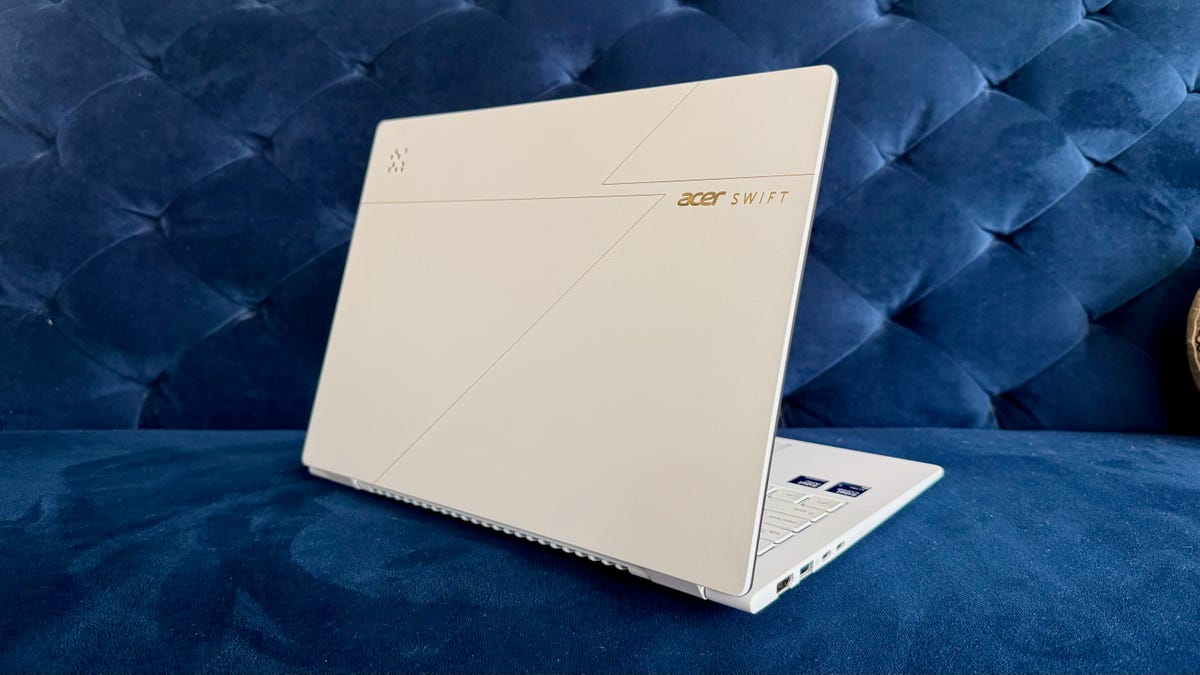
The Swift Edge 14 AI eschews the drab grays and blacks of previous models for a white-and-gold design that looks clean but not overly sterile. I like the laptop’s looks and, more importantly, its solid feel. Computers aren’t a fashion statement, after all — they’re workhorse devices that need to meet your needs at work, school or at home.
The magnesium-aluminum material feels truly durable: The Swift Edge 14 AI’s thin appearance belies the sturdiness of this clamshell device. While the laptop lid had a little give when pushed down on, the rest of the chassis never flexed while being manhandled or wrangled in-and-out of my backpack.
The 180-degree hinge affords a wide range of motion. It even survived a misunderstanding with an inebriated friend who thought it was a different computer with a two-in-one design, which I was talking about earlier in the night. Honestly, I might’ve been in worse shape than the Edge was after that experience.
The Swift Edge 14 AI knocks it out of the park with the big, frequently used fundamentals. The 3K OLED display is vibrant, and even on the sunniest spring day so far I didn’t struggle with the screen’s brightness, which is always a relief. The mechanical touchpad is the perfect size, and it’s responsive to touch, but it loses too much of its click feedback toward the top where it becomes harder to perform a simple click. The keyboard, on the other hand, is genuinely fantastic. Its soft keycaps register taps with very little pressure — this laptop is a typist’s dream.
There’s a well-rounded array of ports here, too, with two Thunderbolt 4 connections, two USB-A ports, an HDMI port and a combo audio jack. My one gripe is that the two potential charging ports are right next to each other on the left side of the chassis — could we get one on the right side of the computer next time, please? The HDMI port and headphone jack are getting lonely over there all by their lonesome.
The biggest thing that grinds my gears, though, is the audio output from the laptop’s two-speaker stereo setup. Listening to music or even watching videos with heavily layered videos reveals lacking bass and overall muddled sound. The Swift Edge 14 AI suffers from more-or-less the same problem the Swift 14 AI does here, which is a shame, because this is one of the core design flaws you’d hope to see massaged out on a laptop that costs an extra $200.
Is the Acer Swift Edge 14 AI worth buying?
The Swift Edge 14 AI looks good and feels great — this portable clamshell barely feels like it adds any weight to my backpack, which makes it a perfect computer to tote around for work. If you’re in the market for a sleek, portable laptop, I think it makes sense to be milling through 14-inch models — and on that front, the Swift Edge 14 AI is a solid competitor with a great display and keyboard alongside a decent touchpad.
On the other hand, the Swift Edge 14 AI’s $1,500 price tag is hard to stomach, especially for a computer that ekes out middling multicore performance numbers compared to similar fare. Sure, pricing has gone up for just about every computer, thanks to a global RAM shortage, but that doesn’t make the pill any easier to swallow, nor does it make it any easier to recommend such an expensive device.
If you’re in the market for a portable computer with a great display, the Swift Edge 14 AI might be a good pick for you, so long as you recognize you’re making performance and battery life tradeoffs. If you’re looking for a similar laptop that’s cheaper and lasts longer on a single charge, the regular ol’ Acer Swift 14 AI might be a good place to start. And for roughly the same price, the Asus Zenbook A14 is equally thin and light with similar performance but much longer battery life.
The review process for laptops, desktops, tablets and other computerlike devices consists of two parts: performance testing under controlled conditions in the CNET Labs and extensive hands-on use by our expert reviewers. This includes evaluating a device’s aesthetics, ergonomics and features. A final review verdict is a combination of both objective and subjective judgments.
The list of benchmarking software we use changes over time as the devices we test evolve. The most important core tests we’re currently running on every compatible computer include Primate Labs Geekbench 6, Cinebench R23, PCMark 10 and 3DMark Fire Strike Ultra.
A more detailed description of each benchmark and how we use it can be found on our How We Test Computers page.
Geekbench 6 CPU (multi-core)
M5 MacBook Air (13-inch) 16890MSI Prestige 14 Flip AI Plus 16607Asus Vivobook S 15 14058HP OmniBook X Flip 14 12747Geekbook X14 Pro 12495Dell XPS 14 11207Lenovo Yoga Slim 9i 14 Gen 10 11029Acer Swift Edge 14 AI 10977Acer Swift 14 AI 10918Asus Zenbook A14 10632
Geekbench 6 CPU (single-core)
M5 MacBook Air (13-inch) 4148MSI Prestige 14 Flip AI Plus 2896HP OmniBook X Flip 14 2823Acer Swift Edge 14 AI 2781Lenovo Yoga Slim 9i 14 Gen 10 2728Acer Swift 14 AI 2701Dell XPS 14 2599Asus Vivobook S 15 2446Geekbook X14 Pro 2343Asus Zenbook A14 2114
Cinebench 2024 CPU (multi-core)
Asus Vivobook S 15 963M5 MacBook Air (13-inch) 926MSI Prestige 14 Flip AI Plus 692HP OmniBook X Flip 14 636Geekbook X14 Pro 627Acer Swift 14 AI 610Lenovo Yoga Slim 9i 14 Gen 10 583Asus Zenbook A14 535Dell XPS 14 530Acer Swift Edge 14 AI 469
Cinebench 2024 CPU (single-core)
M5 MacBook Air (13-inch) 199Lenovo Yoga Slim 9i 14 Gen 10 121Acer Swift 14 AI 121Acer Swift Edge 14 AI 120Dell XPS 14 117MSI Prestige 14 Flip AI Plus 115HP OmniBook X Flip 14 114Asus Vivobook S 15 107Geekbook X14 Pro 99Asus Zenbook A14 96
3DMark Steel Nomad
MSI Prestige 14 Flip AI Plus 1527Asus Zenbook A14 1151M5 MacBook Air (13-inch) 1073Acer Swift 14 AI 871Lenovo Yoga Slim 9i 14 Gen 10 728Geekbook X14 Pro 683Acer Swift Edge 14 AI 642Dell XPS 14 524Asus Vivobook S 15 496HP OmniBook X Flip 14 456
PCMark 10 Pro Edition
MSI Prestige 14 Flip AI Plus 8761Geekbook X14 Pro 8009Acer Swift Edge 14 AI 7660Dell XPS 14 7467HP OmniBook X Flip 14 7199Lenovo Yoga Slim 9i 14 Gen 10 6812Acer Swift 14 AI 6811
Online Streaming Battery Drain test
MSI Prestige 14 Flip AI Plus 25 hr, 18 minAsus Zenbook A14 24 hr, 7 minAcer Swift 14 AI 22 hr, 13 minDell XPS 14 21 hr, 7 minM5 MacBook Air (13-inch) 17 hr, 2 minAsus Vivobook S 15 15 hr, 26 minLenovo Yoga Slim 9i 14 Gen 10 13 hr, 27 minAcer Swift Edge 14 AI 13 hr, 2 minHP OmniBook X Flip 14 9 hr, 1 minGeekbook X14 Pro 8 hr, 39 min
Read the full article here