







As someone who doesn’t drink caffeine, I often rely on a soothing cup of decaf herbal tea when I need a pick-me-up during the day. So when I received an email about the Teforia smart infuser making a comeback, I was intrigued. Using an intelligent algorithm, it scans the NFC chips embedded in Teforia tea boxes and adjusts the temperature, steeping time and aeration to maximize flavor and aroma.
Back in 2017, CNET reviewed the then-$1,500 device, but not favorably, saying that “even the ultra-rich shouldn’t buy this super-pricey teapot.” Due to meager sales, the company shut down.
Cut to January 2026, and tea retailer Adagio Teas announced that it had rebuilt and relaunched Teforia at a lower price of $499. Now, the device can brew any type of loose-leaf tea, and you can customize the settings. On its app, you can also control the machine and share personalized recipes with the Teforia community.
To see if the smart infuser is actually as new and improved as it sounds, even at a lower price, I put Teforia to the test in my own kitchen for a few weeks.
Teforia’s design: Like a Keurig for loose-leaf tea
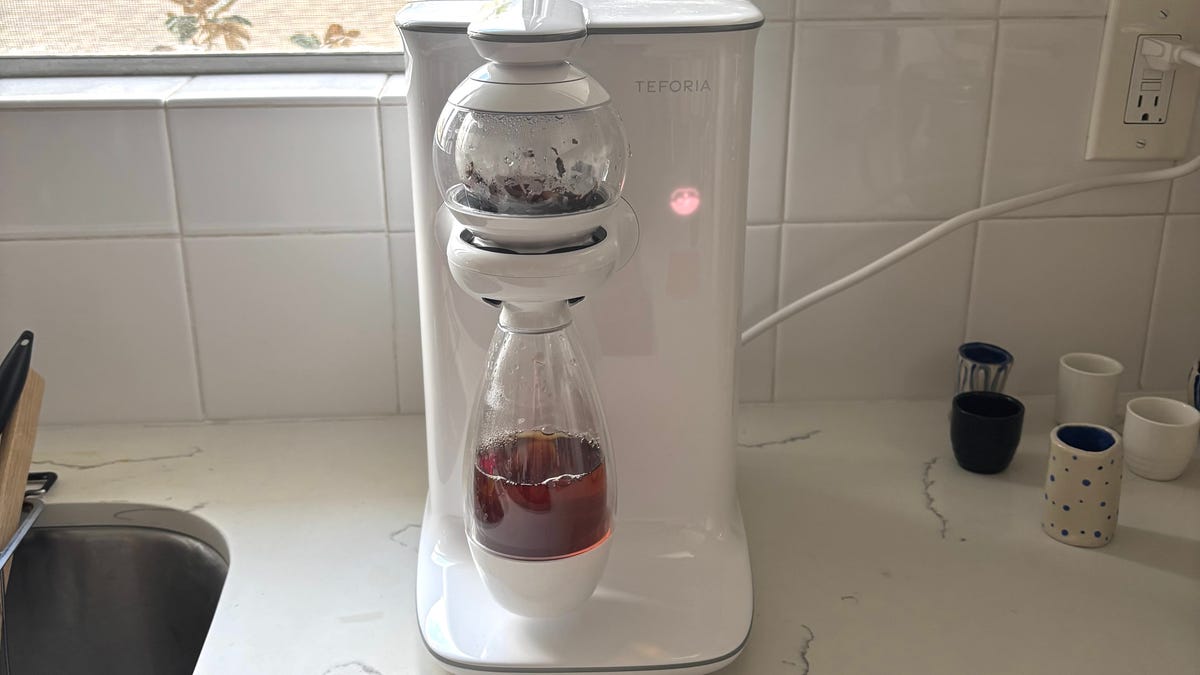
Measuring 12x8x13 inches, it reminds me of a Keurig in size, but I was surprised by the device’s weight of 17 pounds. Comparing it to the photos in CNET’s 2017 article, the 2026 design looks exactly the same.
It’s made of 100% BPA-free white plastic and comes with a globe infuser where the loose-leaf tea is placed and a 13-oz carafe where the brewed tea ends up. Since it’s double-walled, you won’t burn your hand when you reach for the carafe. An infusion arm connects the device to the infuser globe, while a tea reader on top scans the NFC chips on the Teforia tea boxes.
In the back, there’s a water reservoir where you insert a $9 filter that needs to be replaced every two to three months, or after 100 liters of water passes through. Like the 2017 version, the reservoir doesn’t have a max-fill line. It’s not compatible with distilled, reverse osmosis or Zerowater.
There are no physical buttons or screens. Instead, icons will glow through the plastic, and a leaf logo will appear and be pressable when it’s ready for your tea to brew. This was my least-favorite design feature, as I initially struggled to tell the difference between the leaf’s white (tea is ready to steep) and blue (not connected to Wi-Fi) colors, and whether the leaf icon was glowing or pulsing. I also struggled to press the icon to brew my tea and often had to press hard and several times.
Despite being made of plastic, I found Teforia’s design sleek and minimalist, but the icon interface could use some work. While they do have different features, for comparison’s sake, the $330 Breville One-Touch Tea Maker is made of stainless steel and glass, with physical buttons and an LCD screen.
The setup: Not as easy as I’d hoped
Using the device’s setup booklet, I assembled my Teforia and turned it on. The leaf icon glowed blue, indicating that it’s ready for a cleaning cycle, and I pressed the leaf to begin. Once it was complete, I thought the leaf icon was glowing white (which the manual calls a “soft glow”), so I put in some tea leaves and attempted to scan the NFC chip on the box. Nothing happened.
Realizing the leaf was pulsing a light blue instead of “soft glow,” indicating it wasn’t connected to Wi-Fi, I wondered if it would work better when connected, even though Wi-Fi isn’t needed to use the NFC chips. Wi-Fi is only needed for software updates and new tea recipes.
I downloaded the Teforia app and attempted to connect to my Wi-Fi, but nothing happened. I turned Teforia on and off, closed and reopened the app, and even reset Teforia several times, to no avail.
The 2.4GHz Wi-Fi struggle
Teforia can connect only to 2.4GHz Wi-Fi, so I wondered if it was an issue with my router, which uses band steering to select between 2.4GHz, 5GHz and 6GHz. I did some research and found that people had success connecting 2.4GHz-only devices when they enabled Universal Plug and Play, so I downloaded my Wi-Fi provider’s app and enabled UPnP. My router rebooted, and I finally managed to connect to Teforia via Wi-Fi. At this point, I also noticed that my neighbors’ Wi-Fi names were appearing in the Teforia app, which hadn’t happened before.
However, I learned that UPnP poses a security risk, so once Teforia connected, I disabled UPnP. Teforia continued working on my Wi-Fi for several days, but then stopped. I reached out to my Adagio Teas representative, who said that UPnP isn’t needed or recommended. I found a router setting that lets me switch to the 2.4GHz frequency for 30 minutes to set up a smart device, but I wasn’t able to get Teforia to connect.
I even spoke with Teforia’s developer to troubleshoot the Wi-Fi issue, but still, no luck. This later posed a problem when I attempted to use another setting on the device.
Scanning the teas: A fun feature, but there’s a design flaw
As I mentioned previously, I struggled to get Teforia to scan the NFC chip on a box containing the tea packets. I assumed it was a Wi-Fi issue, since the blue leaf on my device continued to pulse, but the problem persisted.
To get Teforia to scan the NFC chip, the manual says to hold the box with the Teforia-ready label against the Teforia leaf logo on top of your tea maker. Once it reads the recipe, the leaf icon will glow white and the device will chime. Even after leaving the box’s label on the tea reader for several minutes and trying several orientations, I still couldn’t get it to read, so I ended up having to brew the tea through the app.
I was sometimes able to get the NFC chip to work, but only after I turned Teforia off and on. I mentioned this to my Adagio Teas rep, who relayed that the tea box should be open when you scan it, as the foil wrapping inside can interfere with the NFC signal. This wasn’t mentioned in the manual, so it seems like a design flaw.
Compared with the 2017 version, the tea boxes changed from loose-leaf tea-containing packs that resemble Keurig pods to boxes filled with foil packs of loose-leaf tea. If the foil interferes with how Teforia is meant to work, then it’s probably not the best material for packaging the Teforia-ready teas.
However, once I opened the box and scanned the NFC chip, it worked every time. I was going to say that I wish the individual tea packets each had a chip so I don’t have to hold onto all the boxes and could save space, but if the foil prevents Teforia from working, I imagine my idea wouldn’t be possible.
You’re also able to do more than one infusion with Teforia, as the leaf icon will continue glowing, ready to be pressed again, after your first brew. Simply keep your tea leaves in the infuser globe, then press the leaf icon when you’re ready.
When using your own loose-leaf tea, Teforia recommends 2.5 grams to 5 grams of tea per infusion. Over 5g can cause overflowing.
The Teforia app: I wish you could select tea by variety
The Teforia app has four tabs:
- Favorites: See your recently brewed and favorite teas.
- Teas: View all the Adagio Teas and other brands currently programmed to work with Teforia, such as Stash and Rishi. Here, you can also “Suggest Tea” for later addition to the catalog. When you click on a tea, you can see additional recipes created by others in the community or create your own.
- Account: Personal info, notifications and tea auto-delivery options.
- Settings: Wi-Fi setup, audio level, scheduling tea to brew, cleaning, drying the infuser for travel, setting altitude, resetting, locating your infuser and connecting a new infuser.
Under Favorites and Teas, you can select “My Recipes,” where you’ll see any customized tea recipes you’ve created. When you click one of the currently available teas under Teas, you can select “Create Recipe” to adjust the time, temperature and agitation (when the loose leaf tea is agitated with water bubbles), which are typically set at 100%. When I spoke with the developer, he mentioned that when he wants to brew iced tea, he’ll increase these factors to make the tea stronger and prevent it from diluting with ice.
I have a random glass of herbal loose-leaf tea that was gifted to me, so I don’t know the variety or brand name, which is needed to suggest a tea in the app. I wish you could simply select the variety — black, green, herbal, chai — instead of having to filter by brand name or wait for your specific tea suggestion to get uploaded into the database. As a workaround, you could select a tea already programmed in the app that most closely resembles your own tea.
One feature I was excited to see was “Scheduled tea,” which lets you schedule a tea to brew on a specific day and time, and it can even repeat. This didn’t work for me. When I asked the representative about it, they said Wi-Fi is currently required for this feature. A new software update allows it to work without Wi-Fi, but for my device to sync, Wi-Fi is needed. They also sent me a demonstration video using their Teforia so I could see the feature in action.
Cleaning and drying the device
Teforia comes with a bottle brush that fits perfectly inside the carafe and infuser globe. There’s also a “Clean Infuser” setting that runs hot water through the machine. For travel, the “Prepare to travel” setting will “dry all water from the infuser,” but I found that this only works by removing all water from the machine’s interior, provided the water reservoir is removed. To dry the carafe and globe, you’d have to do that yourself.
The tea itself: A blind taste test and the winner
Despite my technical issues with Teforia, I will admit that it makes a tasty, flavorful, smooth cup of tea. And it is fun to watch the device work, as it brews an entire cup in small batches and stirs the tea with water bubbles before it pours into the waiting carafe.
To see if it makes tea better than my usual method of using a stainless steel tea infuser ($17 for a two-pack) and teapot, I conducted a blind taste test with three Teforia-ready teas: Earl Grey Bravo, Milk Oolong and Blood Orange.
I labelled the bottom of one mug with “Teforia” and the other with “Infuser.” In the Teforia mug, I poured the tea made with the device. In the Infuser mug, I brewed the tea in the infuser using the instructions on the foil tea bag, measuring the suggested water temperature with a kitchen thermometer and setting a timer for the brew on my phone. After, I removed the infuser.
It was much easier to make the tea with the Teforia because it already had the set temperature, and measuring with a kitchen thermometer didn’t feel as legitimate. I’ll also say that my simple infuser doesn’t aerate the tea with water bubbles, so Teforia had an advantage there.
The Earl Grey Bravo made with the Teforia won the first round, as that tea was smoother and less bitter than the tea brewed with the infuser. After deciding on a winner, I also noticed that my infuser leaked smaller loose-leaf particles into the liquid, whereas there were none in the Teforia-brewed cup.
For both the Milk Oolong and Blood Orange teas, the winner for flavor was the infuser, though it was a bit bitter, while the winner for smoothness and subtlety was the Teforia.
Other customer reviews report issues
Curious to see what other users thought after I concluded my own testing, I began reading customer reviews on the Adagio Teas website. There are three five-star 2025 reviews from users who love Teforia’s results. However, two of those reviewers mentioned returning a broken device before receiving a second that worked. One from April 2025 states that they returned the first device because it leaked, and that their current device only connects to Wi-Fi half the time.
In August 2025, a person who left a one-star review said they sustained burns on their hands while attempting to troubleshoot after the device stopped working mid-boil and pressure from the boiled water built up inside it, causing the water to eject when they removed the reservoir, which they hoped would stop the device from pulling in more water.
They added that neither Wi-Fi nor Bluetooth maintained a proper connection for them. “The only thing I have thought of being an issue is the fact that my Wi-Fi has band steering for 2.4 and 5 GHz networks,” the August 2025 reviewer wrote, relaying my exact issue. “Yet this is something EVERY router has now. This should not be a factor in why this device is so unstable. And now, hazardous.”
In April 2025, another user reported that their app would disconnect from the machine and Wi-Fi. Their device also began leaking when making tea.
A more recent Amazon review from February stated that the user’s device broke within a few months and leaked water everywhere.
Adagio Tea’s response to Teforia reviews
When asked about the negative online reviews, a representative from Adagio Teas told me they have implemented significant updates since the initial release to address Bluetooth connectivity issues, speed and status messaging. “These enhancements have resolved previously reported issues, and we have not received recent reports of Bluetooth Low Energy (BLE) connectivity concerns,” they said.
Adagio Teas has also made Wi-Fi improvements, but again, a 2.4GHz network is recommended. “Reports of Wi-Fi-related issues have been limited.”
Regarding other concerns, my representative stated, “Product safety and quality are extremely important to us. While isolated incidents can occur with any appliance, such reports are rare. When customers contact our support team, we investigate all issues promptly and provide assistance, including replacements. Regrettably, customers rarely update a negative review to reflect a positive outcome.”
To illustrate this, my representative sent me a screenshot of an exchange with the Amazon reviewer I mentioned above. They offered to replace the reviewer’s unit, but they chose to keep it and marked the case as resolved. “We suspect that the leak was found to come from another source, as we haven’t seen this behavior with any other machine,” they explained.
My final thoughts: Is Teforia worth $500?
While I think it’s a cool idea, fun to watch and that Teforia does make a smooth cup of tea, I don’t think the device is worth its $500 price, even though it was previously $1,500. The tea was great, but it didn’t blow me away or make up for the other kinks I encountered when using the device. If you’re a tea devotee with an extra $500 lying around and 2.4GHz Wi-Fi, then it might be a better fit for you.
Ultimately, I’ll go back to using my stainless steel infusers and teapot. If I end up wanting something more high-tech and precise for my cups of tea, I’ll go with a more affordable electric kettle.
Read the full article here


