







Pros
- Excellent, durable design
- Safer radiant heat
- Very useful app features including scheduling and energy monitoring
- Can save money
- Heat and humidity sensor built in
Cons
- Installation requires careful planning
- Need to start heating early as radiant heat takes a bit longer to work
Space heaters aren’t often high-tech, which is why I always have my eyes open for smart heaters with app connections, scheduling and sensors that can help manage room temperature. But I wasn’t expecting anything like this smart model from Boldr, called Kelvin.
Kelvin is a radiant heater designed like a modern work of art, which is nice, but the real value comes from how well it works, especially in smaller spaces that need safe, energy-saving heat like offices, living rooms, playrooms, dens and, unlike other space heaters, bathrooms.
I walked away from this radiant panel very impressed — then walked back again to stand in front of it, because winter’s starting to get very cold here. Here’s why, despite the high cost, this heater could be a great fit for your home, too.
A design to die for (if you have the wall space)
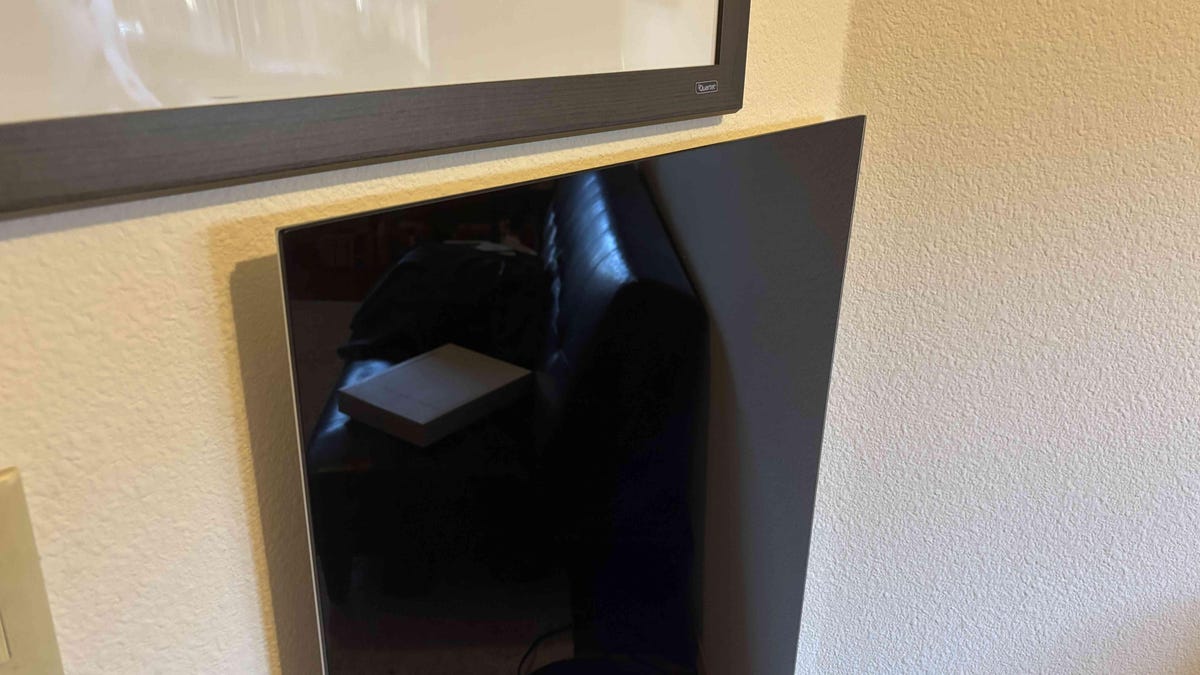
No, Kelvin doesn’t look like a space heater. It’s purposefully designed to look great and take up as little space as possible — as long as you have the room on your wall in the right spot. Product photos show Kelvin heaters mounted in central locations like works of art. I chose a more pragmatic approach, mounting it in my office where it faces the desk for greatest effect. It still looks great, but it’s more out of the way. Don’t feel required to make this heater a centerpiece as long as you find a spot that’s relatively close to where people are active.
Kelvin comes in two sizes, a standard version at 38 by 20 inches, rated for rooms up to 100 square with 450 watts of power, as well as a large version around 47 by 24 inches, rated for up to 200 square feet with 700 watts of power. I tested the large version, which despite its heavy weight (nearly 30 pounds) I recommend if you don’t mind the extra cost.
In addition to app controls, Kelvin comes with a small remote you can use for temperature sensing and control, so having your phone handy isn’t required to use it.
Radiant heat for an energy-saving win
As a radiant heater, Kelvin is completely silent and stirs no dust. Radiant heat is very similar to sunlight, warming objects directly. Those objects then radiate a portion of the heat back out, eventually warming the space. Because no traditional heating elements are involved, there’s far less danger of radiant heaters causing fires the way that other space heaters can.
The heater also includes sensors to show what the nearby temperature is, as well as humidity. These sensors gave wonky readings when I first set the heater up, something that’s fairly common, but within 24 hours they were quite accurate.
When turned on, the heater starts producing heat you can feel within a couple of minutes. As it radiates outward, I could feel its effects from about 10 to 12 feet away, although the true value is in ongoing ambient heating for the whole room. It doesn’t have to be right beside you, but the nearer it is the more you’ll feel the heat — again, without worrying about things catching on fire, which is a major benefit.
Radiant heat has another trick: It’s often very affordable compared to using electric heating elements. Thanks to the app, I could see that my large Kelvin had about 1.38kWh energy use. That’s about a fourth to a fifth of my already energy-efficient heat pump, which I don’t need to use quite as much to heat the whole house when Kelvin is busy heating the current room I’m in. That means it can actually save money over time, especially compared to traditional space heaters. Boldr estimates Kelvin can save up to 13% on monthly energy bills — once I’ve used it for a longer period this winter, I’ll be able to confirm.
App controls and smart home features that few heaters have
Let’s talk a bit about the Boldr app, a facet of Kelvin I greatly appreciated thanks to its quick scheduling abilities. Setup is as easy as downloading the app and plugging the heater in, then entering your Wi-Fi password (you can create an account or use an existing account like Google).
Basic app controls are what you’d expect. You can set a specific temperature for Kelvin to reach and turn the heater on and off at will. I set my temp very high while testing to make things easy, but you can be more accurate so the heater turns off exactly when you want.
But more useful are Kelvin’s automations, which allowed me to set a schedule to turn the heater on before I even started using the office on chilly mornings. Because radiant heaters can take a while to heat the whole room, setting the heat to come on an hour or so before I walked in was an excellent choice, and something I couldn’t do with other space heaters because of the risk of accidental fires.
As I mentioned, the app also has energy monitoring features. Those features can go very deep if you connect to your power utility company. Unfortunately, Boldr’s app didn’t have my company listed but there is a manual input option if you want to go to a lot of work to track how much cash you may be saving.
If you like smart home connections, note that Kelvin can pair with Boldr’s own smart thermostat for even more control options. If that’s not an option, I paired mine easily with Alexa and Google Home, which enable voice controls and another app control option.
Are there any problems with Boldr’s space-age heater?
I didn’t find any noticeable flaws or problems with the heater, but there are caveats that anyone interested in Kelvin should know.
First, Boldr claims you can install Kelvin in about five minutes. Lol. Lmao, even. Particularly with the large model, I needed to carefully pick a spot near an outlet, then use a studfinder to make sure there were no studs or wiring where I wanted to place the panel. Then I had to carefully measure and level before marking holes and screwing in the deep drywall anchors required.
Positioning the heavy Kelvin is also a chore, especially if you’re going to be on a stepstool, so I suggest working with a couple of other people for the mounting process. Start to finish, it took about an hour or two to fully complete my installation. It’s not a heater you’re going to move after it’s installed, so placement is very important.
Second, the back of the heater gets fairly hot, too. Because it’s so close to the wall, you don’t want to put it against anything that’s especially flammable or could scorch under long-term heat. Drywall should be fine — mine was.
Finally, Kelvin is very shiny, almost mirror-like close up, so regardless of whether you pick the black or white version, I wouldn’t put it anywhere that you wouldn’t want a mirror.
Final thoughts on the Kelvin Heater
From its wall art design to easy scheduling without the worry of unattended fires, Kelvin has quickly become one of my favorite heaters. If you have the wall space in the right area, I won’t hesitate to recommend it — even though prices starting at $400 are pretty steep for a space heater.
If your budget just can’t make Boldr’s model work, there are cheaper radiant heaters, such as this $130 model from FrauSonne, but I can’t speak to its quality. Nothing I’ve come across yet really compares to the Kelvin.
Read the full article here


