
Close Menu
Modern Life Today
  • Home
  • Tech
  • Smart Home
  • Energy
  • Home Security
  • Kitchen & Household
  • Outdoor
  • Home Internet
Trending Now

The Best OLED TVs

January 28, 2026

Best Vitamin Subscriptions for 2026

January 28, 2026

Lovehoney Discount Codes and Deals: Up to 70% Off

January 28, 2026
Facebook X (Twitter) Instagram
Modern Life Today
  • Home
  • Tech
  • Smart Home
  • Energy
  • Home Security
  • Kitchen & Household
  • Outdoor
  • Home Internet
Subscribe
Modern Life Today
Home»Tech»Review: Asus ROG Falcata
Tech

Review: Asus ROG Falcata

Press RoomBy Press RoomJanuary 15, 2026No Comments3 Mins Read
Share Facebook Twitter Pinterest Copy Link LinkedIn Tumblr Email

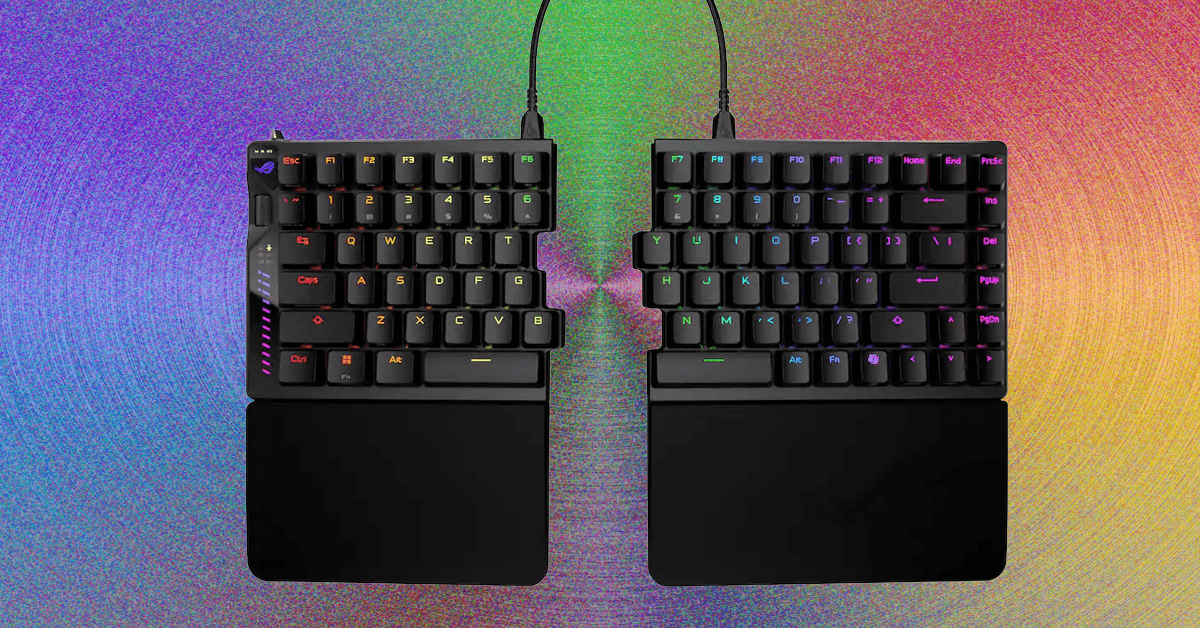
The wheel on the left side has options to adjust actuation distance, rapid-trigger sensitivity, and RGB brightness. You can also adjust volume and media playback, and turn it into a scroll wheel. The LED matrix below it is designed to display adjustments to actuation distance but feels a bit awkward: Each 0.1 mm of adjustment fills its own bar, and it only uses the bottom nine bars, so the screen will roll over four times when adjusting (the top three bars, with dots next to them, illuminate to show how many times the screen has rolled over during the adjustment). The saving grace of this is that, when adjusting the actuation distance, you can press down any switch to see a visualization of how far you’re pressing it, then tweak the actuation distance to match.

Alongside all of this, the Falcata (and, by extension, the Falchion) now has an aftermarket switch option: TTC Gold magnetic switches. While this is still only two switches, it’s an improvement over the singular switch option of most Hall effect keyboards.

Split Apart

Photograph: Henri Robbins

The internal assembly of this keyboard is straightforward yet interesting. Instead of a standard tray mount, where the PCB and plate bolt directly into the bottom half of the shell, the Falcata is more comparable to a bottom-mount. The PCB screws into the plate from underneath, and the plate is screwed onto the bottom half of the case along the edges. While the difference between the two mounting methods is minimal, it does improve typing experience by eliminating the “dead zones” caused by a post in the middle of the keyboard, along with slightly isolating typing from the case (which creates fewer vibrations when typing).

The top and bottom halves can easily be split apart by removing the screws on the plate (no breakable plastic clips here!), but on the left half, four cables connect the top and bottom halves of the keyboard, all of which need to be disconnected before fully separating the two sections. Once this is done, the internal silicone sound-dampening can easily be removed. The foam dampening, however, was adhered strongly enough that removing it left chunks of foam stuck to the PCB, making it impossible to readhere without using new adhesive. This wasn’t a huge issue, since the foam could simply be placed into the keyboard, but it is still frustrating to see when most manufacturers have figured this out.

Read the full article here

Share. Facebook Twitter Pinterest LinkedIn Tumblr Email

Related Articles

The Best OLED TVs

January 28, 2026

Lovehoney Discount Codes and Deals: Up to 70% Off

January 28, 2026

Become a Windows 11 Pro With These 73 Keyboard Shortcuts

January 28, 2026
Add A Comment
Leave A Reply Cancel Reply

Demo
Top Articles

The 8 Best Blenders for Smoothies, Soups, and Sauces

January 14, 2026

All the Pet Tech That Stood Out at CES 2026

January 8, 2026

Premier League Soccer: Stream Bournemouth vs. Tottenham Live

January 7, 2026

Why Our LED Bulbs Burn Out So Fast at Home and How You Can Stop It

January 20, 2026
Don't Miss

Best Robot Vacuums We’ve Tested (January 2026)

By Press RoomJanuary 28, 20260

These robot vacuums are ones that tested well, scoring at least a 7 overall rating,…

HP OmniBook 5 14 Review: You Won’t Believe How Long This Snapdragon X Laptop Runs

January 28, 2026

Robot Vacuums Are Getting Better, but Our Lab Data Shows You Need to Pick Between Great Cleaning Power and Object Avoidance

January 28, 2026

Here’s What It’s Like to Use Acuity Scheduling for Your Business or Side Hustle (2026)

January 28, 2026
About Us
About Us

Modern Life Today is your one-stop website for the latest gadget and technology news and updates, follow us now for the news that matters to you.

Facebook X (Twitter) Pinterest YouTube
Featured News

Nope, Your Gadgets Shouldn’t Die. Charge Them for Less With This $78 MagSafe Stand

November 29, 2025

Repair Your Electronics at Home With This Rare Black Friday Discount on the iFixit Pro Tech Go Toolkit

November 29, 2025

I Bet You Won’t Be Able to Stop After One Episode of Netflix’s Addictive New Thriller

November 29, 2025
Trending Now

The Best Vibrators to Get Your Groove On

November 29, 2025

The Best Air Purifiers of 2025 for Dust, Smoke, and Allergens

November 29, 2025

Tired of Heavy Meals? These Are the 5 Healthiest Air Fryer Foods Approved by Registered Dietitians

November 29, 2025
  • Home
  • Privacy Policy
  • Terms of use
  • For Advertisers
  • Contact
2026 © Prices.com LLC. All Rights Reserved.

Type above and press Enter to search. Press Esc to cancel.