

When our 8-year-old started asking for video games, I knew we were about to engage in an uphill battle. Anytime we’ve been to friends’ houses with gaming consoles, he goes full zombie mode, then has an epic meltdown once the sensory overload wears off. And since he inevitably ropes his 6-year-old brother in, we’re essentially sealing both their fates.
So when our neighbors started raving about a movement-based gaming console called Nex Playground, my first instinct was to shut it down. The words “gaming console” alone were enough to put me in a mental block. Add in my own memories of Wii tennis sessions where I nearly took out the ceiling fan, and I was firmly in the “no” camp.
But after doing a little more research, I was intrigued enough to try it out.
Screen time isn’t something I take lightly. With three kids ages 2 to 8, my husband and I have always been intentional about how and what they watch. They don’t have their own tablets, and most of their screen time happens on our family TV, which means whatever the oldest is exposed to quickly trickles down to our toddler. So anything we bring into the house has to work for all of them. Tall order, I know, but the Nex Playground gets surprisingly close.
Getting started is easy
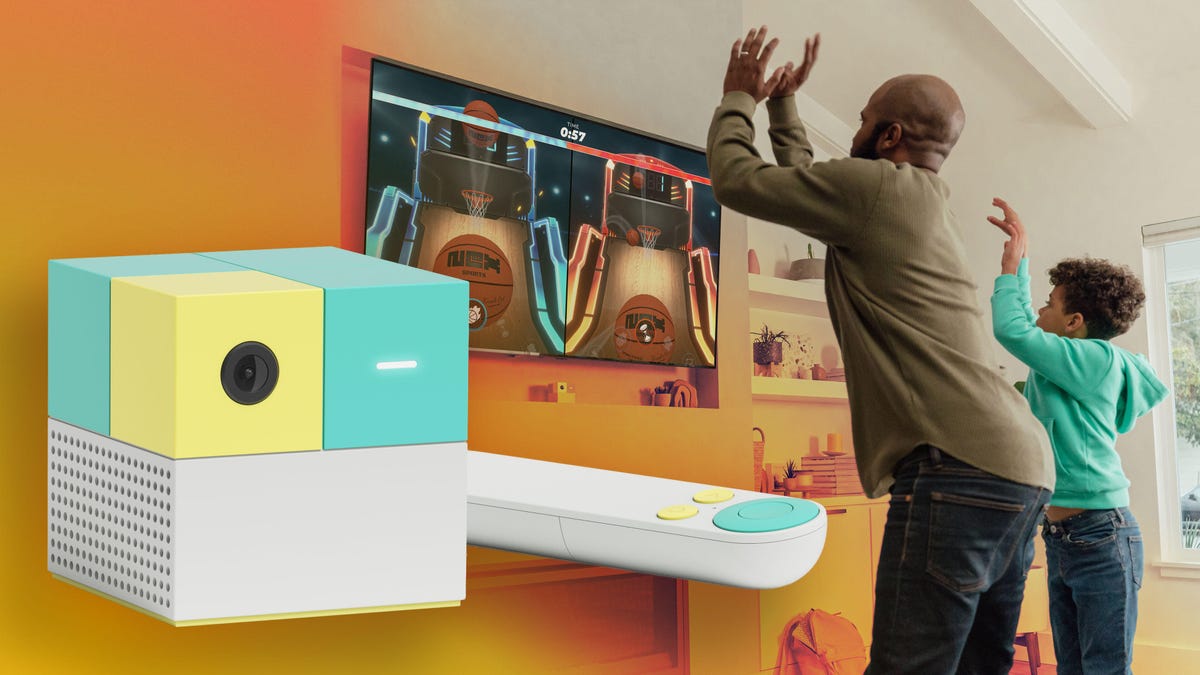
The console itself is refreshingly simple. It’s a small cube, slightly larger than a Rubik’s cube, with a circular camera and motion sensor, a light indicator and two ports for power, and an HDMI connection to the TV. There’s no controller beyond a basic remote for navigating menus. For most games, your body is the controller.
Setup is quick. Plug it in, connect it to your TV, and you’re ready to go. It doesn’t store video or upload footage to the cloud, which was an immediate plus. It also comes with a magnetic privacy cover that you can put on the lens when it’s not in use.
At $250, it’s not cheap, but it’s less than some of the popular gaming consoles for this age range, like the Nintendo Switch 2. That gets you a five-game starter pack: Fruit Ninja, Go Keeper (soccer), Starri (think Guitar Hero for your whole body), Party Fowl (an AR emoji frenzy) and Whack-a-Mole. Additional games require a subscription: $89 a year or $49 for three months, which unlocks a library of 50-plus games and counting. New titles dropped even as I was writing this.
The library spans a surprisingly wide range. There are board game adaptations like Connect Four and Candy Land, character-driven games with Peppa Pig, Bluey and the Ninja Turtles, and sports like baseball and, yes, tennis — minus the ceiling fan hazard. There’s even parent-friendly content like Zumba workouts, which I may or may not have fully committed to on a rainy afternoon.
Even my toddler has gotten in on the action, mostly bouncing her way through Hungry Hungry Hippos when her brothers finally concede.
Gameplay is where it wins
The movements range from swinging your arms to keep a ball in motion, hopping or full-body launches that are far more aggressive than what the game actually requires. (I’m not about to tell the kids otherwise.) After a 45-minute session, my kids are tired and sometimes even drenched in sweat. The Nex Playground entertains and burns energy in one fell swoop.
The graphics also seem intentionally simple and arcade-like, which fits the minimalist play experience. There’s no POV storyline to get lost in, no leveling up into a new world at 9 p.m. on a school night. Some games keep score, which awakens my kids’ competitive streak, but the vibe is more collaborative and hasn’t been the catalyst for more fighting like other games. If anything, it’s done the opposite.
I still don’t love defaulting to a screen when my kids are bored, so we try to use it in moderation. In our house, piano practice is the only thing that unlocks weekend play time, and the fact that they’ll sit at the piano for a full hour tells you everything you need to know.
The verdict that matters most
But the real test: Does it hold up to an 8-year-old who was dead set on a Nintendo Switch?
Short answer: yes. At least for now. He’d still pick the Switch if you asked him, but not for the reasons you’d expect.
“The Playground is more tiring,” he told me, which only helped seal the deal for me. His current favorite is Homerun Hitters. “It’s basically a baseball game where you go against ranked global players. Me and my brother are really good at it.”
This from a kid whose primary hobby is annoying his younger brother. The fact that he said “me and my brother” as a collective was an unexpected bonus.
The Switch may still show up on the Christmas list this year. And realistically, I know I’m on borrowed time. As kids get older, “cool” becomes the currency, and a motion-based cube probably won’t hold up against an Xbox or a Switch once playdates turn into side-by-side gaming sessions.
The Nex Playground isn’t a replacement for those. It’s more of a detour; it gives them a taste of gaming without all the usual side effects. Even if I do eventually cave, I can still see it sticking around for the occasional family game night or as a rainy-day sibling diffuser.
In the meantime, I’ll relish this simpler version of gaming while I still can. He’s not exactly rushing me to return this review unit. More importantly, neither am I.
Read the full article here