

Pros
- Two gorgeous displays
- Effective attachment system for different laptop sizes
- 100W pass-through charging
- Elegant metal design
Cons
- Thick and heavy
- Needs two separate display connections
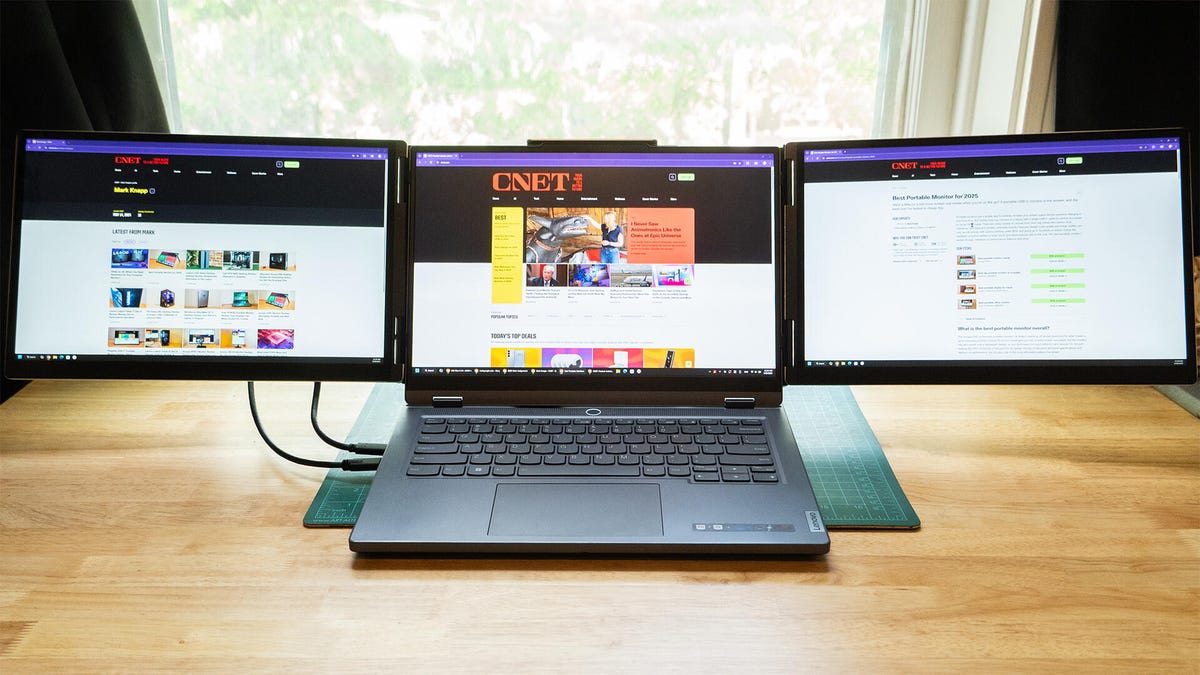
The Monduo 14-Inch Pro Duo is a fascinating product and well-executed, but it’s rather niche. If you need a triple-monitor setup on the go, it does a (somewhat) elegant job. Its spine wraps around a laptop’s built-in monitor, then positions a 14-inch screen on either side.
Thanks to its excellent LCD panels and a polished (albeit wiggly) design, it really lives up to its premise. There’s room for improvement, but only a little. At $749, it’s a pricey setup, and not everyone needs two extra screens for their laptop. But if you do, the Pro Duo does the job well.
Two impressive screens
To start, the displays rock. Each screen is 14 inches with 2,560×1,600 pixels, the image is quite sharp. They’re also plenty bright and colorful, reaching up to 576 nits in my testing and delivering 100% coverage of both the sRGB and DCI-P3 color spaces.
The screens are fairly accurate, with a maximum dE1976 average of 2.13 between the two (the right panel was more accurate on my sample). With average contrast for this type of panel and a cool white point, they’re fine for entertainment and solid for productivity. They’re glossy instead of matte, but they still offer some minor glare reduction.
They’re not just good-looking either. They’re also fast. Monduo says they support 144Hz, but I was only able to drive them at 120Hz with the hardware I had available. Still, at that speed, ghosting was faint and motion was smooth.
Monduo 14-Inch Pro Duo specs
| Price | $749 |
|---|---|
| Size (diagonal) | 14-inch (x2) |
| Panel and backlight | IPS-level LCD |
| Flat or curved | Flat |
| Resolution and pixel density | 2,560×1,600 per display, 215 ppi |
| Aspect ratio | 16:9 |
| Maximum gamut | 100% DCI-P3 |
| Brightness (nits, peak/typical) | 323/576 |
| HDR | No |
| Adaptive sync | No |
| Max vertical refresh rate | 144Hz (rated); 120Hz (tested) |
| Gray-to-gray response time | 3ms |
| Connections | 1x Mini HDMI, 2x USB-C (per display) |
| Audio | N/A |
| VESA mountable | No |
| Panel warranty | 1 year limited warranty |
Well-built but wiggly
The Monduo 14 Pro Duo is well built, but it’s held back by its own flexibility. It’s able to fit multiple laptops thanks to a number of moving parts, which results in some wiggly adjustments here and there. The core of the Monduo 14 Pro Duo is an expanding spine, much like you’d find on a smartphone controller grip or selfie stick. This is what lets the back reach around the sides of different-sized laptop screens.
This version is specifically built for 14-inch laptops, so it adapted well to an M1 MacBook Pro and a Lenovo Legion Slim 5 14APH8. I also successfully wrapped it around a 16-inch Asus gaming laptop. It didn’t have much room to stretch farther, though.
The Pro Duo’s limit isn’t just about the size of the laptop screen. In fact, it seems to have more to do with the height and thickness of the laptop. It has a kickstand on the back to help support its weight, but the stand is only so long. So thicker laptops, or laptops with taller top clamshells (screens with large lower bezels, for instance), can be too tall for the kickstand to reach the desk below. Without this kickstand in place, the laptop display and hinge are supporting much more weight than they’re meant to.
That weight isn’t insignificant. The Pro Duo’s spine and monitors weigh a total of 3.95 pounds before accounting for the cables. It’s also bulky. When the setup is folded closed, the displays nestle into each other for storage, making it 0.87 inches thick.
All this is enough to raise the question: Why not just get two separate portable monitors? Either way, you’d need two cables. The Monduo 14 Pro Duo doesn’t operate with a single-cable connection.
If Monduo had built in some sort of DisplayPort daisy-chain between the two screens, so a single USB-C connection could run both of them, it would be much more convenient. As it stands, you need two USB-C ports and cables, linking out to each screen. Each side of the spine has two USB-C and a mini HDMI port to feed the signal. At least 100W pass-through charging is possible.
Monduo also omitted any buttons or controls on the system. While the default settings are good, getting over 300 nits with decent color, you’ll need Monduo’s software (available for Windows and Mac) and drivers to adjust the brightness and other features.
Do you actually need it?
The Pro Duos don’t do anything that two separate portable monitors wouldn’t do, other than attaching to your laptop in one piece. Two separate screens would also give you the option to leave one at home on occasions when you don’t need to carry three displays, and an extra 4 pounds, in your bag.
For most people, I’d recommend the Innoview PM408 or Arzopa Z1RC instead, starting with one and then grabbing a second if you really need the extra screen real estate. Both are big, sharp, lightweight monitors with good-looking displays and both are less than a third the cost of the Monduo 14 Pro Duo. But if you know you need the triple-monitor setup and want the auxiliary screens attached to your laptop (because you use small tables or desks, for instance), the Monduo 14 Pro Duo doesn’t fail to deliver on its premise.
Monduo 14-Inch Pro Duo test results
| Product name | Size | White point | Gamma | Peak brightness | Default brightness | Gamut coverage (P3 and sRGB) |
|---|---|---|---|---|---|---|
| Monduo 14-Inch Pro Duo | 2×14-inch | 7500K | 2.2 | 576.9 | 323.8 | 100, 100 |
How we test monitors
Measurements for the Monduo 14-Inch Pro Duo were taken using a Spyder X2 Ultra colorimeter using DataColor’s Spyder X2 software for SDR. Color accuracy measurements results are reported in Delta E 1976 using Datacolor’s 48-color patch test.
On the most basic models we may only test brightness, contrast and color gamut. With more capable displays we may also run tests of user-selectable modes for gaming or color-critical usage, uniformity and so on. We may also run tests to verify how white point accuracy varies with brightness. We also use Blur Busters’ motion tests to judge motion artifacts (such as ghosting) or refresh rate-related problems that can affect gaming.
Keep in mind that individual results can and often do vary from a manufacturer’s reported results for a variety of reasons.
Read the full article here