

Pros
- Good overall performance from the price from Intel Arrow Lake CPU
- Great battery life for a big-screen budget laptop
- The 16:10 aspect ratio makes the huge 16-inch display work well in tablet mode
Cons
- Mostly plastic design is heavy and often unwieldy
- Keyboard feels cramped with awkwardly shaped keys
- The trackpad has frustrating issues with click registration
Choosing a budget laptop is tough. There are many low-cost models to choose from, and every machine must make compromises to keep the price down. Adding two-in-one functionality opens up new creative possibilities for students, artists and others, but also means more trade-offs are required as the machine must balance the demands of both laptop and tablet modes.
As a two-in-one, the 16-inch IdeaPad 5i can act as a drawing pad or notetaking tool in addition to a standard laptop. And as a budget laptop, it delivers strong overall performance for the price. You shouldn’t expect to run the latest PC games on the IdeaPad 5i — like almost any other budget model, it has integrated graphics — but the respectable multi-core performance of the Intel Core Ultra 7 255U means you might get to enjoy one of your favorite indie titles on the go.
I got tripped up by some aspects of the design, namely the keyboard and touchpad, but offsetting my frustrations with the input devices was getting to work on a huge display and doing so for long stretches of time away from a wall outlet. The IdeaPad 5i’s battery life is fantastic for a 16-inch laptop. If you don’t mind lugging around a heavy machine, this versatile piece of hardware is best suited for broad-shouldered college students and budding artists.
Lenovo IdeaPad 5i 16 2-in-1 Gen 10
| Price as reviewed | $780 |
|---|---|
| Display size/resolution | 16-inch 1,920×1,200-pixel touchscreen IPS LCD |
| CPU | Intel Core Ultra 7 255U |
| Memory | 16GB LPPDR5X (soldered) |
| Graphics | Intel Arrow Lake integrated graphics |
| Storage | 1TB SSD |
| Ports | USB-C 3.2 Gen 2 (x2), USB-A 3.2 Gen 1 (x2), HDMI 1.4b, micro SD card reader and dual headphone/microphone jack |
| Networking | Wi-Fi 6 and Bluetooth 5.2 |
| Operating system | Windows 11 Home |
| Weight | 4.2 pounds |
Lenovo IdeaPad 5i 16 2-in-1 Gen 10 specifications
There aren’t many ways you can customize the IdeaPad 5i 16 2-in-1 Gen 10, but that doesn’t mean you’re completely helpless when it comes to shaving a couple of bucks off the final price.
While the model we tested contained an Intel Core Ultra 7 255U processor and a 1TB SSD, the base configuration for this laptop houses an Intel Core Ultra 5 225U processor and a 512GB SSD. That cheaper model costs $730 at Lenovo, but I’m not sure that difference is worth giving up some processing power and storage space.
Aside from that handful of hardware tweaks, you have a decent amount of control over what software and accessories to add on to the latest IdeaPad.
An upgrade to Windows 11 Pro (from the standard Windows 11 Home OS) costs an additional $80, and there are various pricey bundles for licenses to Microsoft 365, Microsoft Office Home, Microsoft Office Business and Adobe Acrobat. This is also where you’ll have a chance to choose between gray or blue colors for your new laptop — perfectly bland and inoffensive choices, to be sure.
The IdeaPad 5i 16 2-in-1 Gen 10 costs $760 with a Core Ultra 5 225U and a 1TB SSD, while the model we reviewed with the upgraded CPU and 1TB SSD can be purchased for $780 at Lenovo.
The Lenovo IdeaPad 5i 16 2-in-1 is a good pick for college classes and art projects
The IdeaPad 5i 16 2-in-1 Gen 10 outdid its predecessor on our multicore performance tests, but it still didn’t eke out wins against some key competitors. Both the Lenovo Yoga 7 14 Gen 9 and HP Envy x360 16 scored higher than the IdeaPad 5i 16 2-in-1 Gen 10 on the Geekbench 6 and Cinebench 2024 multicore tests. The IdeaPad 5i 16 2-in-1 Gen 10 managed to edge out the Dell Inspiron 14 2-in-1 on the Geekbench 6 test but lost to its Dell competitor on the Cinebench test.
That means you might be able to use the IdeaPad 5i 16 2-in-1 Gen 10 for artistic endeavors, but it’s likely that you’ll quickly run aground if your workload includes intensive video or audio editing. It’ll get the job done for everyday tasks, but you’ll need to manage your expectations about rendering hours of video.
While you shouldn’t expect high-performance gaming from a budget laptop, you still might be able to smoothly run some of your favorite indie games (and a multiplayer favorite or two). If you try to boot up a 4X strategy game instead of a demanding AAA game like Cyberpunk, you’re probably in for a good time. I used my work breaks to knock out a couple of player-versus-player Tetris matches online, which is something my everyday ThinkPad P14s Gen 5 AMD struggled to handle.
Trying to push the IdeaPad 5i 16 2-in-1 Gen 10 into AAA gaming is a mistake because you won’t have a fluid or entertaining experience. If you can suck up 30 frame-per-second gameplay (like console players used to), however, then you might be able to squeeze in a couple of hours of playing Guardians of the Galaxy or Shadow of the Tomb Raider between classes. You won’t be playing those games on the High setting for graphics quality, that’s for sure.
The IdeaPad 5i 16 2-in-1 Gen 10’s true value comes in its workhorse versatility — though its score on the PCMark 10 benchmark actually clocked in below its predecessor. Still, this computer scored close to 7,000 points on the test, beating out the Lenovo IdeaPad Slim 5i and the HP Envy x360 16. That’s enough proof that the latest iteration of the IdeaPad 2-in-1 can handle a smattering of common office-related activities at your speed.
Perhaps most impressively, the IdeaPad 5i 16 2-in-1 Gen 10 has improved on its predecessor’s already solid 14 hours of battery life. The latest iteration of this computer lasted almost 15 hours during CNET’s battery test. This is a marked improvement, and while it won’t contend with a laptop like the OmniBook X 14, you might just be able to squeeze out two days’ worth of work on a single charge.
A laptop caught in the middle of an identity crisis
While the internal specs and generous vertical display space are a boon to digital artists, I’m feeling rather cold on the IdeaPad 5i 16 2-in-1 Gen 10’s overall design. With a 16-inch display, the system is too large to comfortably use as a tablet, but compromises on the materials, keyboard, trackpad and a host of other quintessential design features make other budget laptops look like more appealing options. This is a versatile computer, but its drawbacks are incredibly grating.
When we reviewed the Lenovo IdeaPad 5 14 2-in-1 Gen 9, we dinged the laptop for the heft of its design. The 16-inch IdeaPad 5i Gen 10 is predictably much weightier, which is a trade-off in and of itself. Students and artists will likely appreciate the large screen to work on while sitting at a desk or lounging on a couch, but the extra weight makes it tougher to take this versatile device on the go. It was genuinely uncomfortable to carry this laptop while it was folded into tablet mode, meaning you’ll have to flip the laptop back along its hinge to transport it from one place to another.
This is one of the least portable laptops I’ve ever used, and it’s certainly a cumbersome two-in-one. When I’m looking for a computer to have the versatility of a tablet — or at least a tented drawing pad — I want it to be as thin and light as possible. This 16-inch IdeaPad 5i weighs more than 4 pounds and is extremely thick and bulky once you flip it along the hinge.
Perhaps this is a natural drawback of a 16-inch two-in-one laptop, but it’s still a hard pill to swallow. It doesn’t help that most of the IdeaPad 5i 2-in-1’s chassis is made of plastic (with an aluminum lid), making it feel massive but not sturdy.
The tablet mode feels tailored to artists, but I question whether the 1,920×1,200-pixel resolution will cut it for highly detailed work. Colored artwork seems to fare decently well on the IdeaPad 5i 16 2-in-1 Gen 10’s display, as it captures a relatively vivacious range of hues. There’s some graininess where similar shades merge with one another, which I could see becoming a particular pain point for artists who often blend complementary hues in their work. Black-and-white pieces are definitely a bigger issue, as the finer details blur and become indistinguishable from one another once you zoom in to work on a tiny part of the canvas. Writers will have no problem with the display, though, because text remains sharp enough to be legible even when it’s scaled down — so long as you keep the brightness turned up on a sunny day.
I was hoping that the heft and size of the IdeaPad 5i 16 2-in-1 Gen 10 would at least result in a comfortable keyboard and touchpad, but I found each is just an additional source of friction. The keycaps keep the awkward, rounded-off design of their predecessors, which made it hard for me to find my comfortable typing rhythm. Some people may like the inclusion of a number pad, but it shifts the keyboard over the the left, and I found it challenging to orient myself to a keyboard that’s far from centered below the display. As my typos mounted, I resorted to looking down at the keyboard to type from time to time, which is a big no-no when it comes to quick, clean work. I did like that the keys provided the right amount of pressure resistance, though — they’re adequately clicky and responsive, and there’s not enough give to make an accidental keystroke feel like a constant worry.
The touchpad might be the most egregious design flaw on this laptop. Like the keyboard, it’s also shifted over to the left side of the laptop. For a right-handed person like me, it was annoying to reach over after typing something in order to scroll through a page. Considering that most clicks are made on the left side of the touchpad, I found myself really needing to reach across the huge keyboard deck beyond what felt natural or comfortable to perform a simple mouse click.
The touchpad also loses its clickiness the farther you track your finger upward. By the time your finger reaches the top of the touchpad, you physically can’t click it down anymore, which means you need to lift your finger off the laptop and click somewhere else. It’s the type of mild frustration that arises when design compromises are made, and while it might not seem terribly important at first, repeating this process over and over again gets old quickly.
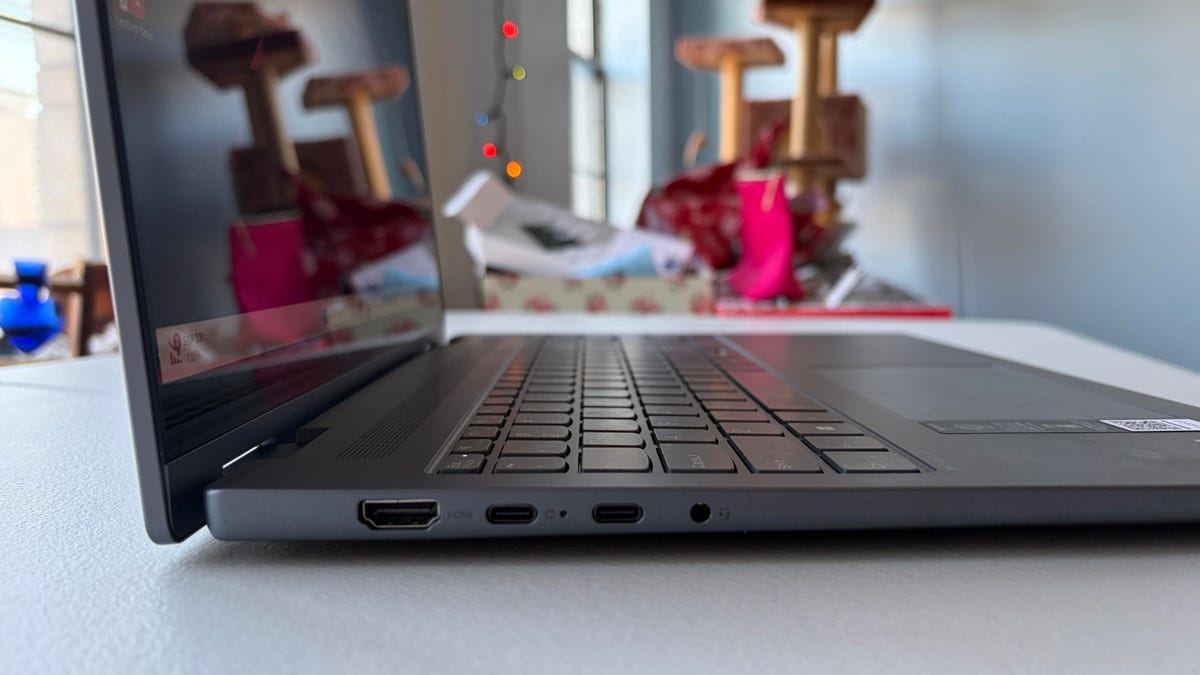
One last limitation of the design: you better not be hoping to charge the IdeaPad 5i 16 2-in-1 Gen 10 from the right side of its chassis because both of the USB-C ports are on the left side.
The single speaker located just above the keyboard is perfectly adequate for a budget laptop, and I was happy enough with the 1080p IR integrated webcam. This camera might fuzz out your backgrounds and fail to provide perfect color contrast, but the picture quality is decent enough when focused on the user — and when you’re rushing into the Zoom meeting you’re already five minutes late to, that’s the kind of tangible thing that counts.
Is the Lenovo IdeaPad 5i 2-in-1 Gen 10 worth buying?
The IdeaPad 5i 16 2-in-1 Gen 10 is a laptop that’ll force you to make sacrifices, but that’s something you should expect from a budget model. It’s a hefty, awkward two-in-one that weighs over four pounds but has a convenient 360-degree hinge for tablet mode. Compromises made on basic hardware like the keyboard and touchpad lead to a finicky and frustrating user experience at times, but the battery life and processing power are genuinely impressive compared with similar budget laptops. If you’re willing to put up with some of the hardware frustrations, the IdeaPad 5i 16 2-in-1 Gen 10 provides excellent performance and battery life compared to similar laptops — if you can get this computer on sale, its versatility makes it a solid budget pick for work and leisure.
The review process for laptops, desktops, tablets and other computerlike devices consists of two parts: performance testing under controlled conditions in the CNET Labs and extensive hands-on use by our expert reviewers. This includes evaluating a device’s aesthetics, ergonomics and features. A final review verdict is a combination of both objective and subjective judgments.
The list of benchmarking software we use changes over time as the devices we test evolve. The most important core tests we’re currently running on every compatible computer include Primate Labs Geekbench 6, Cinebench R23, PCMark 10 and 3DMark Fire Strike Ultra.
A more detailed description of each benchmark and how we use it can be found on our How We Test Computers page.
Geekbench 6 CPU (multi-core)
Dell 16 Plus 2-in-1 11080Dell 14 Plus 2-in-1 10554Acer Aspire 16 AI 10521Lenovo IdeaPad 5i 16 2-in-1 Gen 10 10,388Lenovo Yoga 7 16 Gen 9 9507Lenovo IdeaPad Slim 5i 8939
Geekbench 6 CPU (single-core)
Dell 14 Plus 2-in-1 2792Dell 16 Plus 2-in-1 2760Lenovo IdeaPad 5i 16 2-in-1 Gen 10 2,645Lenovo IdeaPad Slim 5i 2587Lenovo Yoga 7 16 Gen 9 2378Acer Aspire 16 AI 2139
Cinebench 2024 CPU (multi-core)
Lenovo IdeaPad Slim 5i 677Dell 16 Plus 2-in-1 537Lenovo IdeaPad 5i 16 2-in-1 Gen 10 530Dell 14 Plus 2-in-1 491Acer Aspire 16 AI 426
Cinebench 2024 CPU (single-core)
Dell 16 Plus 2-in-1 122Dell 14 Plus 2-in-1 111Lenovo IdeaPad 5i 16 2-in-1 Gen 10 109Lenovo IdeaPad Slim 5i 108Acer Aspire 16 AI 96
3DMark Steel Nomad
Dell 16 Plus 2-in-1 815Lenovo IdeaPad 5i 16 2-in-1 Gen 10 380Acer Aspire 16 AI 227Dell 14 Plus 2-in-1 220Lenovo IdeaPad Slim 5i 171
PCMark 10 Pro Edition
Dell 16 Plus 2-in-1 6805Lenovo IdeaPad 5i 16 2-in-1 Gen 10 6757Dell 14 Plus 2-in-1 6752Lenovo Yoga 7 16 Gen 9 6618Lenovo IdeaPad Slim 5i 6067
Online Streaming Battery Drain test
Acer Aspire 16 AI 21 hr, 9 minLenovo IdeaPad Slim 5i 15 hr, 24 minLenovo IdeaPad 5i 16 2-in-1 Gen 10 14 hr, 58 minDell 14 Plus 2-in-1 14 hr, 55 minLenovo Yoga 7 16 Gen 9 10 hr, 57 minDell 16 Plus 2-in-1 8 hr, 58 min
Read the full article here