

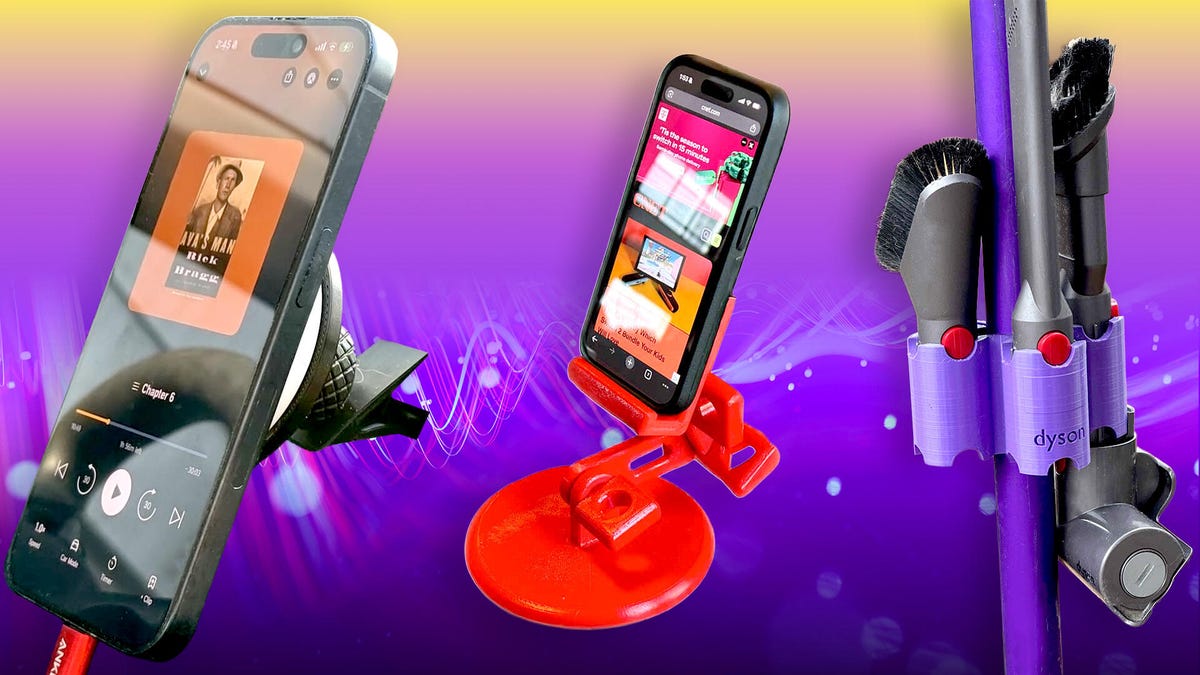
3D printing isn’t just a hobby for me. I’ve been using it for years to make useful tools and custom accessories that manufacturers often don’t sell or have discontinued. I’ve printed out more geegaws and doodads for use around my house than I can count, but these are my favorites: a Dyson tool holder, two phone stands, custom storage bins and a custom cookie cutter modeled after my dog, Jasper.
That’s not an exhaustive list by any means. Almost any tool or accessory you can imagine can be 3D printed. All of the 3D prints we featured can be printed with any 3D printer, including our top pick, the $280 Bambu Labs A1. I printed my versions on a Prusa Mini Plus.
I printed my own Dyson tool holder
I love my Dyson vacuum: it sucks in the best possible way and has plenty of cleaning heads for a variety of tasks. The included dock has no place to store all of them, though, so I keep misplacing them. Until I printed this Dyson Tool Holder, that is. It holds up to six cleaning heads, putting them exactly where you need them while you clean.
After printing the 3D model, I used four M3 screws to clamp it to the long extension wand of my Dyson. It is designed for the Dyson V11, but it works fine with my V8 and even holds the bulky hair tool. It should work with any Dyson cordless that has the same-diameter wand extension. The vacuum still fits into the standard charging dock, making it much easier to store. If that looks too bulky, go with a wall-mounted version. Pro tip: The best match I found for the purple of my Dyson was Polymaker Polylite PETG filament in purple, which is similar but a bit lighter.
A drawer knife holder helped save my dulling blades
You don’t just throw a good set of knives into a drawer to get all blunt — you protect their sharp edges. This simple drawer knife holder is a great way to do that, as it holds five knives, sharp edges down and away from prying fingers and all the other junk in your drawer. It’s designed to integrate with Ikea drawer separators, but it works just fine on its own as well. I printed this one in mint green PLA filament from Polymaker. This attractive, easy-to-print filament is tough enough for everyday use but flexible enough to hold knives of various thicknesses.
Custom cookie cutters made from my dog’s model
Want to make your own customized cookies? A 3D printer and the appropriately named CookieCad designer or CookieAI can do just that. You upload an image or text, and it creates a 3D-printable design. You have to subscribe to get more options than a basic cookie-cutter, but it might be worth it if you’re a big home baker. You can create simple cutter designs for free, though, as I did.
I made my own Jasper Dog Cookies by using the photo tools in Apple Photos to cut my dog Jasper out of a photo, then uploaded it to CookieAI. After a minute or so, I had a 3D design for the cutter, which I sent to my 3D printer and printed in PLA. A bit of cookie dough rolling and stamping later, I had these cute Jasper Dog Cookies ready to bake!
These cookie-cutter creator apps can be a bit picky about the photo. You want a simple, bold image with minimal detail, like a silhouette portrait or a head-and-shoulders shot. I was lucky with my photo — Jasper has quite an, erm, distinctive profile, which I turned into a silhouette, which created a characteristic shape for the cookies. I’m making dog treats with this cookie cutter to give to his friends.
One thing to note here: 3D printing materials are not food-safe, so never use them directly with any food, since they can shed microplastics and harbor bacteria. What I did was to put Saran Wrap over the cookie dough after rolling, then use the cutter through this, pressing gently to keep the wrap intact. After that, I removed the wrap and used a sharp, clean knife to cut out any cookies that didn’t separate.
I made storage boxes, organizers and more with Gridfinity
Gridfinity is an open-source standard for 3D-printed storage boxes, modular drawers, desk organizers and many other cool things to help you organize stuff. The cool part is that it all works together because it is based on the same standard grid system. So, all of those models will fit into the same baseplate system that can be stored in a drawer, screwed to a wall, or put, well, pretty much anywhere. You can even put magnets in it to hold the containers in place. My favorite design so far has to be Bookfinity — book-like containers with a title on the spine that shows what’s inside.
Pull out a book and open it. It has customized compartments for screws, bolts, washers, first aid supplies and anything else you want to organize. Can’t find the design you want? Customize your own. You can change the text, add logos, tweak the book size, then drop in whatever holders, containers or other Gridfinity parts you want to use. I couldn’t print the multicolor version (my multicolor printer isn’t working at the moment), but I was able to print a single-color version that worked perfectly.
Never buy a cell phone mount again
You can never be too rich, too good-looking or have too many things to hold your cellphone. I have two favorite 3D-printed ones — an adjustable one for use at home and one that clips onto the air vent in my car.
For around the house, I like this 3D-printed adjustable mount from Pork3D, which is easy to print, assemble, and adjust, with 3D-printed bolts that lock the arms in place. You can also route a power cable through the bolt handles to keep it out of the way. I initially 3D-printed it in orange PLA, but later decided it needed to be a nice fire-engine red. So, I painted it with Krylon Fusion Plastic spray paint, which bonded well to the PLA. Pro tip: Spray paint like this (or a clear-coat spray) is an excellent way to give a 3D print a smooth, clean finish, and it is less stinky and dangerous than using something like Plastic Weld or acetone.
My personal pick for mounting my phone in the car is this car mount by SethMoser. I like it because it is simple, flexible and just works. After printing the version that clips onto the air vent in black PLA, I assembled it by inserting a couple of the ring spacers into the nut and inserting the ball mount. A quick twist of the ring, and it was secure. Next, I attached a MagSafe charging pad to the front with a sticky pad, tucked the cable away and connected it to the USB port in my car. It held my iPhone perfectly, putting it within easy glancing distance for undistracted driving. SethMoser has produced another even simpler version, but I prefer the flexibility of the first.
3D printed holiday decorations
Want something truly unique to hang for the winter? How about unique 3D-printed snowflakes? This model uses the Makerworld customizer to generate unique snowflakes — just hit the customizer button, enter a random five-digit number, and it will create a unique snowflake. You can change the size, the number of arms and other details and even make sure the design includes a spot to hang it from a hook.
OK, so the mathematicians among you will have spotted something about the “uniqueness.” The seed that creates the snowflake is a number from one to 999,999, so there are about a million possible variants. That’s before you include the number of arms and the branch level, which controls the complexity of the flake. Anyway, it is pretty unlikely that someone will print the same snowflake as you, with all the holiday party social anxiety that could cause.
When you’ve found a design you like, click Download in the top-right corner to print it yourself. If you have a Bambu Labs printer, you can go straight from there to printing: just select your printer from the list, and it will send it right to your printer. If you have another brand of printer, just select any printer from the list, then hit the arrow next to the big Download button and choose STL file. You can then load the downloaded STL model into the slicer software for your printer and print away.
I found the best results from setting the thickness to about 3 or 4 millimeters and using a 0.2mm layer thickness, as this gives the snowflake a little more strength. Print it too thin, and the ends tend to snap off when you lift it from the print bed.
Real snowflakes usually have six arms because of the crystalline properties of water, but if you want to baffle people, set the arms to five or seven and see if they can figure out what’s wrong with them.
These are just five of the examples I use in my day-to-day, but there are many more functional 3D prints you can do.
Read the full article here