

Pros
- Sleek, solid design at a reasonable weight
- Strong performance with long battery life
- Quiet and cool operation
- Physical keys have returned to the Function row
- Huge, haptic touchpad
- Quad speakers produce great sound
Cons
- Matches MacBook Pro in price but not performance
- Seams along the edges and below the keyboard are magnets for debris
- Limited port selection with no adapter included
- No fingerprint reader
We’ve got a bit of a New Coke situation here with Dell. For those unfamiliar, in 1985, Coca-Cola replaced its original formula with a new recipe in an attempt to reverse declining sales and a slide in market share. Last year, Dell rebranded its laptops, presumably for the same reason. Dell’s new laptops were greeted as warmly as New Coke and didn’t last much longer than the revamped elixir. Coca-Cola brought back its classic formula after just a few months, and Dell has restored its longtime XPS brand only a year after introducing its new Dell (just Dell), Dell Plus and Dell Premium lineups.
Replacing the classic XPS line, Dell’s Premium laptops were the New Coke-iest of the new bunch. They fell short of the mark with a design that prized form over function and a weight that recalled granite or lead. Solid to be sure, but with shocking, shoulder-wrecking heft. Where New Coke was too sweet, Dell’s new Premium laptops were too heavy.
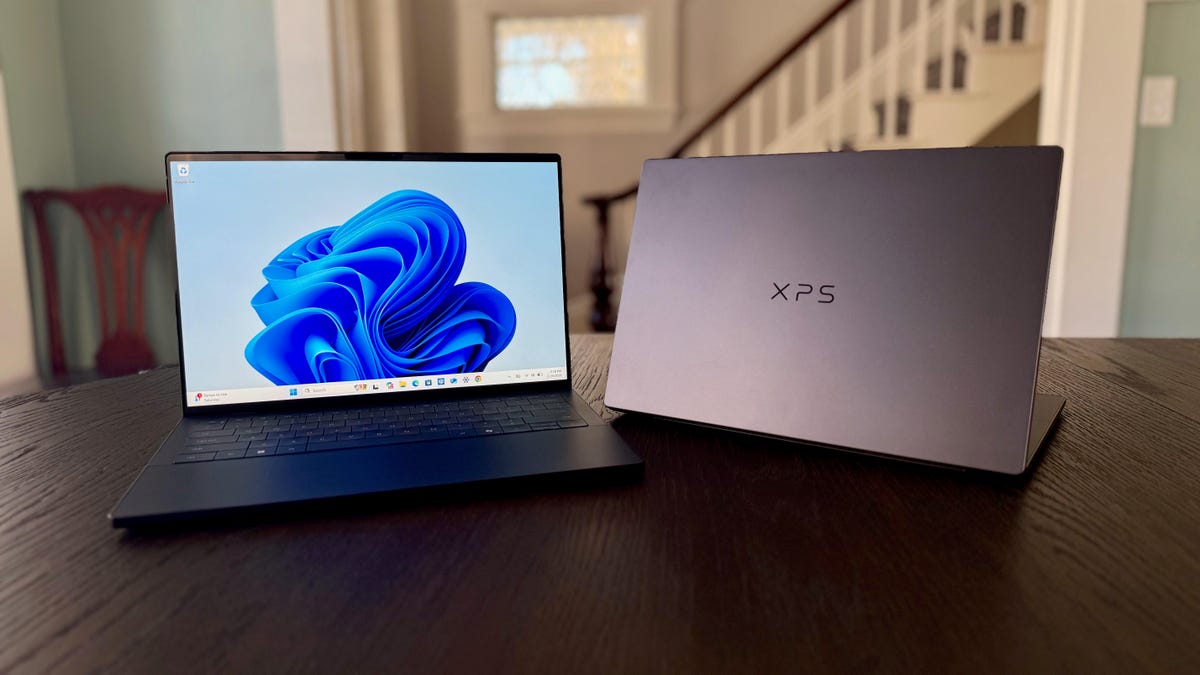
The Dell XPS 14 kickstarts the return of the XPS line alongside the larger XPS 16 (a smaller XPS 13 is expected later this year). It corrects many of the errors of the Dell 14 Premium, including the most egregious, by coming in at a reasonable weight. And with new Intel Panther Lake processors, the XPS 14 delivers more than Diet Coke power with strong overall performance and long battery life.
With the XPS 14, a classic returns with a product worthy of its name and gives Dell a MacBook Pro alternative for Windows users. Like the MacBook Pro, however, the XPS 14 is expensive but not overpriced (the RAM shortage certainly isn’t helping with laptop prices). Starting at $1,350 and quickly accelerating from there, it’ll end up costing a bit more than you would probably like, but you’ll get a fantastic laptop that’s built to last.
Dell XPS 14 test systems
| Dell XPS 14 (IPS display) | Dell XPS 14 (OLED display) | |
| Price as reviewed | $1,450 | $1,950 |
| Display size/resolution | 14-inch 1920×1200 120Hz IPS LCD | 14-inch 2880×1800 120Hz touch OLED |
| CPU | Intel Core Ultra 7 355 | Intel Core Ultra X7 358H |
| Memory | 16GB LPDDR5-7467 | 32GB LPDDR5-9600 |
| Graphics | Intel Graphicss (4 Xe3 cores) | Intel Arc B390 (12 Xe3 cores) |
| Storage | 512GB SSD | 1TB SSD |
| Ports | 3x USB-C Thunderbolt 4, combo audio | 3x USB-C Thunderbolt 4, combo audio |
| Networking | Wi-Fi 7 and Bluetooth 6.0 | Wi-Fi 7 and Bluetooth 6.0 |
| Operating system | Windows 11 Home | Windows 11 Home |
| Weight | 3.18 lbs (1.44 kg) | 3.15 lbs (1.43 kg) |
Dell offers three different chips from Intel’s latest Panther Lake family of mobile processors for the XPS 14. The baseline model features an Intel Core Ultra 5 325 chip, 16GB of RAM, a 512GB SSD and a 1,920×1,200-pixel non-touch IPS display for $1,600. Not coincidentally, Apple’s 14-inch MacBook Pro starts at $1,599.
As outlined in the chart above, Dell sent me two models. Each has one of the higher-end Panther Lake chips on offer.
Like other laptop vendors, Dell constantly rotates discounts of varying degrees on its site. At the time of this review, there was a $250 discount for any XPS 14 configuration. So, the entry-level Core Ultra 5 system was selling for $1,350, and my two models were selling for $1,450 and $1,950.
The XPS 14 starts at £1,599 in the UK and AU$3,249 in Australia.
Dell XPS 14 performance
The twin XPS 14s I tested give us a chance to compare a Core Ultra 7 processor with a Core Ultra X7 part. The Core Ultra X7 358H is a 16-core processor with four performance cores, eight efficient cores and four low-power efficient cores. Remove the eight efficient cores, and you basically end up with the Core Ultra 7 355; it’s an eight-core chip with four performance cores and four low-power efficient cores.
The bigger difference between the two processors is the number of cores in the integrated GPU. The Core Ultra 7 355’s iGPU is simply labeled as Intel Graphics and has four Xe3 graphics cores. The Core Ultra X7 358H, in contrast, has Intel’s integrated Arc B390 graphics processor with 12 Xe3 cores. Put simply, the Ultra 7’s integrated graphics are made for general use, while the Ultra X7 is better equipped for gaming and content creation.
Outside of the CPUs themselves, there’s another difference in my two XPS 14 test systems worth mentioning. The XPS 14 OLED model has the advantage in memory, in terms of both amount at speed, with 32GB of 9,600MHz RAM. The lower-end XPS 14 with a standard IPS LCD has 16GB of 7,467MHz RAM.
Now, onto the benchmark results, which you can check out in the performance charts at the end of this review. The OLED model with the Core Ultra X7 358H finished testing with scores similar to those of the MSI Prestige 14 Flip AI Plus, which uses the same CPU. The OLED XPS 14 enjoyed larger advantages against the lower-end IPS XPS 14 in our multicore tests, a not surprising result given its CPU has double the cores of the Core Ultra 7 355 processor.
The OLED model was able to put even greater distance between itself and the IPS model on our graphics and gaming tests. Again, it comes down to cores: the 12 Xe3 graphics cores of the integrated Arc B990 GPU you get with the Core Ultra X7 358H processor are triple the cores of the standard integrated Intel Graphics of the Core Ultra 7 355.
Still, neither XPS 14 could match the scores of the M5 MacBook Pro 14, although the OLED model did edge the MacBook Pro on one test, 3DMark Steel Nomad, which again shows the power of Intel’s integrated Arc B390 GPU.
I ran our gaming benchmarks on the higher-end XPS 14, and it turned in impressive frame rates for a laptop with an integrated GPU. It managed to eclipse the sweet spot of 60 frames per second on the Guardians of the Galaxy benchmark, averaging 64fps on the test at 1080p with quality settings at High. You’ll get better performance from a laptop with an entry-level RTX 4050 or 5050 GPU, but those models are typically bulkier and more expensive, with much shorter battery life. It fell short of 60fps on the Shadow of the Tomb Raider test at 50fps.
On more demanding titles, Assassin’s Creed: Shadows and F1 2024, I needed to adjust quality settings down and employ XeSS Frame Generation, which uses AI to boost frame rates, to climb above 60fps. Still, both games looked great using XeSS FG, and the XPS 14 stayed remarkably cool and quiet during gameplay.
This efficiency shows up not only in quiet operation but also results in long battery life. A higher-resolution OLED panel consumes battery resources at a greater clip than a lower-res IPS display, but both XPS 14 laptops delivered outstanding results in battery testing. The IPS model lasted more than 21 hours, and the OLED model lasted nearly 15 hours. The MacBook Pro was longer than either at 23 hours, while the Qualcomm Snapdragon X-based HP OmniBook 5 14 still holds the battery life crown at more than 28 hours.
Let’s get physical (in the Function row)
Good riddance, touch-sensitive icons in the Function row and hello, actual, physical keys! I like tactile feedback when I press a button; it lets me know my physical action was received. I also take comfort in knowing I have a functioning Esc key at all times when things in Windows go sideways. Sure, the Function row of smooth icons looked sleek on the Dell 14 Premium, but I didn’t like using them. There’s a good reason why Apple did away with the Touch Bar years ago on its MacBooks — nobody liked using it!
Below the Function row, the keyboard has the same latticeless design with no spacing between the keys as the Dell 14 Premium. But the keys have been tuned so that they feel firmer and more stable than previously; my off-center key strikes on the XPS 14 didn’t feel as wobbly as on the 14 Premium.
Below the keyboard, the touchpad has the same haptic feedback as the previous model, but Dell has added subtle etched lines on either side so you can see and feel where its active surface ends. It’s a great design tweak that makes the laptop easier to use while preserving its sleek looks.
And the XPS 14 is sleek-looking. And solid feeling. It’s made from CNC-machined aluminum and feels just as rigid and sturdy as the Dell 14 Premium, but does so without the tank-like feel. The 14 Premium weighed a leaden 3.8 pounds, and the XPS 14 comes in at less than 3.2 pounds. The IPS model weighs 3.2 pounds, and the OLED model is ever-so-slightly lighter. That’s a much more reasonable weight for a 14-inch laptop and is appreciably lighter than the 14-inch MacBook Pro that weighs 3.5 pounds.
The XPS 14 also has some of the thinnest display bezels on any laptop, making for a very compact 14-inch laptop. The OLED model is a hair thinner than the IPS model, but both are thinner than the 14-inch MacBook Pro. And each is more compact at 12.2 inches wide but 8.3 inches deep, compared with the MacBook Pro that’s 12.3 inches wide and 8.7 inches deep.
Dell offers the XPS 14 in one color it calls Graphite. (A second color will be introduced in the next month or so, called Shimmer, that Dell described to me as a more of a “champagne” hue compared to the silvery-white Platinum it previously offered on many of its laptops.) The Graphite color is a matte black that’s a shade lighter than the Space Black Apple offers for the MacBook Pro.
The XPS 14 and MacBook Pro are very similar in overall appearance, but there are a few differences, in addition to the latticeless keyboard on the XPS 14. The XPS 14’s corners aren’t as rounded as the MacBook Pro’s, and it lacks the cutout below the touchpad that helps you lift the MacBook Pro’s lid to open the laptop. On the XPS 14, the lid just barely overhangs the keyboard deck to give your finger enough purchase to lift the lid. And I was able to do so with one finger.
The XPS 14 also lacks the seamless quality of the MacBook Pro’s unibody design. A seam runs along the edges of the keyboard deck, and there’s also a seam at the bottom of the keyboard, separating it from the touchpad/wrist rest area. The XPS 14 is a good-looking laptop, but it doesn’t have the smooth, one-piece appearance that gives a MacBook its iconic look. Plus, these narrow seams are traps for collecting lint, dirt, dust and other detritus.
I tested both XPS 14 display options
The OLED display adds $150 to the cost of the XPS 14, and it’s money well spent. Not only do you get a sharper picture with the higher 2.8K resolution that provides crisper text, but significantly better contrast with the deep blacks you only get with an OLED. Color performance was also better on the OLED. It covered 100% of the sRGB and P3 gamuts and 95% of the larger AdobeRGB color space. Compare those numbers to 98% sRGB, 73% P3 and 72% AdobeRGB on the IPS display.
The OLED panel also supplies touch support, which you don’t get with the LCD. Both displays, however, supply a dynamic refresh rate of up to 120Hz. I was surprised to find that the IPS panel has a wider range of 1 to 120Hz than the OLED, which goes from 20 to 120Hz.
The IPS display was brighter, hitting a peak of 535 nits on my tests with a Spyder X Elite colorimeter. The OLED display achieved a maximum of 406 nits. I wouldn’t let lower brightness dissuade you from the OLED panel. With effectively zero-nit black levels, an OLED doesn’t need to get as bright because its higher contrast ratio keeps images on the screen more visible in brightly lit environments than an IPS panel at the same brightness. The only thing you sacrifice with the OLED display is battery life, but getting close to 15 hours on a single charge shouldn’t restrict your mobility with the XPS 14.
With either model, you get quad speakers that pump out impressive sound for a laptop. I could detect some bass when listening to music, and dialogue and effects in shows and movies sounded clear and natural.
Both models feature an 8-megapixel webcam that can capture 4K photos and 1440p video. That’s great for an integrated webcam, and even better is the fact that Dell squeezes the camera into the narrow bezel above the display and doesn’t need a notch in the display, as you have on a MacBook.
The webcam has an IR webcam for Windows Hello logins using facial recognition. If you prefer using your finger for secure, biometric logins, you’re out of luck; the XPS 14 lacks a fingerprint scanner. Many laptops offer both options, so I’m surprised to find only the one on a premium laptop like the XPS 14.
Another nitpick: The XPS 14 has a paltry port selection. The three Thunderbolt 4 ports are nice, but that’s it, other than a headphone jack. And Dell doesn’t include an adapter connecting to your USB-A and HDMI devices.
Is the 2026 Dell XPS 14 a good laptop?
With the XPS 14, Dell corrects many of the missteps it took with the previous 14 Premium. I love its sleek looks, solid feel and trim dimensions. And I love the fact that it’s more than half a pound lighter than the tank that was the Dell 14 Premium. Dell must be feeling pretty proud about the XPS 14 because it slapped a premium price on this premium laptop. Apple does the same thing with its 14-inch MacBook Pro, but the M5 processor bested the Core Ultra X7 358H in the higher-end XPS 14 I tested with the OLED display.
The two laptops make a great comparison because the OLED XPS 14 and M5 MacBook Pro we tested each cost $1,950. In this head-to-head, the MacBook Pro wins in terms of both power and efficiency, with better performance scores on nearly every test and longer battery life. And I still favor the MacBook Pro’s overall design, even if it is a bit heavier. The XPS 14’s return is a triumphant one overall, but the MacBook Pro is still the better premium laptop for creators.
The review process for laptops, desktops, tablets and other computerlike devices consists of two parts: performance testing under controlled conditions in the CNET Labs and extensive hands-on use by our expert reviewers. This includes evaluating a device’s aesthetics, ergonomics and features. A final review verdict is a combination of both objective and subjective judgments.
The list of benchmarking software we use changes over time as the devices we test evolve. The most important core tests we’re currently running on every compatible computer include Primate Labs Geekbench 6, Cinebench 2024, PCMark 10 and 3DMark Fire Strike Ultra.
A more detailed description of each benchmark and how we use it can be found on our How We Test Computers page.
Geekbench 6 CPU (multi-core)
Apple MacBook Pro 14 (M5, late 2025) 17946Lenovo Yoga Pro 9i 16 Aura Edition 17748MSI Prestige 14 Flip AI Plus 16607Dell XPS 14 (OLED) 16197Dell 14 Premium 14921MSI Katana 15 HX B14W 14587Asus Vivobook S 15 14058HP OmniBook X Flip 14 12747HP OmniBook 5 14 11379Dell XPS 14 11207Dell 14 Plus 11027
Geekbench 6 CPU (single-core)
Apple MacBook Pro 14 (M5, late 2025) 4263Lenovo Yoga Pro 9i 16 Aura Edition 2980MSI Prestige 14 Flip AI Plus 2896HP OmniBook X Flip 14 2823Dell XPS 14 (OLED) 2813MSI Katana 15 HX B14W 2738Dell 14 Plus 2694Dell 14 Premium 2668Dell XPS 14 2599Asus Vivobook S 15 2446HP OmniBook 5 14 2395
Cinebench 2024 CPU (multi-core)
MSI Katana 15 HX B14W 1220Lenovo Yoga Pro 9i 16 Aura Edition 1218Apple MacBook Pro 14 (M5, late 2025) 1118Asus Vivobook S 15 963Dell 14 Premium 799Dell XPS 14 (OLED) 700MSI Prestige 14 Flip AI Plus 692HP OmniBook 5 14 675HP OmniBook X Flip 14 636Dell XPS 14 530Dell 14 Plus 465
Cinebench 2024 CPU (single-core)
Apple MacBook Pro 14 (M5, late 2025) 199Lenovo Yoga Pro 9i 16 Aura Edition 130Dell XPS 14 (OLED) 124Dell 14 Premium 122Dell 14 Plus 120Dell XPS 14 117MSI Katana 15 HX B14W 117MSI Prestige 14 Flip AI Plus 115HP OmniBook X Flip 14 114HP OmniBook 5 14 110Asus Vivobook S 15 107
PCMark 10 Pro Edition
Lenovo Yoga Pro 9i 16 Aura Edition 9754Dell XPS 14 (OLED) 8981MSI Prestige 14 Flip AI Plus 8761Dell XPS 14 7467HP OmniBook X Flip 14 7199MSI Katana 15 HX B14W 7024Dell 14 Premium 6881Dell 14 Plus 6767
3DMark Steel Nomad
Lenovo Yoga Pro 9i 16 Aura Edition 2278MSI Katana 15 HX B14W 2207MSI Prestige 14 Flip AI Plus 1527Dell XPS 14 (OLED) 1286Apple MacBook Pro 14 (M5, late 2025) 1129Dell 14 Premium 836Dell 14 Plus 575Dell XPS 14 524Asus Vivobook S 15 496HP OmniBook X Flip 14 456HP OmniBook 5 14 228
3DMark Fire Strike Ultra
MSI Katana 15 HX B14W 6285Lenovo Yoga Pro 9i 16 Aura Edition 6247MSI Prestige 14 Flip AI Plus 3491Dell XPS 14 (OLED) 3019Dell 14 Plus 2239Dell 14 Premium 2139HP OmniBook X Flip 14 1916Dell XPS 14 1554HP OmniBook 5 14 919
Online streaming battery drain test
HP OmniBook 5 14 28 hr, 19 minMSI Prestige 14 Flip AI Plus 25 hr, 18 minM5 Apple MacBook Pro 14 22 hr, 59 minDell XPS 14 21 hr, 7 minAsus Vivobook S 15 15 hr, 26 minDell XPS 14 (OLED) 14 hr, 42 minDell 14 Plus 14 hrLenovo Yoga Pro 9i 16 Aura Edition 11 hr, 33 minDell 14 Premium 10 hr, 21 minHP OmniBook X Flip 14 9 hr, 1 minMSI Katana 15 HX B14W 6 hr, 14 min
Guardians of the Galaxy (High @1920 x 1080)
Acer Predator Helios Neo 16 PHN16-71 165MSI Katana 15 HX B14W 159Lenovo Yoga Pro 9i 16 Aura Edition 155Acer Nitro 16 AN16-41-R3ZV 128Dell XPS 14 9440 108Dell XPS 14 (OLED) 64MSI Prestige 14 Flip AI Plus 44Dell 14 Premium 30
Shadow of the Tomb Raider (Highest @ 1920 x 1080)
Lenovo Yoga Pro 9i 16 Aura Edition 159MSI Katana 15 HX B14W 155Acer Predator Helios Neo 16 PHN16-71 136Acer Nitro 16 AN16-41-R3ZV 126Dell XPS 14 9440 84MSI Prestige 14 Flip AI Plus 64M5 Apple MacBook Pro 14 56Dell XPS 14 (OLED) 50Dell 14 Premium 31
Assasin’s Creed Shadows (1920×1080 @ High)
MSI Katana 15 HX B14W 53Lenovo Yoga Pro 9i 16 Aura Edition 48MSI Prestige 14 Flip AI Plus 27Dell XPS 14 (OLED) 24
F1 24 (1920×1080 @ Ultra High)
MSI Katana 15 HX B14W 104Lenovo Yoga Pro 9i 16 Aura Edition 76Dell XPS 14 (OLED) 33MSI Prestige 14 Flip AI Plus 25
System configurations
| Dell XPS 14 | Windows 11 Home; Intel Core Ultra 7 355; 16GB DDR5 RAM; Intel Graphics; 512GB SSD |
|---|---|
| Dell XPS 14 (OLED) | Windows 11 Home; Intel Core Ultra X7 358H; 32GB DDR5 RAM; Intel Arc B390 Graphics; 1TB SSD |
| MSI Prestige 14 Flip AI Plus | Windows 11 Home; Intel Core Ultra X7 358H; 32GB DDR5 RAM; Intel Arc B390 Graphics; 1TB SSD |
| Dell 14 Plus | Windows 11 Home; Intel Core Ultra 7 256V; 16GB DDR5 RAM; Intel Arc 140V Graphics; 1TB SSD |
| Dell 14 Premium | Windows 11 Home; Intel Core Ultra 7 255H; 32GB DDR5 RAM; Intel Arc 140T Graphics; 1TB SSD |
| Asus Vivobook S 15 | Windows 11 Home; Qualcomm Snapdragon X Elite X1E-78-100; 16GB DDR5 RAM; Qualcomm Adreno Graphics; 1TB SSD |
| HP OmniBook 5 14 | Windows 11 Home; Qualcomm Snapdragon X Plus X1P-42-100; 32GB DDR5 RAM; Qualcomm Adreno Graphics; 1TB SSD |
| HP OmniBook X Flip 14 | Windows 11 Home; AMD Ryzen AI 7 350; 32GB DDR5 RAM; AMD Radeon 860M Graphics; 1TB SSD |
| Lenovo Yoga Pro 9i 16 Aura Edition | Windows 11 Home; Intel Core Ultra 9 285H; 32GB DDR5 RAM; Nvidia GeForce RTX 5050; 1TB SSD |
| MSI Katana 15 HX B14W | Windows 11 Home; Intel Core i7-14650HX; 16GB DDR5 RAM; Nvidia GeForce RTX 5050; 512GB SSD |
| Acer Predator Helios Neo 16 PHN16-71 | Windows 11 Home; Intel Core i5-13500HX; 16GB DDR5 RAM; Nvidia GeForce RTX 4050; 512GB SSD |
| Acer Nitro 16 AN16-41-R3ZV | Windows 11 Home; AMD Ryzen 5 7640HS; 16GB DDR5 RAM; Nvidia GeForce RTX 4050; 512GB SSD |
| M5 Apple MacBook Pro 14 | Apple MacOS Tahoe 26.0.1; Apple M5 (10-core CPU, 10-core GPU); 16GB LPDDR5; 1TB SSD |
Read the full article here