

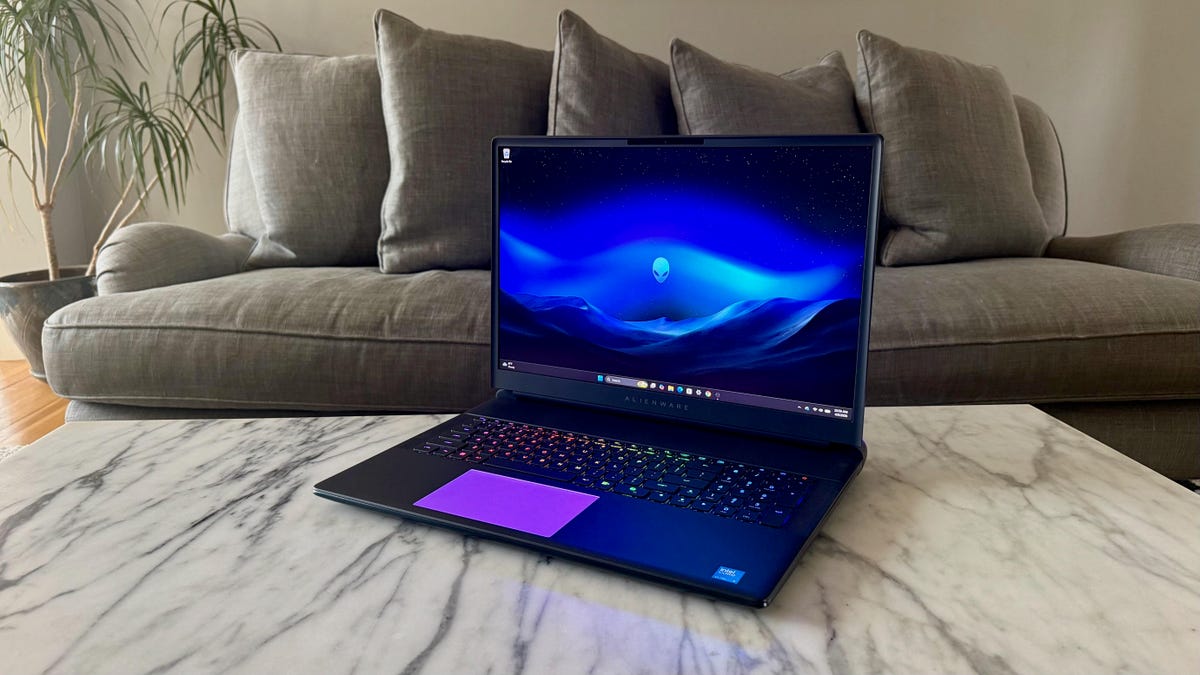
Pros
- RTX 5090 delivers outstanding 3D performance
- 18-inch display is massive and fast
- CherryMX mechanical keyboard is awesome
- Dazzling RGB lighting is everywhere
- RAM and storage can be upgraded after purchase
Cons
- Pricing will make you weak in the legs
- You’ll need to lift with your legs to move it
- No OLED or mini-LED display options
- Battery life is predictably short
The Alienware 18 Area-51 is a laptop in name only. Its extreme size makes it more of a desktop PC that can happen to fold shut. This is a desktop replacement laptop that’s not leaving your desk very often. Unless you are the size of a professional wrestler turned actor like Dwayne “The Rock” Johnson or Danny Bautista, I don’t recommend placing the Alienware 18 Area-51 on your lap.
Even if you wanted to take it with you, I’d like to see you try to slide this thing into your backpack. No, you’ll need a duffle bag to hit the road with the Alienware 18 Area-51. Still, it’ll feel more like traveling with an all-in-one than a laptop — this 18-inch, 9-pound behemoth weighs nearly as much as Apple’s 24-inch iMac.
But what you’ll be lugging around or, more likely, have anchored to your desk is a ripper of a gaming laptop. The Alienware 18 Area-51 offers a choice of three Intel Arrow Lake CPUs and up to Nvidia’s flagship GeForce RTX 5090 GPU. You can load it up with as much as 64GB of DDR5-6400 RAM and 12TB of storage. The RAM and SSD aren’t soldered to the motherboard, so you can replace or upgrade each.
The expansive-for-a-laptop 18-inch display targets gamers. Its 2,560×1,600-pixel resolution lets you play games at 1440p, and its speedy 300Hz refresh rate will keep up with the high frame rates at 1080p. But for the price, I’m surprised it’s a standard IPS LCD and not an OLED or mini-LED display. Creators looking for a 4K resolution with stronger color performance and greater contrast will need to search elsewhere for something, such as the Asus ProArt P16.
Likewise, creators don’t need the Alienware 18 Area-51’s mechanical keyboard upgrade, but gamers will certainly love the feel of the CherryMX switches. Just be prepared for sticker shock for the pleasure of mashing those mechanical keys.
If you’ve got a chunk of money to throw at an oversize, over-the-top gaming laptop, the Alienware 18 Area-51 is a great target at which to aim.
Alienware 18 Area-51
| Price as reviewed | $5,350 |
|---|---|
| Display size/resolution | 18-inch 2560×1600 300Hz IPS LCD |
| CPU | Intel Core Ultra 9 275HX |
| Memory | 64GB LPDDR5-6400 |
| Graphics | Nvidia GeForce RTX 5090 |
| Storage | 2TB SSD |
| Ports | 2x USB-C Thunderbolt 5, 3x 1 USB Type-A 3.2 Gen 1, HDMI 2.1, Ethernet, SD card slot, combo audio |
| Networking | Wi-Fi 7 and Bluetooth 5.4 |
| Operating system | Windows 11 Home 25H2 |
| Weight | 9.2 lbs (4.2 kg) |
Dell sells three fixed configurations of the Alienware 18 Area-51 and offers a customizable model as well.
The entry-level model costs $2,400 for an Intel Core Ultra 7 255HX processor and RTX 5060 graphics along with 32GB of RAM and a 1TB SSD. That’s the lowest of the three fixed configurations, as well as the starting point of the configurable model. The middle of the three fixed models costs $2,950 for a Core Ultra 9 275HX, RTX 5070 Ti and a 2TB SSD. For $3,500, you get RTX 5080 but oddly drop back to 1TB of storage with the top preconfigured system.
Even higher CPU and GPU options are available with the customizable system where you can get a Core Ultra 9 290HX Plus and an RTX 5090, plus up to 64GB of RAM and 12TB of storage in a RAID 0 array.
Our test system costs $5,350 and features the Core Ultra 9 275HX, 64GB of RAM, RTX 5090 graphics and a 2TB SSD. The lone display offered is an 18-inch IPS panel with a 2.5K (2,560×1,600 pixels) resolution and 300Hz refresh rate. The laptop comes with two keyboard options; our test system has the CherryMX mechanical keyboard that adds a hefty $520 to the bill.
The Alienware 18 Area-51 starts at £2,299 in the UK and AU$5,298 in Australia. Pricing for the US and international models reflects Dell’s discounts at the time of this review.
Big and bold and littered with RGB lighting
The Alienware 18 Area-51 is the XL version of the Alienware 16 Area-51 we reviewed last year. The two share the same design with gently curved edges, aluminum top and bottom panels, a large thermal shelf behind the display and windowed section on the bottom panel that doesn’t let you see much more than a couple cooling fans and a few ribbon connectors. And there’s RGB lighting everywhere.
The 18-inch model is absolutely massive. The laptop weighs a staggering 9.2 pounds, which is a full 2 pounds heavier than the 16-inch version. Meanwhile, the 360-watt power adapter adds another 2.2 pounds if you want to take this thing on the road. That’s about 11.5 pounds of laptop.
But if you want a giant laptop for gaming at home (though even moving it from one room to another is a two-handed operation), then the 18-inch display certainly provides a larger canvas. This is a display geared toward gamers specifically and not creators who might also like to game. It’s an LED-backlit IPS LCD panel that doesn’t have the wide color coverage or contrast of an OLED that you can usually find at this price (or less), such as with the Asus ProArt P16 or Asus ROG Zephyrus G16.
On my display tests with a Spyder X Elite colorimeter, it covered 100% coverage of the sRGB color space but came up short in the larger color gamuts, hitting 98% of P3 and 88% of AdobeRGB. Compare those figures with the ProArt P16, a true creator laptop, that provides 100% coverage of the sRGB and P3 gamuts and 95% of AdobeRGB.
The Alienware 18 Area-51 proved to be plenty bright, however, achieving a peak brightness of 509 nits. And with a 300Hz refresh rate, it has the speed that gamers look for. It’s both bigger and faster than the Alienware 16 Area-51, which has a 16-inch, 240Hz panel.
With or without the keyboard upgrade, the Alienware 18 Area-51 is excessive. So, I’d argue that it doesn’t make sense to spend the money for this over-the-top laptop without also spending the money for the mechanical keyboard. The CherryMX switches provide a tactile feedback that is so much snappier and more satisfying to mash in games than membrane keys. And with the ultralow-profile design keeps key travel to a reasonable level; I was able to type at my normal clip and enjoyed the clicky-clack feel. It’s certainly noisier than a normal laptop keyboard, but the enormous Alienware 18 Area-51 isn’t likely to be lugged to a library, coffee shop or any other public space with any regularity.
With either keyboard option, you get per-key RGB lighting. And in addition to the keyboard, the Alienware 18 Area-51’s RGB lighting extends to the trackpad, the alienhead logo on the top panel, the thermal shelf behind the display and the two cooling fans you can see through the window on the bottom panel. The customization options are boundless using the Alienware Command Center app.
The Alienware 18 Area-51 has a quad-speaker array, with two tweeters positioned on either side of the keyboard and two woofers on the front edge of the bottom panel. The overall sound is a bit fuller than that of a typical laptop but still felt a bit flat to me, especially when I had the volume pushed near the max. Gamers, keep your headset handy.
The webcam is also a bit underwhelming. It’s just a 1080p camera, while many laptops that cost thousands less than the Alienware 18 Area-51 supply a 1440p or even a 4K camera. It suffices for casual video calls, but streamers will want to use an external webcam. The webcam does have an IR sensor for facial recognition Windows Hello logins, which is especially useful because the laptop lacks a fingerprint reader.
Given the massive size of the Alienware 18 Area-51, it’s no surprise that it has no shortage of ports. Most are located on the back edge of the thermal shelf, where you’ll find two Thunderbolt 5 ports, three USB 3.2 Gen 1 Type-A ports, HDMI 2.1 and Ethernet outputs and the power connector. Two more connections can be found on the laptop’s left side: a headset jack and a full-size SD card reader. One note on Thunderbolt connectivity: It’s GPU dependent. Thunderbolt 5 comes with configurations with RTX 5070 Ti graphics and above.
Inside, the laptop gives you the ability to upgrade both the RAM and storage. Instead of onboard memory soldered to the motherboard, the Alienware 18 Area-51 uses DDR5 modules that you can swap out. And there are a total of three M.2 slots, only one of which was occupied in our test system with the 2TB SSD.
Alienware 18 Area-51 performance
What can I say about the Alienware 18 Area-51’s performance other than it’s incredibly fast and impressive. With its Intel Core Ultra 9 275HX, the Alienware 18 Area-51 delivered excellent multicore and single-core results on our Geekbench 6 and Cinebench 2024 CPU tests.
It was even more impressive on our 3D gaming tests, where its RTX 5090 running at a full 175 watts turned in blazing frame rates, although the gap between it and lower-cost models with RTX 5080 and 5070 GPUs aren’t as big as you might think. But Guardians of the Galaxy and Shadows of the Tomb Raider are older games that aren’t pushing these GPUs to their breaking points.
To further gauge its 3D prowess, I ran our two new gaming benchmarks on the Alienware 18 Area-51. I don’t have results from Assassin’s Creed Shadows and F1 24 from the competing systems, but I can tell you that the Alienware 18 Area-51 ran both games with ease. It averaged 98 frames per second on Assassin’s Creed Shadows at 1080p and High settings. And it maintained a high framerate when I pushed the quality settings to Ultra High, averaging 78 fps. On F1 24, it averaged 171 fps at 1080p and 154 fps at 1440p, both with settings at Ultra High.
Also impressive was the laptop’s ability to stay cool and quiet during gaming. The whir of the cooling fans was a constant presence during games, but they never reached jet-engine levels of noise. The back half of the bottom of the laptop got warm during longer gaming sessions, but not to a worrying degree.
Battery life was predictably short. The Alienware 18 Area-51 lasted just over four hours on our YouTube streaming battery drain test. That’s not the shortest runtime I’ve seen from a gaming laptop, but it still doesn’t let you stray too far from a wall outlet, even if you wanted to lug this nine-plus-pound laptop somewhere.
Is the Alienware 18 Area-51 worth buying?
The Alienware 18 Area-51 is overkill, and that’s the point. No one needs a laptop this large, but if you want the biggest, baddest gaming laptop and have the money to get it, it’s a supercolossal showpiece. From the 3D power of Nvidia’s flagship RTX 5090 and enormous 18-inch display to the fantastic tactile feel of the mechanical keys and dazzling RGB lighting, the Alienware 18 Area-51 is a wonderland of gaming laptop tech.
The review process for laptops, desktops, tablets and other computerlike devices consists of two parts: performance testing under controlled conditions in the CNET Labs and extensive hands-on use by our expert reviewers. This includes evaluating a device’s aesthetics, ergonomics and features. A final review verdict is a combination of both objective and subjective judgments.
The list of benchmarking software we use changes over time as the devices we test evolve. The most important core tests we’re currently running on every compatible computer include Primate Labs Geekbench 6, Cinebench R23, PCMark 10 and 3DMark Fire Strike Ultra.
A more detailed description of each benchmark and how we use it can be found on our How We Test Computers page.
Geekbench 6 CPU (multicore)
Alienware 18 Area-51 21472Alienware 16 Area-51 20043HP Omen 16 Max 18924Alienware 16X Aurora 18587Acer Predator Helios Neo 16S AI 18113Asus ProArt P16 15377Lenovo LOQ 15 9711
Geekbench 6 CPU (single-core)
Alienware 16 Area-51 3073Alienware 18 Area-51 3068HP Omen 16 Max 2961Alienware 16X Aurora 2948Acer Predator Helios Neo 16S AI 2944Asus ProArt P16 2905Lenovo LOQ 15 2475
Cinebench 2024 CPU (multicore)
Alienware 18 Area-51 2113Alienware 16 Area-51 2002Acer Predator Helios Neo 16S AI 1641Alienware 16X Aurora 1630HP Omen 16 Max 1467Asus ProArt P16 1188Lenovo LOQ 15 826
Cinebench 2024 CPU (single-core)
Alienware 18 Area-51 134Alienware 16 Area-51 134HP Omen 16 Max 131Alienware 16X Aurora 129Acer Predator Helios Neo 16S AI 128Asus ProArt P16 115Lenovo LOQ 15 103
3DMark Fire Strike Ultra
Acer Predator Helios Neo 16S AI 17668Alienware 18 Area-51 16431Alienware 16 Area-51 13504HP Omen 16 Max 10975Asus ProArt P16 7530Lenovo LOQ 15 7269Alienware 16X Aurora 6929
Guardians of the Galaxy (High @ 1920 x 1080)
Alienware 18 Area-51 184Alienware 16 Area-51 183Acer Predator Helios Neo 16S AI 177Alienware 16X Aurora 174HP Omen 16 Max 162Asus ProArt P16 124Lenovo LOQ 15 113
Shadow of the Tomb Raider (Highest @ 1920 x 1080)
Alienware 18 Area-51 230Acer Predator Helios Neo 16S AI 219Alienware 16 Area-51 207HP Omen 16 Max 189Alienware 16X Aurora 184Asus ProArt P16 150Lenovo LOQ 15 143
The Riftbreaker GPU (1920 x 1080)
Alienware 18 Area-51 481.21Alienware 16 Area-51 371.84HP Omen 16 Max 345Alienware 16X Aurora 260.11Lenovo LOQ 15 246.81Acer Predator Helios Neo 16S AI 220.58Asus ProArt P16 219
Online streaming battery drain test
Asus ProArt P16 10:52Lenovo LOQ 15 7:48Alienware 16X Aurora 7:36Alienware 18 Area-51 4:02HP Omen 16 Max 2:45Alienware 16 Area-51 2:29Acer Predator Helios Neo 16S AI 1:55
System configurations
| Alienware 18 Area-51 | Windows 11 Home; Intel Core Ultra 9 275HX; 64GB DDR5 RAM; Nvidia GeForce RTX 5090; 2TB SSD |
|---|---|
| Alienware 16 Area-51 | Windows 11 Home; Intel Core Ultra 9 275HX; 32GB DDR5 RAM; Nvidia GeForce RTX 5080; 1TB SSD |
| HP Omen 16 Max | Windows 11 Home; Intel Core Ultra 9 275HX; 32GB DDR5 RAM; Nvidia GeForce RTX 5080; 1TB SSD |
| Asus ProArt P16 | Windows 11 Home; AMD Ryzen AI 9 HX 370; 32GB DDR5 RAM; Nvidia GeForce RTX 5070; 2TB SSD |
| Acer Predator Helios Neo 16S AI | Windows 11 Home; Intel Core 9 Ultra 275HX; 32GB DDR RAM; 8GB Nvidia GeForce RTX 5070; 1TB SSD |
| Alienware 16X Aurora | Windows 11 Home; Intel Core Ultra 7 255HX; 32GB DDR5 RAM; Nvidia GeForce RTX 5060; 1TB SSD |
| Lenovo LOQ 15 | Windows 11 Home; AMD Ryzen 7 250; 16GB DDR5 RAM; Nvidia GeForce RTX 5060; 512GB SSD |
Read the full article here