

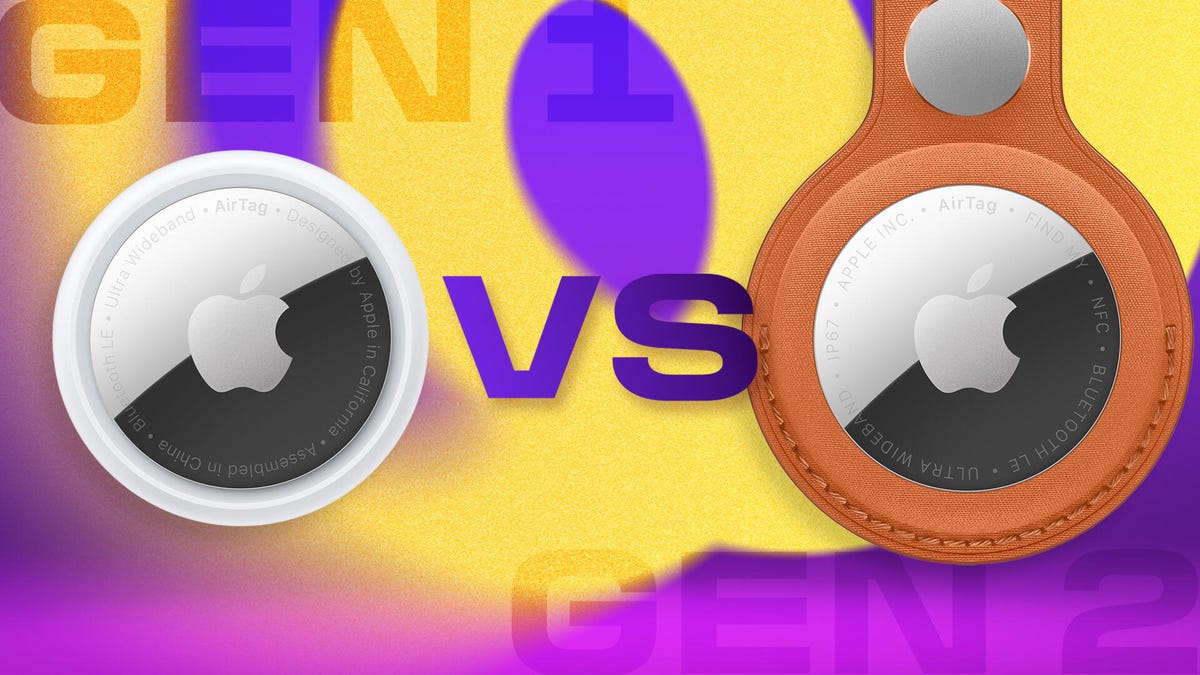
When Apple upgrades its hardware, the differences are usually stark: things like better iPhone cameras, more laptop storage or higher-quality screens. But Apple just introduced a new version of its popular AirTag tracker that looks and seems to behave exactly like the ones you likely have in one of your bags right now. However, there are some key differences with this second-generation AirTag (which Apple technically doesn’t call AirTag 2) that we’re here to drill down into.
How much do AirTags cost?
The retail price of an AirTag is $29 or $99 for a pack of four. That has been consistent since the original AirTags were introduced in 2021. However, unless you’re buying directly from Apple, you’re likely to find them at discounted prices, often around $24 for a single AirTag and $75 for a four-pack.
So far, it looks like Apple and retailers will keep the second-generation AirTags at their retail prices. However, first-generation AirTags are being sold for as little as $70 for a pack of four, bringing the per-tag cost down to $17.50.
We don’t know how much existing first-generation AirTag inventory is out there, so that pricing might persist for a while. It’s also likely that once second-generation AirTags hit the market, they too will be discounted by third-party retailers.
Do the new AirTags (2nd generation) look different?
For the most part, a second-gen AirTag looks exactly like the first-gen model, from its white plastic exterior to its shiny aluminum backplate. There is a slight weight difference: 11 grams (original) versus 11.8 grams (2nd-gen).
They’re both powered by a single CR2032 coin cell battery, which is easy to find and affordable. In my experience, the battery lasts about a year before it needs to be replaced.
How can you identify the AirTag generations?
Since both generations of AirTags share the same design, you need to look for other clues to tell them apart. Flip it over and look at the writing inscribed around the edge of the metal disk: if it’s in all capital letters, it’s a new second-generation AirTag. The new models also include “FIND MY” and “NFC” as well as “IP67,” the rating for water and dust-resistance.
The first-gen AirTags text is written in sentence case (initial capital letter and then lowercase) and also has “Designed by Apple in California” and “Assembled in China.”
Precision Finding
The most significant difference between AirTag generations is the presence of a second-generation Ultra Wideband chip in the newest AirTag models. That locator chip is what signals the tag’s location to nearby devices. It’s also what enables Precision Finding, one of the best AirTag features. Both generations have UWB chips — the second-generation AirTag is the only one with the upgraded version.
Instead of just seeing that an AirTag is somewhere in your house, Precision Finding guides you to the exact spot until you’re literally on top of it. Using the Find My app on your iPhone, searching for the tag points you in its direction and estimates its distance.
However, you still need to be fairly close to any AirTag to find it, which is where the second-generation’s advantage comes in: its upgraded UWB chip extends its detection range by 1.5 times compared to the original AirTag. The practical advantage is that you shouldn’t have to wander around as much trying to lock onto the tag’s signal before homing in on it.
Another benefit is Apple Watch compatibility with Precision Finding. The second-gen UWB in the new AirTags enables Apple Watch Series 9 and later, as well as the Ultra 2 model and later, to use the same pinpoint locator that iPhones have been capable of since the iPhone 11. Make sure you update to WatchOS 26.2.1 to turn on this feature.
Longer Bluetooth range
The AirTags (second generation) have what Apple calls an “upgraded Bluetooth chip” that extends the tag’s Bluetooth network range. It’s not clear which Bluetooth version is in use; Apple lists it only as Bluetooth LE (low energy) on the back of the AirTag.
The longer Bluetooth range helps in a couple of ways. It makes it easier for the tag to securely and privately connect to nearby devices to register its location and status, and then share that with Apple’s Find My network.
For example, the reason you can see that your luggage made it to your airport when you land isn’t because the AirTag’s Bluetooth can reach all the way to the gate where the bags are being unloaded (it can’t). It’s that an iPhone belonging to someone on the plane or an airport employee picked up the AirTag’s signal and passed it along to the Find My network.
It also means an AirTag can be more easily picked up by your iPhone (which is good in case someone attempts to track you without your knowledge).
Louder speaker and new chime
Both AirTag generations have a speaker for those times when it’s easier to find the tag by listening for its locator chime after you’ve instructed it to play. It also chirps when the battery is low and when an unidentified AirTag is nearby. The speaker in the second-gen AirTag is louder than the first generation, which Apple says can be heard twice as far away.
The new AirTag also uses a new identifiable chime that is supposed to be easier to hear in noisy environments.
Read the full article here